MCP server · Notes
Memcord MCP server
by ukkit
Your AI can save, organize, and search your past chats so it remembers what you discussed before.

Memcord is a small helper you install on your own computer. It lets your AI keep a memory of your conversations, so you can come back weeks later and still find what you talked about. It is handy if you use Claude often and keep losing track of good ideas or decisions.
What is an MCP server? The 30-second version
On its own, your AI can only chat with you in the moment. It forgets everything once the window closes. An MCP server is a small helper program that gives your AI a new skill or a connection to something. Memcord is that helper here: it gives your AI a memory for your chats, stored on your own machine, so it can look things up and save things for you when you ask.
What this MCP server does
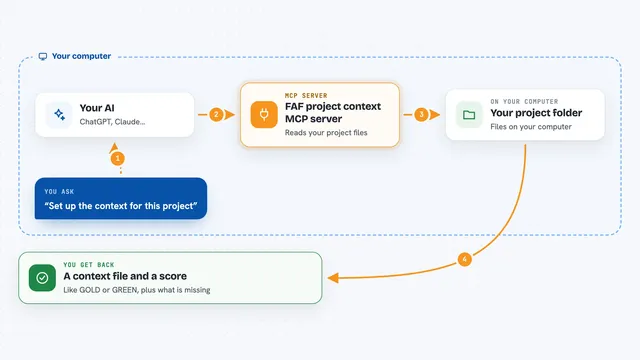
You ask your AI to save or search your chats. The AI passes your request to Memcord, which is running quietly on your computer. Memcord writes the conversation into a memory slot, or looks through past slots to find what you need. Then it hands the answer back to your AI, which shows it to you in the chat. Everything stays on your computer, not on someone else's servers.
 Click to zoom
What you can do with it
- Save a conversation into a project memory slot
- Summarize a chat and store the summary
- Search across all your saved chats for a word or topic
- Ask a plain question like what did we decide and get an answer from past chats
- List all your memory slots
- Jump to a point in the timeline, like two hours ago
- Merge related conversations and remove duplicates
Try asking your AI
- “Save this conversation to my project memory”
- “Search my past chats for anything about the API design”
- “What did we decide about the launch date last week”
- “List all my memory slots”
What it gives back to you
You get answers in the chat, written in normal sentences. It can show you a list of memory slots, a summary of a conversation, or the exact lines from a past chat that match your search. When it saves something, it just tells you it is done.
Before you start
What you need
- Python 3.10 or newer
- The uv tool, a small program that installs Python apps (the installer sets this up for you)
- A supported AI app like Claude Desktop, Claude Code, VSCode with Copilot, or Google Antigravity
Good to know
It reads and writes files on your computer, so point it at folders you are comfortable letting it manage.
Install it with your AI
Add Memcord MCP server to your AI, no technical skills needed
You don't install anything by hand. You copy one prompt, paste it into an AI that can work on your computer, and it checks, installs and connects the server for you, asking you when it needs something.
Sign in to get the install prompt
Members get a ready-made prompt that lets the Claude desktop app check Memcord MCP server, install it and connect it for them, step by step. You don't need any technical skills: you copy, paste and answer a few questions. Your connected AI can also find and install any of the 4,609 MCP servers here for you.
Who it's for
People who use Claude or another AI assistant every day and want their past conversations to stay searchable and organized on their own computer.