MCP server · Developer tools
Sentry MCP server
by utapyngo
Ask your AI about Sentry errors, traces, and events without leaving the chat.

This is a small helper that connects your AI assistant to Sentry, the tool many teams use to track errors and crashes in their apps. Once it is set up, you can ask your AI questions about a Sentry issue and it will go look up the details for you. It is handy for anyone who checks error reports but does not want to click around the Sentry website all day.
What is an MCP server? The 30-second version
On its own, your AI can only chat with you. It cannot see your Sentry account or look anything up there. An MCP server is a small helper program that gives your AI a new skill, and this one gives it a connection to Sentry. So when you ask about a specific error, the AI uses this helper to fetch the details from Sentry and then explains them back to you.
What this MCP server does
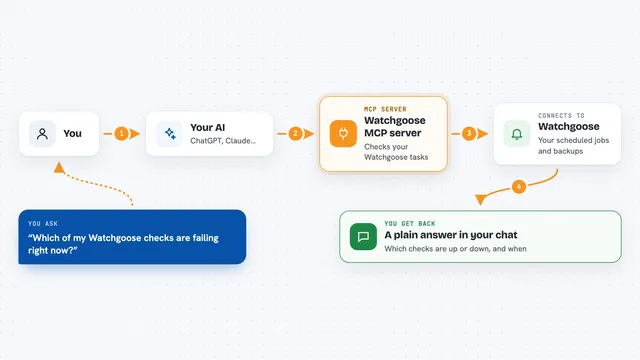
You ask your AI something about a Sentry issue, like what went wrong or when it started. The AI passes your question to this helper program. The helper talks to Sentry using your account token and pulls back the issue details, the events, or the trace information. Then the AI reads that information and answers you in plain language in the chat. You never have to open the Sentry website yourself.
 Click to zoom
What you can do with it
- Look up the full details of a Sentry issue, including tags and stack traces
- See the latest event for an issue, or a specific event if you have its ID
- Search the events inside one issue using Sentry's search syntax
- Fetch trace details to see how a request moved through your system
- Sort events by newest or oldest and limit how many come back
- Ask follow-up questions about an error without leaving the chat
Try asking your AI
- “What is going on with issue PROJECT-123 in Sentry?”
- “Show me the latest event for this Sentry issue and explain the stack trace”
- “Search the events in issue PROJECT-123 for ones from the last day”
- “Pull up the trace details for trace id 4f2a1b9c8d7e6f5a4b3c2d1e0f9a8b7c”
What it gives back to you
You get answers in the chat, written out in normal sentences. The AI can show you issue details like the error message, tags, and stack trace, or a list of matching events with their timestamps. For traces, it can describe the spans and timing. It is all read-only, so nothing in Sentry gets changed.
Before you start
What you need
- A Sentry account with access to the project you want to look at
- A Sentry authentication token (a kind of password for apps; you create one in your Sentry account settings)
- Your Sentry hostname, usually sentry.io unless your company runs its own Sentry
- The sentry-mcp program installed, or mise if you prefer not to install it yourself
Good to know
It only reads from Sentry, so it will not change or delete anything, but it does use your Sentry token, so keep that token private and give it only the access it needs.
Install it with your AI
Add Sentry MCP server to your AI, no technical skills needed
You don't install anything by hand. You copy one prompt, paste it into an AI that can work on your computer, and it checks, installs and connects the server for you, asking you when it needs something.
Sign in to get the install prompt
Members get a ready-made prompt that lets the Claude desktop app check Sentry MCP server, install it and connect it for them, step by step. You don't need any technical skills: you copy, paste and answer a few questions. Your connected AI can also find and install any of the 4,609 MCP servers here for you.
Who it's for
Developers, support engineers, and anyone on a team who triages Sentry errors and wants quick answers without opening the Sentry website.