
MCP server · Developer tools
CyberRescue MCP server
Let your AI read logs and check memory inside your Docker containers while you debug.
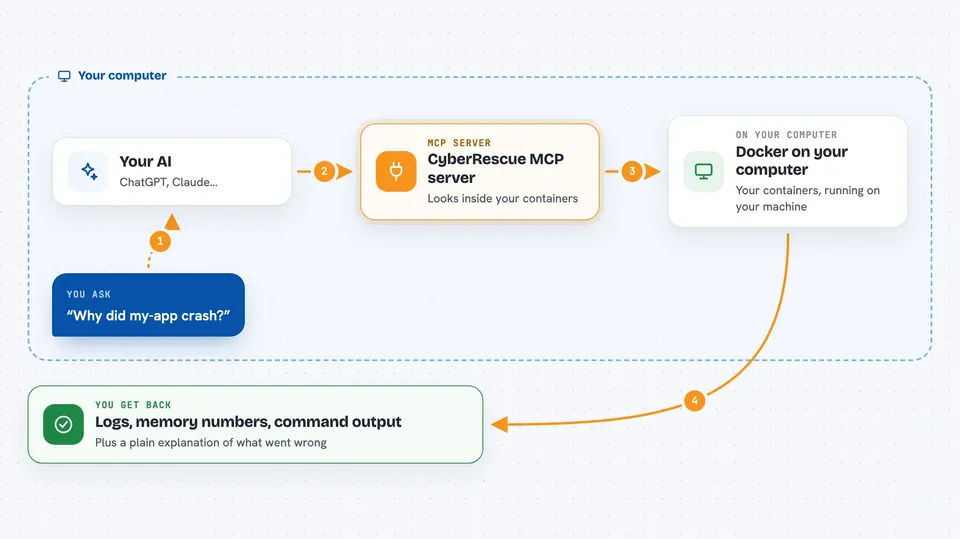
CyberRescue is a small helper you run on your own computer that lets Claude look inside your Docker containers. It is handy if you use Docker and want help figuring out why a container crashed, is leaking memory, or is misbehaving. Instead of switching between terminals and copy-pasting logs, you just ask Claude in plain words.
What is an MCP server? The 30-second version
On its own, your AI can only chat with you. An MCP server is a small helper program that gives your AI a new skill or a connection to another tool. CyberRescue is that helper, and its skill is talking to Docker on your machine. Once it is connected, your AI can fetch container logs, check memory and CPU, and run a diagnostic command inside a container when you ask.
What this MCP server does
You ask Claude something like "why did my-app crash?" and it decides which of the three tools to use. It can pull the last chunk of logs from a container, take a live memory and CPU snapshot, and run a shell command inside the container. The helper talks to Docker on your computer, gets the answer, and hands it back to Claude. Claude then explains what it found and suggests a fix, all in the same chat.
 Click to zoom
What you can do with it
- Read the latest logs from a container by name or ID
- Filter logs by keyword or by time
- Check live memory and CPU usage of a container
- See the top processes eating memory inside a container
- Run a diagnostic shell command inside a container
- Ask Claude to explain what likely went wrong
Try asking your AI
- “Debug the container named my-app: show me the last 150 log lines and its memory usage.”
- “Which process is eating the most memory inside leaking-node right now?”
- “Run printenv DATABASE_URL inside broken-flask and tell me if it is set.”
- “Look at crashed-nginx logs and tell me why it will not start.”
What it gives back to you
You get the actual log lines, memory and CPU numbers, and the output of any command it ran, shown right in the chat. Claude usually follows up with a short explanation of what it thinks went wrong and what to try next. Logs are capped at 50KB, so very long logs come back trimmed with a note that they were cut.
Before you start
What you need
- Docker Desktop installed and running
- uv, a small tool for running Python projects (the README shows how to install it)
- Claude Desktop app
- macOS on Apple Silicon, or Windows 10/11 with WSL2
Good to know
The command tool can run shell commands inside your containers, so only point it at containers you trust and review what your AI is about to run.
Install it with your AI
Add CyberRescue MCP server to your AI, no technical skills needed
You don't install anything by hand. You copy one prompt, paste it into an AI that can work on your computer, and it checks, installs and connects the server for you, asking you when it needs something.
Sign in to get the install prompt
Members get a ready-made prompt that lets the Claude desktop app check CyberRescue MCP server, install it and connect it for them, step by step. You don't need any technical skills: you copy, paste and answer a few questions. Your connected AI can also find and install any of the 4,609 MCP servers here for you.
Who it's for
Developers and anyone who runs Docker containers and wants a faster way to figure out why one is broken.



