MCP server · Productivity
humanizer-ru MCP server
Find and remove copy-paste traces from chat tools in Russian text, without guessing who wrote it.
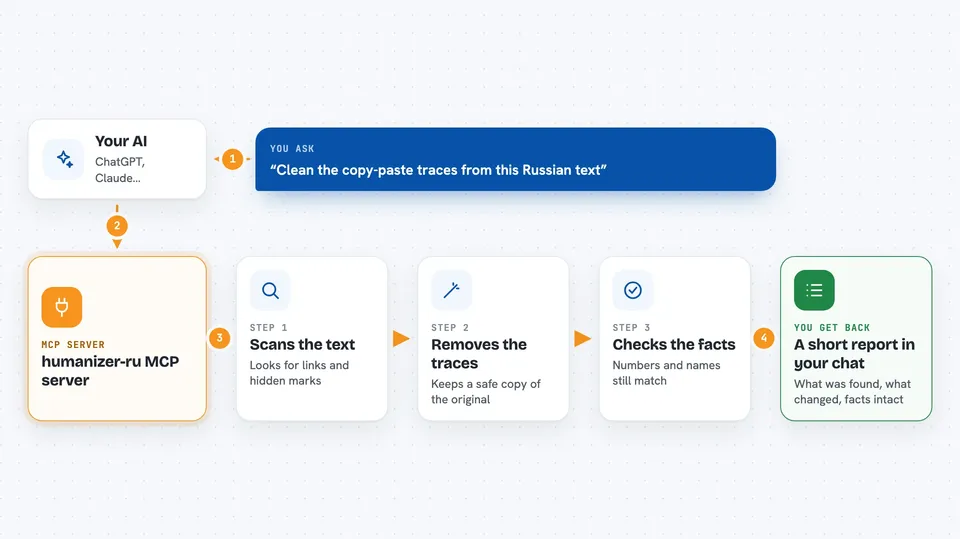
This is a small helper that looks for leftover traces in Russian text that came out of a chat tool. Think of the strange bits that sometimes get pasted in by accident, like hidden citation tags or invisible characters. It is handy for editors, teachers, and anyone who wants to tidy up a document before sharing it.
What is an MCP server? The 30-second version
On its own, your AI can only chat with you. An MCP server is a small helper program that gives your AI a new skill. This one connects your AI to humanizer-ru, a tool for Russian text. Once it is connected, your AI can scan your text, clean it, and check facts for you when you ask.
What this MCP server does
You paste a piece of Russian text into your chat and ask your AI to check it. Your AI passes the text to this helper. The helper scans it for known copy-paste traces, like service links or invisible characters. It can also remove the traces it supports and then check that the facts in the text are still the same. You get back a short report in the chat, showing what was found and what was changed.
 Click to zoom
What you can do with it
- Scan a Russian text for copy-paste traces from chat tools
- Remove supported traces while keeping a backup of the original
- Compare facts before and after a cleanup to make sure nothing important was lost
- Show a preview of what would be removed before you commit
- Report what was found and what was changed in a short summary
Try asking your AI
- “Please scan this Russian text for any traces from a chat tool.”
- “Clean up the copy-paste traces in this document and keep a backup.”
- “Show me what would be removed from this text before you change anything.”
- “Check that the numbers and names in this text are still the same after cleanup.”
What it gives back to you
You get a short report in the chat. It lists any traces it found, with the line and a small piece of the text around them. If it cleaned something, it tells you what was removed and confirms that the facts still match. The original file stays safe in a backup copy.
Before you start
What you need
- Python installed on your computer (the free programming tool it runs on)
- The uvx tool or pip to install the humanizer-ru package
- A text file in Russian that you want to check
Good to know
It can change your text, so always keep the backup it makes and check the result yourself.
Install it with your AI
Add humanizer-ru MCP server to your AI, no technical skills needed
You don't install anything by hand. You copy one prompt, paste it into an AI that can work on your computer, and it checks, installs and connects the server for you, asking you when it needs something.
Sign in to get the install prompt
Members get a ready-made prompt that lets the Claude desktop app check humanizer-ru MCP server, install it and connect it for them, step by step. You don't need any technical skills: you copy, paste and answer a few questions. Your connected AI can also find and install any of the 4,361 MCP servers here for you.
Who it's for
Editors, teachers, and anyone who works with Russian text and wants to tidy it up before sharing.