
MCP server · Notes
Yggdrasil memory server
by VonderVuflya
Give your AI a local memory so it remembers your project decisions between chats.
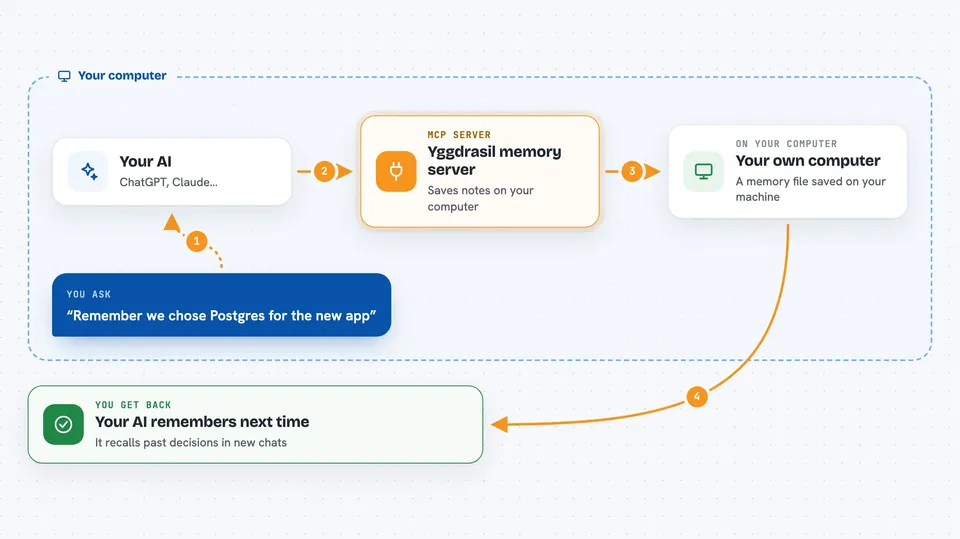
Yggdrasil is a small memory helper that lives on your own computer. It lets your AI assistant remember the important things about your projects, like decisions you made and problems you already solved. It is handy for anyone who is tired of explaining the same project again in every new chat.
What is an MCP server? The 30-second version
On its own, your AI can only chat with you and forgets everything when the window closes. An MCP server is a small helper program that gives your AI a new skill or a connection to something outside the chat. Yggdrasil is that helper, and its skill is memory: it stores notes about your work in a file on your machine and hands them back to your AI when they are useful. So instead of starting from zero each time, your AI can look things up in your own little memory store.
What this MCP server does
You tell your AI something worth keeping, like a decision or a lesson learned, and it saves that as a memory through Yggdrasil. Later, in a new chat or a different tool, you ask your AI what you decided or whether you solved something before, and it searches your saved memories. Yggdrasil keeps everything in a simple database file on your computer, so nothing is sent to a cloud service. It also tidies up over time, spotting duplicates and putting them aside for review instead of deleting anything. The result is that your AI walks into each session already knowing the background.
 Click to zoom
What you can do with it
- Save a project decision or lesson so your AI remembers it next time
- Ask your AI to recall what you decided about a project
- Search your past notes across different projects for a similar problem
- Keep project status and open follow-ups visible at the start of a session
- Import memories from another memory tool you were using
- Seed memory from your old chat transcripts and notes files
- Read and edit your memories as plain Markdown notes
What it gives back to you
You get back short answers in the chat, drawn from your saved memories. Often that means a list of relevant notes with the project they came from, or a summary of a past decision. When your AI saves something new, it confirms what it stored. You can also open the memory files yourself and read them like ordinary notes.
Before you start
What you need
- A computer where you can run small local programs
- The uv tool, which the setup uses to launch Yggdrasil
- An AI tool that supports MCP, such as Claude Code or Codex
Good to know
It stores notes about your work on your machine, so keep in mind that anything you ask it to remember is written to a local file.
Install it with your AI
Add Yggdrasil memory server to your AI, no technical skills needed
You don't install anything by hand. You copy one prompt, paste it into an AI that can work on your computer, and it checks, installs and connects the server for you, asking you when it needs something.
Sign in to get the install prompt
Members get a ready-made prompt that lets the Claude desktop app check Yggdrasil memory server, install it and connect it for them, step by step. You don't need any technical skills: you copy, paste and answer a few questions. Your connected AI can also find and install any of the 4,609 MCP servers here for you.
Who it's for
Developers and technical teams who use AI coding assistants daily and want them to remember project context between sessions.





