
MCP server · Analytics
MySQL MCP server (Pro)
by wenb1n-dev
Lets your AI look at and change your MySQL database, check its health, and suggest faster queries.
This is a helper that connects your AI assistant to a MySQL database. MySQL is a common place where companies keep their data, like customer lists, orders, or staff records. If you often need to look something up in that database or ask questions about it, this lets your AI do the digging for you.
What is an MCP server? The 30-second version
On its own, your AI can only chat. An MCP server is a small helper program that gives your AI a new skill or a connection to an app or service. This one connects your AI to a MySQL database, so the AI can look things up, run queries, and check how the database is doing when you ask. You stay in the chat; the helper does the technical talking to the database.
What this MCP server does
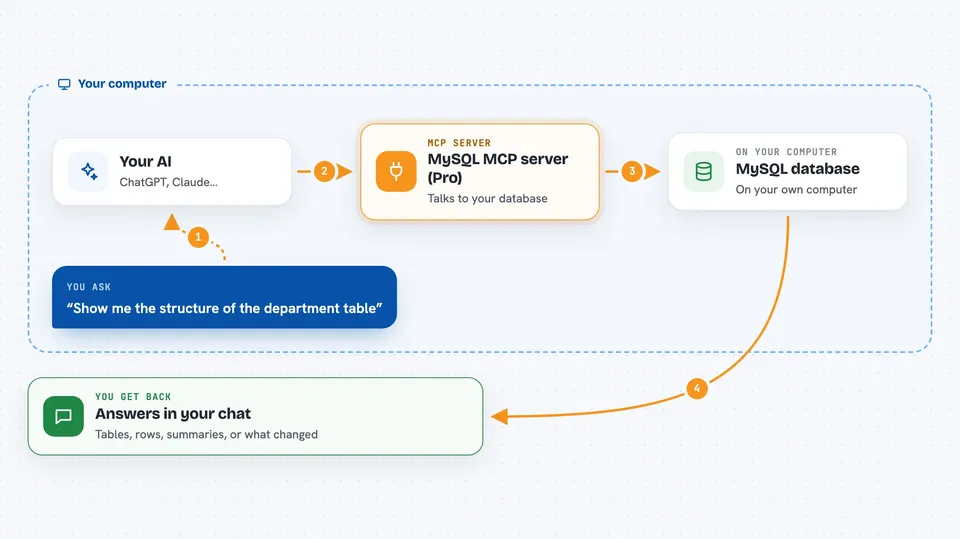
You ask your AI a question in plain words, like which tables hold staff data or why a query is slow. The AI uses this helper to send the right commands to your MySQL database. The helper runs them and sends the results back to the AI. The AI then explains what it found or what it changed, right there in the chat. You never have to write SQL yourself unless you want to.
 Click to zoom
What you can do with it
- Look up table names and structures using table comments
- Run read queries to fetch data from your database
- Insert, update, or delete rows if your role allows it
- Check the health of your MySQL server, including locks and transactions
- Review indexes and spot unused or redundant ones
- Get suggestions to make a slow SQL query faster
- Create or change tables if you have admin permission
Try asking your AI
- “Show me the structure of the department table”
- “Find all orders placed last week and summarize them”
- “Why is this query slow: select * from orders where customer_id = 5”
- “Check the current health status of MySQL”
What it gives back to you
You get answers in the chat: lists of tables, rows of data, short summaries, or explanations of what is slow and why. If the AI changed something, it tells you what it did. For health checks, you get a plain report on connections, locks, and running queries.
Before you start
What you need
- A MySQL database you can connect to, with its address, port, username, password, and database name
- Python installed on your computer (the README uses pip or uvx)
- Permission to install small programs on your machine
Good to know
If you set the role to writer or admin, the AI can change or delete data, and admin can even drop tables. Start with readonly until you trust what you are doing.
Install it with your AI
Add MySQL MCP server (Pro) to your AI, no technical skills needed
You don't install anything by hand. You copy one prompt, paste it into an AI that can work on your computer, and it checks, installs and connects the server for you, asking you when it needs something.
Sign in to get the install prompt
Members get a ready-made prompt that lets the Claude desktop app check MySQL MCP server (Pro), install it and connect it for them, step by step. You don't need any technical skills: you copy, paste and answer a few questions. Your connected AI can also find and install any of the 4,609 MCP servers here for you.
Who it's for
Anyone who works with a MySQL database and wants to ask questions or make small changes without writing SQL, like analysts, support staff, or operations teams.


