
MCP server · Research
SearXNG MCP server
by whw23
Lets your AI search the web privately across 200+ engines and many categories, right from the chat.
This is a helper that gives your AI a private web search. It uses SearXNG, a free search tool that gathers results from many search engines at once without tracking you. It is handy if you want your AI to look things up online without sending your questions to one big search company.
What is an MCP server? The 30-second version
On its own, your AI can only talk with you using what it already knows. An MCP server is a small helper program that gives your AI a new skill. This one connects your AI to SearXNG, a private search engine. When you ask a question, the AI sends it through this helper, and the helper brings back real search results from the web.
What this MCP server does
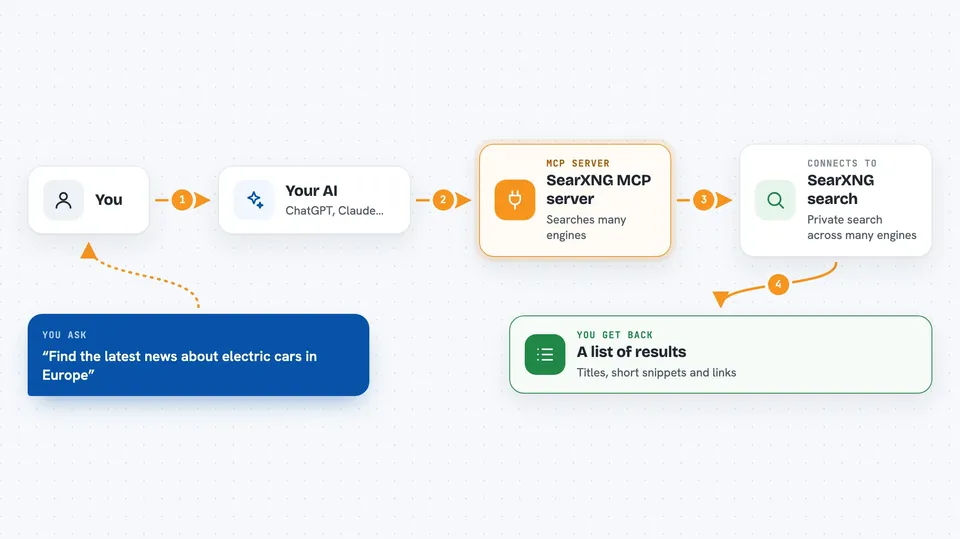
You ask your AI something that needs fresh information, like a news topic or a fact you want to check. The AI passes your words to this helper. The helper asks SearXNG, which quietly gathers results from many search engines at the same time. Then it hands the results back to your AI, trimmed down so they fit neatly. Your AI reads them and writes you an answer in the chat.
 Click to zoom
What you can do with it
- Search the web across 200+ engines in one go
- Pick a category like news, images, videos, science, or IT
- Choose specific engines such as Google, Bing, or Wikipedia
- Search in a particular language
- Get up to five pages of results in a single request
- Ask for autocomplete suggestions to find better search words
- See which search engines are available, grouped by category
Try asking your AI
- “Search the web for the latest news about electric cars in Europe”
- “Look up recent science articles about sleep and memory”
- “Find images of the Eiffel Tower at night”
- “Give me autocomplete suggestions for the phrase best budget laptop”
What it gives back to you
You get back a list of search results: titles, short snippets, and links. Your AI usually reads them and writes a short summary or answer for you. If you asked for several pages, you get more results in the same reply. Autocomplete gives you a list of suggested search phrases.
Before you start
What you need
- Docker installed on your computer or a server, if you use the ready-made container
- Python 3.14 or newer plus your own SearXNG instance, if you use the uvx option
- An API key you make up yourself, only if you want to protect the server with a password
Good to know
If you run it as a server without setting an API key, anyone who can reach that address can use it, so set a key if it is on a shared network.
Install it with your AI
Add SearXNG MCP server to your AI, no technical skills needed
You don't install anything by hand. You copy one prompt, paste it into an AI that can work on your computer, and it checks, installs and connects the server for you, asking you when it needs something.
Sign in to get the install prompt
Members get a ready-made prompt that lets the Claude desktop app check SearXNG MCP server, install it and connect it for them, step by step. You don't need any technical skills: you copy, paste and answer a few questions. Your connected AI can also find and install any of the 4,609 MCP servers here for you.
Who it's for
Anyone who wants their AI to search the web privately, especially office workers who value not being tracked and people who handle sensitive questions.


