MCP server · Research
Philippine Civic Data MCP server
by xmpuspus
Ask your AI about Philippine places, earthquakes, weather, procurement and census numbers.
This is a helper that connects your AI to public Philippine government data. It pulls together earthquake and volcano bulletins, weather and typhoon updates, government spending notices, census numbers, and more. It is handy if you work in research, journalism, local government, or any job where you need facts about a Philippine place.
What is an MCP server? The 30-second version
On its own, your AI can only chat with you. An MCP server is a small helper program that gives your AI a new skill or a connection to an outside source. This one connects your AI to Philippine civic data, so when you ask a question about a city, a storm, or a government project, the AI can go look it up for you. You just type your question in plain words, and the helper does the fetching.
What this MCP server does
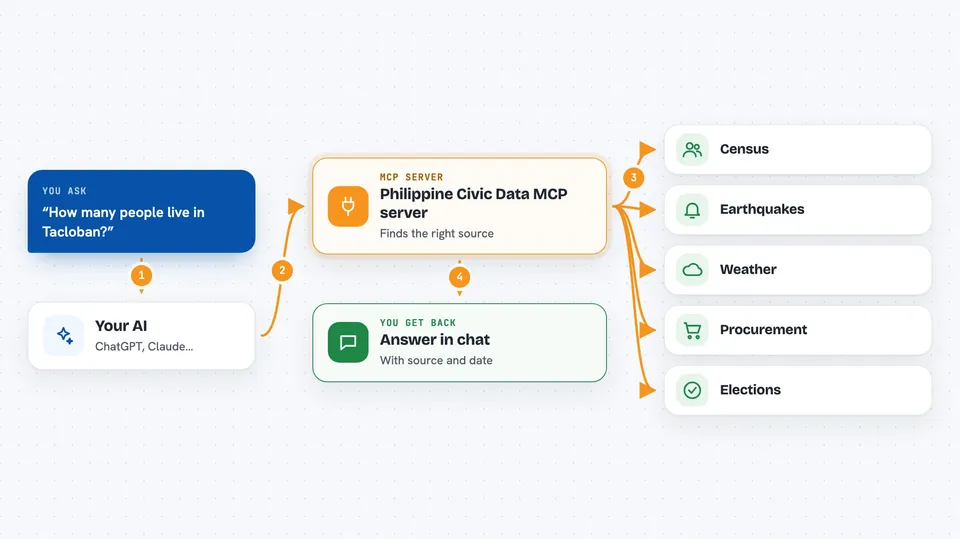
You ask your AI something like how many people live in a certain city. The AI passes that question to this helper. The helper then talks to the right public source, such as the PSA census tables or the PHIVOLCS earthquake feed. It brings the answer back and the AI explains it to you in the chat. If a source is down, it tells you clearly instead of pretending there is no data.
 Click to zoom
What you can do with it
- Get a full profile of any Philippine place, from region down to barangay
- Check earthquakes and volcano alert levels near a location
- See the weather forecast, typhoon bulletins and air quality for a city
- Search government procurement notices for roads, flood control and other projects
- Compare two or more places on population, poverty and employment
- Look up census, poverty, inflation and labor statistics
- Read the 2025 election results down to precinct level
Try asking your AI
- “Give me a profile of Tacloban.”
- “Any earthquakes near Legazpi in the last day?”
- “What is the poverty rate in Eastern Visayas?”
- “Search PhilGEPS for flood control projects in Pampanga.”
What it gives back to you
You get answers in the chat, usually as short summaries with the numbers you asked for. Some tools return lists, like recent earthquakes or procurement notices. You can also ask for a comparison to be exported as a CSV file. Every answer notes where the data came from and when it was retrieved.
Before you start
What you need
- The uvx tool installed on your computer (it comes with the uv Python tool)
- A supported AI client such as Claude Desktop, Claude Code, Cursor or VS Code
Good to know
The data comes from public records and some indicators are statistical estimates, so treat any finding as a starting point and check the original source before making claims about a person or project.
Install it with your AI
Add Philippine Civic Data MCP server to your AI, no technical skills needed
You don't install anything by hand. You copy one prompt, paste it into an AI that can work on your computer, and it checks, installs and connects the server for you, asking you when it needs something.
Sign in to get the install prompt
Members get a ready-made prompt that lets the Claude desktop app check Philippine Civic Data MCP server, install it and connect it for them, step by step. You don't need any technical skills: you copy, paste and answer a few questions. Your connected AI can also find and install any of the 4,361 MCP servers here for you.
Who it's for
Researchers, journalists, students, local government staff, and anyone who needs quick facts about Philippine places and public data.