MCP server · Research
UNESCO UIS MCP server
Ask your AI for UNESCO numbers on education, science, culture and communication by country and year.
This is a helper that connects your AI to the UNESCO Institute for Statistics, the place where the UN keeps its numbers on education, research, culture and communication around the world. Once it is connected, you can just ask in your own words and get real figures back, with a note saying where each number came from. It is handy for anyone who writes reports, does research, or just needs a trustworthy statistic without digging through the UIS website.
What is an MCP server? The 30-second version
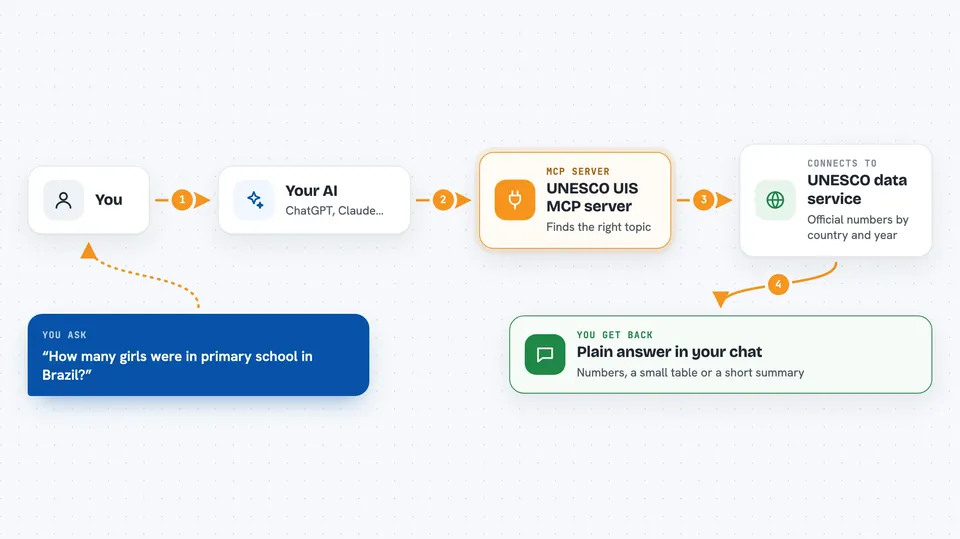
On its own, your AI can only chat: it has no way to look up live numbers. An MCP server is a small helper program that gives your AI one new skill, in this case a connection to the UNESCO statistics service. You ask your AI a question, the AI passes it to this helper, the helper talks to UNESCO, and the answer comes back to you in the chat. You never touch the helper directly, you just talk to your AI like always.
What this MCP server does
You ask your AI something like how many girls were enrolled in primary school in Brazil. The AI sends that question to this helper, which searches the UNESCO list of about 5,000 indicators and finds the closest match. The helper then asks the official UNESCO data service for the actual numbers for the country and years you want. It hands the results back to your AI, which explains them to you in normal language. Every answer also carries a small note saying which UNESCO page the data came from and when it was pulled, so you can check it yourself.
 Click to zoom
What you can do with it
- Search UNESCO indicators using your everyday words instead of official jargon
- Get education, science, culture and communication figures for a country and a range of years
- Look up the exact country or region code UNESCO uses for a place
- See which years of data exist for an indicator before you ask for numbers
- Read the footnotes and notes that come with a data point
- Get a link to the public UNESCO Data Browser page for any indicator
- Use it inside ChatGPT Deep Research so long reports can cite UNESCO figures
Try asking your AI
- “How many students were enrolled in tertiary education in Brazil between 2015 and 2022?”
- “Show me the research spending as a share of GDP for Germany and France in the last ten years.”
- “What UNESCO indicator covers literacy rates, and what data do you have for India?”
- “Compare the pupil to teacher ratio in primary school for Kenya, Ghana and Nigeria.”
What it gives back to you
You get back plain answers in the chat: numbers, small tables, or a short summary of what the data shows. If you asked about several countries or years, you usually get a list you can read at a glance. Alongside the numbers, the helper quietly attaches a source note with the UNESCO link and the date the data was taken. If nothing matches your question, it tells you so and suggests a different wording instead of making something up.
Before you start
What you need
- An AI app that can use MCP servers, such as Claude Desktop or ChatGPT with a connector
- Node.js 22 or newer if you want to run it on your own computer
- Nothing else for the hosted version, it is open and needs no key
Good to know
The numbers come straight from UNESCO and are not changed by this tool, but the catalogue of indicators is refreshed by hand a few times a year, so very recent releases may not show up yet.
Install it with your AI
Add UNESCO UIS MCP server to your AI, no technical skills needed
You don't install anything by hand. You copy one prompt, paste it into an AI that can work on your computer, and it checks, installs and connects the server for you, asking you when it needs something.
Sign in to get the install prompt
Members get a ready-made prompt that lets the Claude desktop app check UNESCO UIS MCP server, install it and connect it for them, step by step. You don't need any technical skills: you copy, paste and answer a few questions. Your connected AI can also find and install any of the 4,609 MCP servers here for you.
Who it's for
Researchers, students, journalists, policy analysts and anyone who needs reliable UNESCO statistics on education, science, culture or communication without hunting through the UIS website.