MCP server · Research
LaTeX MCP server
by Yeok-c
Let your AI read your cited papers, compile your LaTeX, and drop figures and tables into your document.
This is a helper that connects your AI assistant to your LaTeX writing project. It lets the AI look at your .tex files, read the papers you cite, run your Python scripts to make figures, and compile your document to check it still builds. It is handy if you write papers or reports in LaTeX and want the AI to do the boring back-and-forth for you.
What is an MCP server? The 30-second version
On its own, your AI can only chat with you. An MCP server is a small helper program that gives your AI a new skill or a connection to something on your computer. This one connects your AI to your LaTeX project folder, so it can open your files, read your cited papers, and run the build for you. You just ask in plain words, and the helper does the file work behind the scenes.
What this MCP server does
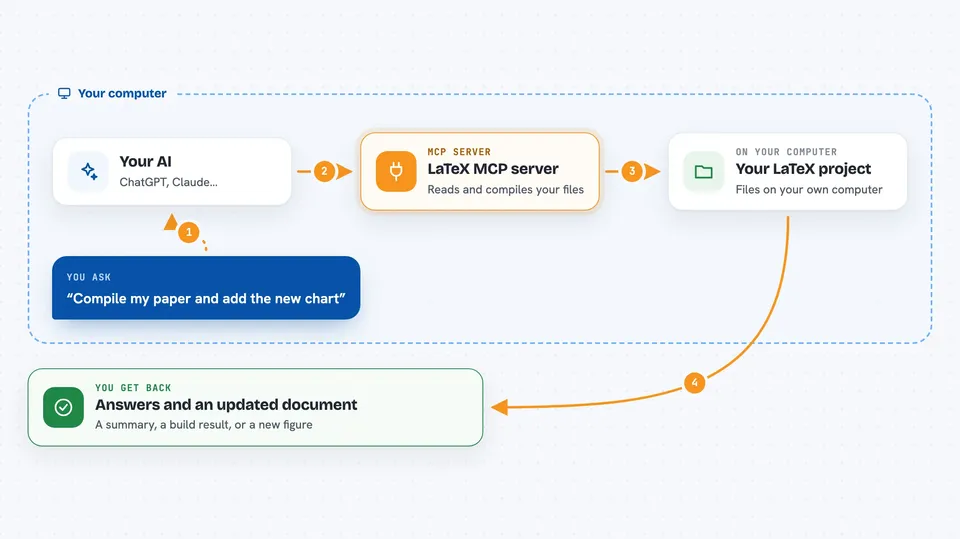
You ask your AI something about your paper, like which files exist or what a cited paper says. The AI passes that request to this helper program. The helper then looks inside your LaTeX project folder, reads the right file or PDF, or runs a compile command. It sends the result back to the AI, and the AI explains it to you in the chat. If you ask it to add a figure or a table, it can run your Python script and place the result into your LaTeX for you.
 Click to zoom
What you can do with it
- List all the .tex files in your project so you can see your chapters and sections
- Read a file from your project, including a chunk of a PDF
- Pull the details out of your .bib file, like titles and download links
- Download the PDFs of the papers you cite
- Read a cited paper by its citation key and summarize what it says
- Compile your LaTeX document and tell you if it built or where it failed
- Run your own Python scripts to make figures or tables and place them into your document
Try asking your AI
- “List all the tex files in my project and tell me which one is the main document”
- “Read the paper I cite as smith2023model and summarize its main claim”
- “Compile my document and tell me if there are any errors”
- “Run my figure script and add the new chart into the results section”
What it gives back to you
You get answers in the chat, like a list of your files, a summary of a paper, or the text pulled from a PDF. When it compiles, it tells you whether the build succeeded and shows a snippet of the log if something went wrong. If it adds a figure or table, it tells you what it changed in your document. It can also save a small JSON file of extracted PDF text for later use.
Before you start
What you need
- A LaTeX project folder on your computer
- Python and the uv tool installed
- Node.js 18 or newer if you want the TypeScript tools like summarize_text
- A LaTeX setup with latexmk and pdflatex or xelatex installed
Good to know
It can change files in your project and download PDFs, so point it at a copy or a project you can restore if something goes wrong.
Install it with your AI
Add LaTeX MCP server to your AI, no technical skills needed
You don't install anything by hand. You copy one prompt, paste it into an AI that can work on your computer, and it checks, installs and connects the server for you, asking you when it needs something.
Sign in to get the install prompt
Members get a ready-made prompt that lets the Claude desktop app check LaTeX MCP server, install it and connect it for them, step by step. You don't need any technical skills: you copy, paste and answer a few questions. Your connected AI can also find and install any of the 4,609 MCP servers here for you.
Who it's for
Researchers, students, and anyone who writes papers or reports in LaTeX and wants their AI to help with reading sources, building figures, and compiling.