MCP server · Productivity
opn.onl MCP server
Let your AI shorten links, read click stats, and make QR codes on opn.onl for you.
This is a small helper that connects your AI assistant to opn.onl, a tool for making short links. Once it is set up, you can just ask your AI in plain words to shorten a link, check how many clicks it got, or make a QR code. It is handy for anyone who shares links and wants to keep track of them without clicking around a website.
What is an MCP server? The 30-second version
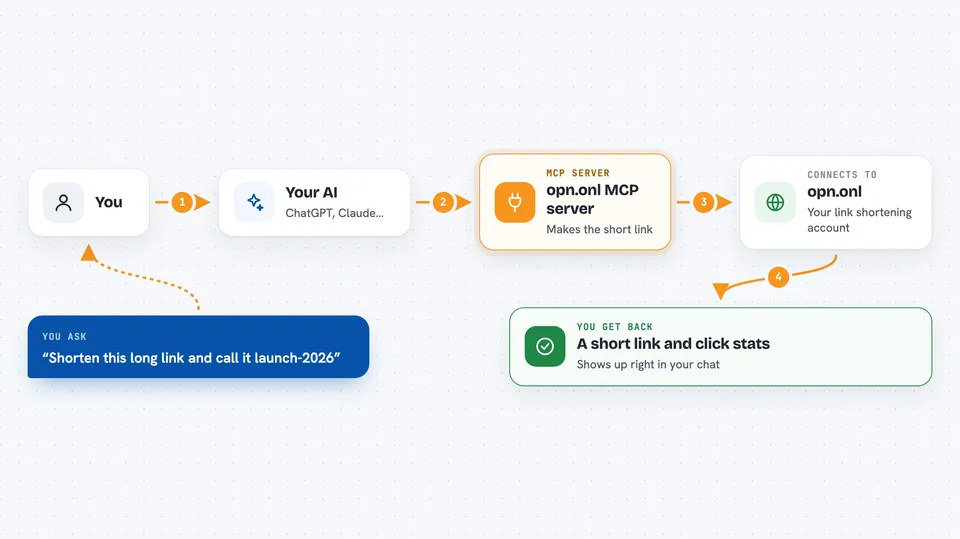
On its own, your AI can only chat. An MCP server is a small helper program that gives your AI a new skill or a connection to an app, and here it connects your AI to opn.onl. So when you ask your AI to shorten a link, the AI passes that request to this helper, the helper talks to opn.onl, and the result comes back to you in the chat. You do not need to understand how it works under the hood. You just ask, and it happens.
What this MCP server does
You type a request in your AI chat, like asking it to shorten a long web address. Your AI sends that request to this helper. The helper then talks to opn.onl using your account, creates the short link, or looks up the stats you asked for. The answer comes back into the chat as a short link, a list, or a summary of clicks. It all happens in one step, without you opening another website.
 Click to zoom
What you can do with it
- Shorten one link or many links at once
- Give a link a custom name, like launch-2026
- See how many clicks a link got and from where
- Make a QR code for a link, with your own colour or logo
- Organise links into folders and add tags
- Check if a custom short name is still free
- Update, delete, or duplicate a link
Try asking your AI
- “Shorten https://example.com/very/long/url and call it launch-2026”
- “Shorten these five URLs into a new folder called Q3 Campaign”
- “How many clicks did link 42 get in the last 30 days, and from which countries?”
- “Give me a branded SVG QR code for link 42”
What it gives back to you
You get answers right in the chat. That might be a new short link, a list of your links, a summary of clicks and countries, or a QR code image. If you asked it to change or delete something, it tells you what it did. Everything shows up as normal text or an image, no technical output to read.
Before you start
What you need
- An opn.onl account (the hosted service or your own self-hosted copy)
- An API key from opn.onl, found under Settings then API Keys (it starts with opn_ and is shown only once)
- The Claude desktop app or another AI app that supports MCP servers
- Node.js installed on your computer so the npx command can run
Good to know
This helper can change and delete your links, so double-check before you say yes to a delete or a big update.
Install it with your AI
Add opn.onl MCP server to your AI, no technical skills needed
You don't install anything by hand. You copy one prompt, paste it into an AI that can work on your computer, and it checks, installs and connects the server for you, asking you when it needs something.
Sign in to get the install prompt
Members get a ready-made prompt that lets the Claude desktop app check opn.onl MCP server, install it and connect it for them, step by step. You don't need any technical skills: you copy, paste and answer a few questions. Your connected AI can also find and install any of the 4,609 MCP servers here for you.
Who it's for
Anyone who shares links often, like marketers, writers, community managers, or small business owners who want quick stats and QR codes without extra clicking.