MCP server · Research
Fetch MCP server
by zcaceres
Lets your AI open web pages, pull data and read YouTube transcripts for you.
This is a small helper that lets your AI go and fetch things from the web. Instead of you copying and pasting a page into the chat, your AI can grab it itself and hand you back the useful part. It is handy for anyone who reads articles, checks web data or works with YouTube videos during the day.
What is an MCP server? The 30-second version
On its own, your AI can only chat with what it already knows or what you paste in. An MCP server is a little helper program that gives your AI one new skill. This one gives it the skill of fetching web content, so when you ask for a page or a video transcript, your AI calls this helper, the helper goes to the web, and the answer comes back into your chat.
What this MCP server does
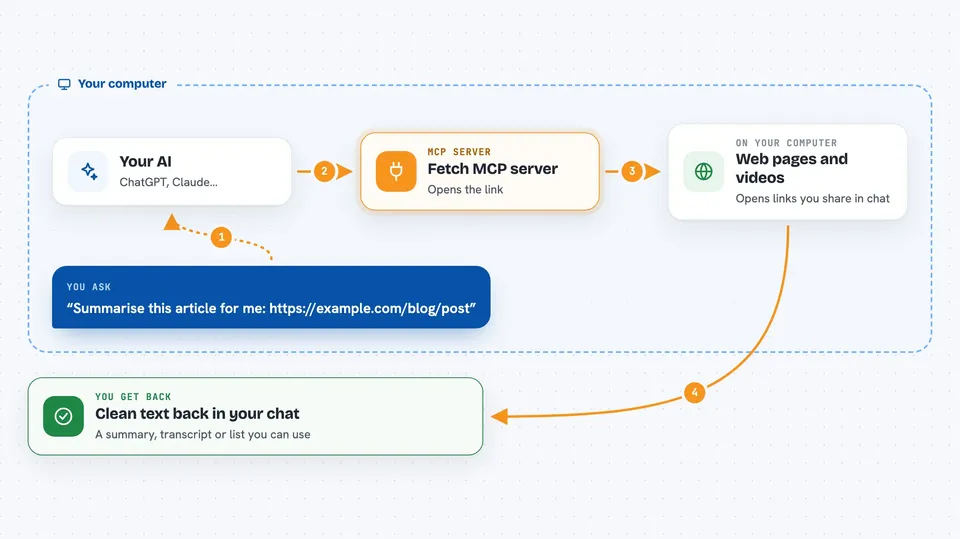
You ask your AI something that involves a web address, like a blog post or a YouTube link. Your AI passes that address to this helper. The helper visits the page, grabs the content, and cleans it up into a format that is easy to read, such as plain text, Markdown or. It then sends that back to your AI, which turns it into an answer for you. You never have to leave the chat or copy anything by hand.
 Click to zoom
What you can do with it
- Read a web page and give you the main article text
- Pull data from a web address that returns JSON
- Get the transcript of a YouTube video
- Convert a page into Markdown you can paste elsewhere
- Fetch raw HTML when you need the exact page source
- Limit how much text comes back so answers stay short
- Fetch through a proxy when you are behind a company firewall
Try asking your AI
- “Summarise this article for me: https://example.com/blog/post”
- “What does the data at https://api.example.com/data say?”
- “Give me the transcript of this YouTube video in English”
- “Turn this page into Markdown so I can paste it into my notes”
What it gives back to you
You get the content back inside your chat, already cleaned up. That might be a summary of an article, a block of text, a list of data from a JSON page, or the words spoken in a video. By default it returns the first 5000 characters, and you can ask for more or start further in if the page is long.
Before you start
What you need
- The Claude desktop app or another app that supports MCP servers
- Node.js installed on your computer (the free software that runs npx)
Good to know
It can only read pages, not change them, but it will fetch whatever web address you give it, so avoid pointing it at private or internal company links.
Install it with your AI
Add Fetch MCP server to your AI, no technical skills needed
You don't install anything by hand. You copy one prompt, paste it into an AI that can work on your computer, and it checks, installs and connects the server for you, asking you when it needs something.
Sign in to get the install prompt
Members get a ready-made prompt that lets the Claude desktop app check Fetch MCP server, install it and connect it for them, step by step. You don't need any technical skills: you copy, paste and answer a few questions. Your connected AI can also find and install any of the 4,609 MCP servers here for you.
Who it's for
Anyone who reads a lot online, checks web data or works with YouTube videos, like researchers, writers, analysts and support staff.