
MCP server · Productivity
Feishu MCP server
by ztxtxwd
Let your AI read, search and edit your Feishu documents for you, after you log in with your Feishu account.
This is a helper that connects your AI assistant to Feishu, the chat and document app. Once it is set up, you can ask your AI to look through your Feishu docs, add content, or clean things up, and it will do it through your own Feishu account. It is handy if you write and edit a lot of documents in Feishu and want your AI to help without copying and pasting back and forth.
What is an MCP server? The 30-second version
On its own, your AI can only chat with you. An MCP server is a small helper program that gives your AI a new skill or a connection to an app. This one connects your AI to Feishu, so it can look things up and make changes there when you ask. You sign in with your Feishu account, and the helper uses that login to act on your behalf.
What this MCP server does
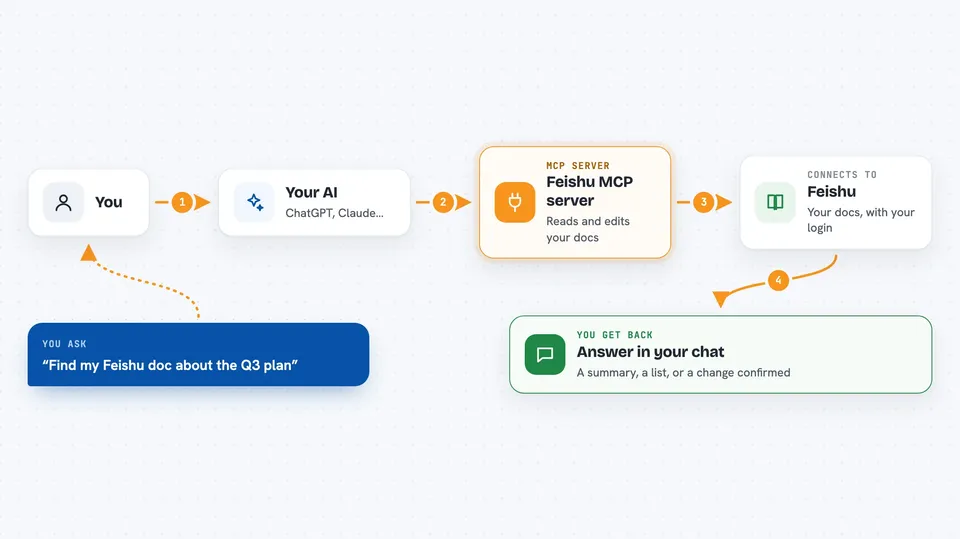
You ask your AI something about your Feishu documents, like finding a page or adding a section. The AI sends that request to this helper. The helper talks to Feishu using your Feishu login, so it only sees what you can see. Feishu sends the answer or makes the change, and the helper passes it back to your AI. You then see the result right in your chat, as text, a list, or a confirmation that something was updated.
 Click to zoom
What you can do with it
- Search your Feishu documents for a topic or phrase
- Read the structure of a document, including its blocks and nested parts
- Create new blocks in a document, such as headings, paragraphs and tables
- Update the content of existing blocks
- Delete blocks in bulk when you want to clean up a document
- Upload and insert images, videos or files into a document
- Import Markdown content into a Feishu document
Try asking your AI
- “Find my Feishu doc about the Q3 marketing plan and summarise the key points”
- “Add a new section called Next Steps at the end of my project notes document”
- “Replace the old pricing table in my proposal doc with the numbers I just gave you”
- “Search my Feishu docs for anything mentioning the client Acme and list the titles”
What it gives back to you
You get answers in plain text in your chat, like a summary of a document or a list of matching pages. When the AI changes something, it tells you what it created, updated or deleted. For uploads, it confirms that the file was added. You do not get a separate file back; everything shows up as a reply in the conversation.
Before you start
What you need
- A Feishu account
- A Feishu app created on the Feishu Open Platform, with its App ID and App Secret
- A Cloudflare account if you want to host it yourself
- Node.js 18 or newer and npm on your computer
Good to know
It can change and delete content in your Feishu documents, so double check before letting it make big edits.
Install it with your AI
Add Feishu MCP server to your AI, no technical skills needed
You don't install anything by hand. You copy one prompt, paste it into an AI that can work on your computer, and it checks, installs and connects the server for you, asking you when it needs something.
Sign in to get the install prompt
Members get a ready-made prompt that lets the Claude desktop app check Feishu MCP server, install it and connect it for them, step by step. You don't need any technical skills: you copy, paste and answer a few questions. Your connected AI can also find and install any of the 4,361 MCP servers here for you.
Who it's for
People who write and manage a lot of documents in Feishu, like project managers, writers, and team leads who want their AI to help with Feishu content.





