MCP server · Generative art
Amazon Bedrock Nova Canvas MCP server
by zxkane
Lets your AI create pictures from your written description using Amazon's Nova Canvas image model.
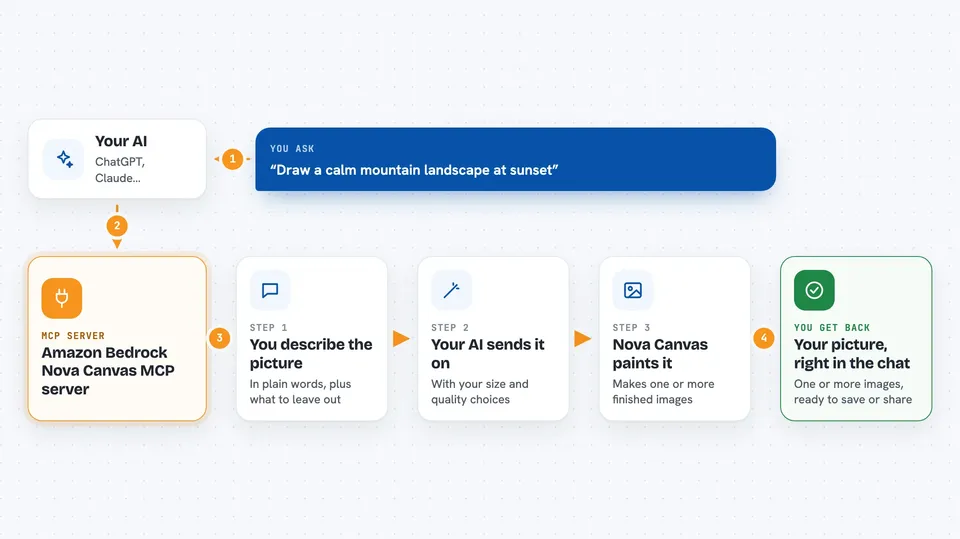
This is a small helper that connects your AI assistant to Amazon's Nova Canvas, an image-making model that lives in Amazon's cloud. You describe the picture you want in normal words, and the helper sends that description off and brings back an image. It is handy if you need quick visuals for slides, drafts, or ideas but do not want to open a separate image tool.
What is an MCP server? The 30-second version
On its own, your AI can only chat. An MCP server is a small helper program that gives your AI a new skill or a connection to another service. This one connects your AI to Amazon Bedrock's Nova Canvas model, which is where the actual image gets made. So when you ask for a picture, your AI passes your words to this helper, and the helper talks to Amazon for you.
What this MCP server does
You type a request in plain words, like asking for a picture of a quiet mountain at sunset. Your AI sends that request to this helper, along with any extra details you gave, such as what you do not want in the picture or how big it should be. The helper passes everything to Amazon's Nova Canvas model in the cloud. Nova Canvas creates the image and sends it back. Your AI then shows you the finished picture in the chat.
 Click to zoom
What you can do with it
- Create an image from a written description
- Say what you do not want in the picture, like people or text
- Choose the width and height of the image
- Pick a quality level, standard or premium
- Ask for several versions of the same image at once
- Reuse the same settings to get a similar result again
Try asking your AI
- “Make me a picture of a cozy reading nook by a window, warm light, no people”
- “Create two versions of a simple flat illustration of a paper airplane over a desk”
- “Draw a calm mountain landscape at sunset, nothing man-made in it”
- “Generate a square image of a cup of coffee on a wooden table, top-down view”
What it gives back to you
You get one or more finished images back, shown right in the chat. Along with the picture, your AI may mention the settings used, like the size and quality. If something goes wrong, for example your Amazon account is not set up for this model, you get an error message instead of an image. Nothing else in your files or accounts is changed.
Before you start
What you need
- An Amazon Web Services (AWS) account with access turned on for Amazon Bedrock and the Nova Canvas model
- AWS access keys (a kind of username and password for apps) with permission to use Bedrock
- Node.js version 18 or newer on the computer where the helper runs
- The Claude desktop app, or another AI app that supports MCP servers
Good to know
Each image is made through your Amazon account and may count toward your Amazon usage costs, so keep an eye on your spending.
Install it with your AI
Add Amazon Bedrock Nova Canvas MCP server to your AI, no technical skills needed
You don't install anything by hand. You copy one prompt, paste it into an AI that can work on your computer, and it checks, installs and connects the server for you, asking you when it needs something.
Sign in to get the install prompt
Members get a ready-made prompt that lets the Claude desktop app check Amazon Bedrock Nova Canvas MCP server, install it and connect it for them, step by step. You don't need any technical skills: you copy, paste and answer a few questions. Your connected AI can also find and install any of the 4,361 MCP servers here for you.
Who it's for
People who need quick images for slides, drafts, or ideas and already have an Amazon cloud account set up.