AI agent for freelancers
Freelance Invoice Follow-up Agent
Invoices paid on time with as little chasing as possible
What it does
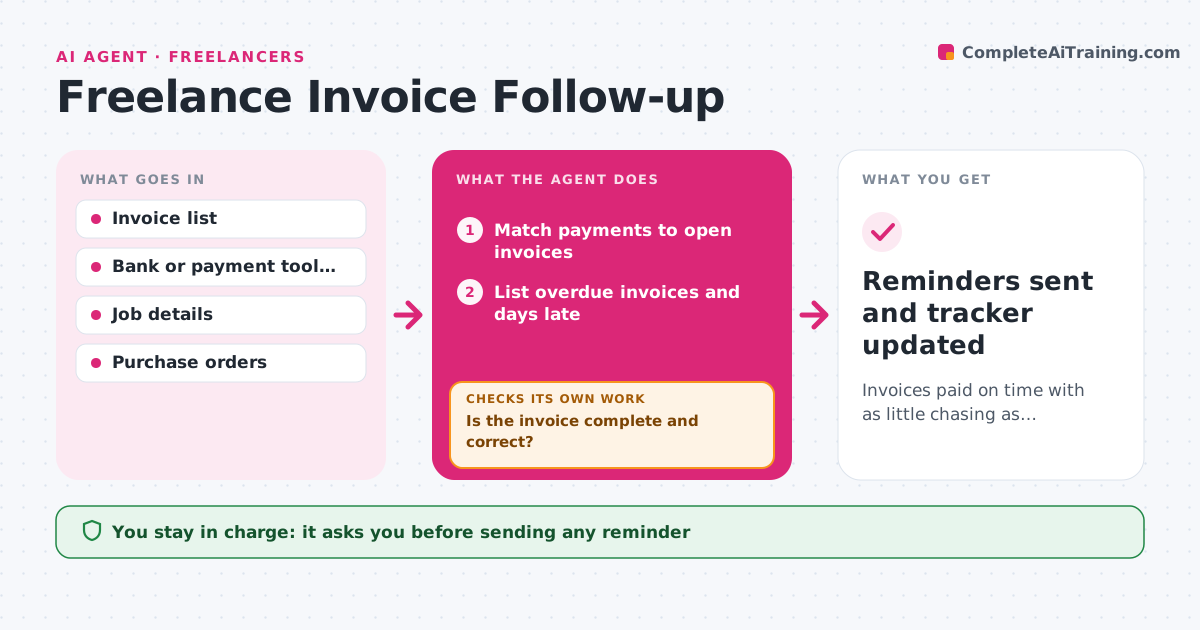
Freelancers lose hours and cash flow chasing late payments. This agent watches every open invoice. Each day it matches payments from your bank or payment tool to invoices and updates balances, including partial payments. For overdue invoices, it first compares the invoice with the job record: amount, purchase order number, billing contact and due date, since errors are a common cause of delay. If something is wrong, it corrects and reissues the invoice and restarts the due clock. Then it drafts a reminder with a tone that fits how late the payment is, friendly at first and firmer after the set number of days. It only asks for the remaining balance after partial payments. You approve every message. Edge case: when a client's accounts team says they need a PO number, it adds it, reissues the invoice and drafts a reply.
How it works
Follow the arrows from top to bottom. The orange dashed arrow is the loop: when a check fails, the agent goes back and tries again.
Read the steps as a list
- Daily invoice check
- Match payments to open invoices
- List overdue invoices and days late
- Compare each overdue invoice with the job record
- Is the invoice complete and correct?If not: correct the invoice, reissue it and restart the due clock. Back to step 4.
- Draft reminders in a tone that fits the delay
- Freelancer approves each reminderThe agent waits here for your OK.
- Reminders sent and tracker updated
How it decides
It sends reminders based on days overdue and each client's payment history. An invoice with missing details gets fixed and reissued before any reminder.
- Send a first friendly reminder a few days after the due date
- Use a firmer tone after the set number of days
- Track partial payments and remind only for the balance
Make it yours
Every agent is a starting point. You choose these settings for your own situation.
- Days after due date for first reminder (default 3)
- Days before firmer tone (default 21)
- Late fee rules
- Invoicing tool to connect
What keeps you in control
It always asks you first
- Sending any reminder
- Adding a late fee
Hard limits
- Never threatens legal action
- Never sends a message without approval
It stops when
- Done: invoice paid in full
- Stop: overdue past the escalation limit; suggest next steps to the freelancer
Set it up
We guide you through the set-up, step by step
Members get the full set-up guide for this agent. No technical skills needed: you copy, paste and upload.
- One set of instructions to paste into your AI, with the clicks for ChatGPT, Claude, Microsoft 365 Copilot, Gemini and Grok
- The agent then walks you through connecting your own data, one source at a time
- A downloadable copy with the flow chart, the rules and the full guide