AI tool
Magic Animator (Beta)
Magic Animator (Beta) instantly transforms Figma designs into animated content with one click. Create, edit, and export animations as GIF, Lottie, or MP4 for ads, apps, sites, and social posts—all within Figma’s interface.

About Magic Animator (Beta)
Magic Animator (Beta) is an AI-powered animation tool that allows users to quickly animate their Figma designs with minimal effort. It supports importing SVG and Lottie files, enabling smooth transitions from static designs to animated content suitable for ads, apps, websites, and social media.
Review
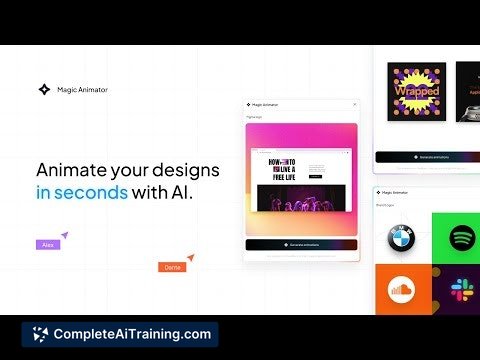
Magic Animator (Beta) aims to simplify the animation process by generating motion directly from design files in Figma. Its user-friendly interface and AI-assisted workflow make it accessible to both beginners and experienced designers looking to speed up animation tasks.
Key Features
- 1-click animation generation from Figma designs using AI
- Import support for SVGs and Lottie files to animate existing assets
- Full-featured, editable motion editor with timeline control
- Export animations as GIF, Lottie, or MP4 formats for versatile use
- Collaboration tools for team-based animation projects
Pricing and Value
Magic Animator (Beta) is currently available for free, providing designers with an opportunity to explore its animation capabilities without upfront costs. Given its features and AI-assisted workflow, it offers solid value for those who need quick, editable animations integrated directly with Figma. Users can expect further updates and potential pricing tiers as the product matures beyond the beta stage.
Pros
- Simple and intuitive interface suitable for users of all skill levels
- Significantly reduces time spent on creating basic animations
- Supports multiple export formats enabling broad compatibility
- Seamless integration with Figma streamlines design-to-animation workflow
- Collaborative features enhance team productivity
Cons
- Occasional bugs and reports of data loss affecting reliability
- Still in beta, so some advanced features and stability improvements are needed
- May not yet fully replace more complex animation software for professional projects
Magic Animator (Beta) is well-suited for designers and small teams seeking to add motion to their Figma designs quickly without deep animation expertise. It works best for creating engaging animations for digital marketing, UI/UX prototypes, and social content where speed and ease of use are priorities. Users requiring advanced control or highly polished animations might want to supplement it with more specialized tools.
Jobs Magic Animator (Beta) suits
We checked Magic Animator (Beta) against 500+ jobs; these get the most out of it.
Alternatives to Magic Animator (Beta)
Other tools that do the same main job. Our AI compared Magic Animator (Beta) with similar tools and kept the ones you could use instead.