MCP server · Analytics
Fermat MCP server
by abhiphile
Lets your AI do math and draw charts for you, from simple sums to equations and graphs.
Fermat MCP is a helper that gives your AI a maths brain. It can work out numbers, solve equations step by step, and draw charts from your data. It is handy if you often deal with spreadsheets, reports, or homework-style maths and want quick answers without opening a separate calculator app.
What is an MCP server? The 30-second version
On its own, your AI can only chat and write text. An MCP server is a small helper program that gives your AI a new skill or a connection to another tool. This one connects your AI to a maths engine called Fermat, which is built from three well-known Python libraries for numbers, symbols, and charts. Once it is connected, you can ask your AI a maths question and it will quietly use this helper to work out the answer or draw the picture.
What this MCP server does
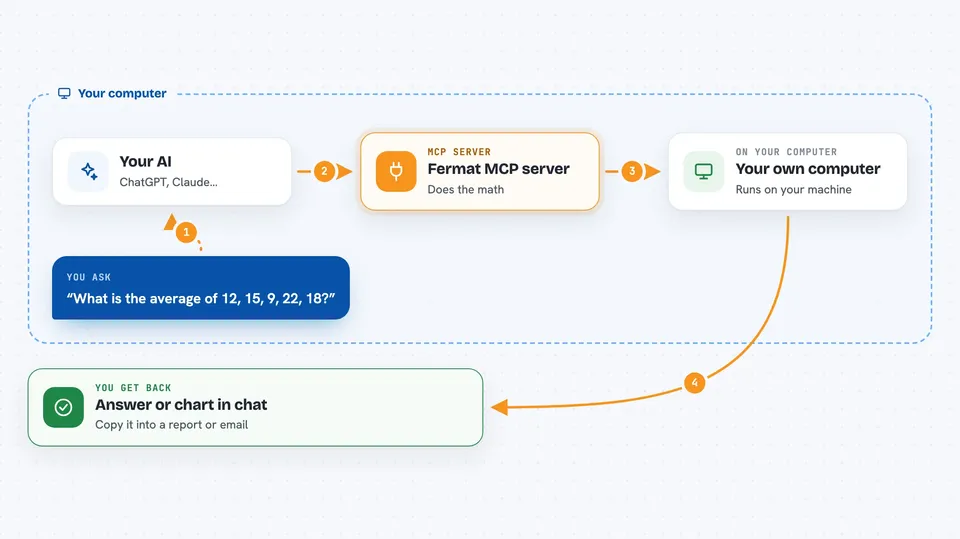
You type a question in plain words, like asking for the average of some numbers or the graph of an equation. Your AI passes the details to this helper. The helper does the actual calculation or drawing using its maths libraries, then sends the result back. Your AI shows you the answer or the chart right in the chat. You do not need to know any of the maths software yourself.
 Click to zoom
What you can do with it
- Add, subtract, multiply and divide lists of numbers
- Find averages, medians, and standard deviations
- Solve equations and simplify algebra
- Work out derivatives and integrals
- Draw bar charts, scatter plots, and line charts
- Plot mathematical equations like x squared or sine
- Do matrix maths such as inverses and eigenvalues
Try asking your AI
- “What is the average and standard deviation of 12, 15, 9, 22, 18?”
- “Solve the equation x squared minus 5x plus 6 equals zero”
- “Plot a bar chart of sales: 120, 90, 200, 150”
- “What is the derivative of x cubed plus 2x?”
What it gives back to you
You get the answer as text in the chat, often with the steps or the final number. For charts, you get an image of the plot. For matrices, you get lists of numbers. Everything appears right where you are chatting, so you can copy it into a report or email.
Before you start
What you need
- A computer with Python 3.12 or newer installed
- The uv tool installed (a small helper for running Python programs)
- The Fermat MCP files downloaded from its GitHub page
- An AI app that supports MCP servers, like Claude Desktop, VS Code, or Gemini CLI
Good to know
It runs on your own computer and can use a fair amount of processing power for big matrices or many plots, so keep an eye on long tasks.
Install it with your AI
Add Fermat MCP server to your AI, no technical skills needed
You don't install anything by hand. You copy one prompt, paste it into an AI that can work on your computer, and it checks, installs and connects the server for you, asking you when it needs something.
Sign in to get the install prompt
Members get a ready-made prompt that lets the Claude desktop app check Fermat MCP server, install it and connect it for them, step by step. You don't need any technical skills: you copy, paste and answer a few questions. Your connected AI can also find and install any of the 4,361 MCP servers here for you.
Who it's for
Anyone who does everyday maths at work or school, like analysts, students, teachers, and office workers who deal with numbers and charts.