
MCP server · Research
Kagi Search MCP server
by ac3xx
Lets your AI run web searches through Kagi and bring the results back into your chat.
This is a small helper that connects your AI assistant to Kagi Search. Once it is set up, you can ask your AI to look something up on the web, and it will use Kagi to find the results for you. It is handy if you already use Kagi and want your AI to search with it instead of the usual built-in search.
What is an MCP server? The 30-second version
On its own, your AI can only chat with you using what it already knows. An MCP server is a small helper program that gives your AI a new skill or a connection to an app or service. This one connects your AI to Kagi Search, so when you ask a question that needs fresh web results, the AI can go and look them up through Kagi. You do not have to do the searching yourself; you just ask in plain words.
What this MCP server does
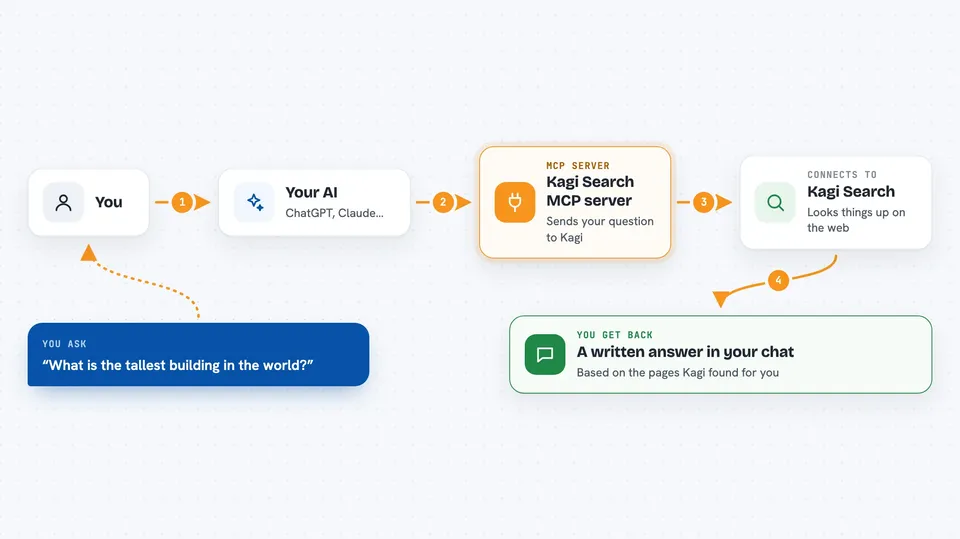
You type a question in your chat, like you normally would. Your AI notices it needs web results and passes your question to this helper. The helper sends the search to Kagi using your Kagi API key and waits for the answer. Kagi sends back a list of search results, and the helper hands them to your AI. Your AI then reads those results and writes a reply for you in the chat.
 Click to zoom
What you can do with it
- Search the web through Kagi by asking your AI a question
- Limit how many results come back when you want a short list
- Get a quick overview of what the web says about a topic
- Ask follow-up questions about the results your AI found
- Use Kagi results as the basis for a summary or comparison
What it gives back to you
You get a written answer in your chat, based on the search results your AI found through Kagi. Depending on what you asked, that might be a short summary, a list of links or sources, or a few key points pulled from the pages. The raw search results are used behind the scenes, so what you see is your AI's reply, not a wall of links.
Before you start
What you need
- A Kagi account with access to the Kagi Search API (it is in private beta, so you may need to be accepted first)
- A Kagi API key (a kind of password for apps; Kagi gives you one from your account)
- Node.js installed on your computer if you run the server yourself
- The Claude desktop app or another AI app that supports MCP servers
Good to know
This server can only search right now, but it uses your Kagi API key, so keep that key private and check your Kagi plan for any search limits or costs.
Install it with your AI
Add Kagi Search MCP server to your AI, no technical skills needed
You don't install anything by hand. You copy one prompt, paste it into an AI that can work on your computer, and it checks, installs and connects the server for you, asking you when it needs something.
Sign in to get the install prompt
Members get a ready-made prompt that lets the Claude desktop app check Kagi Search MCP server, install it and connect it for them, step by step. You don't need any technical skills: you copy, paste and answer a few questions. Your connected AI can also find and install any of the 4,361 MCP servers here for you.
Who it's for
People who already use Kagi and want their AI assistant to search the web through it, especially researchers, writers, and anyone who does a lot of lookups.


