MCP server · Generative art
Flux image MCP server
by AceDataCloud
Ask your AI to create or edit pictures with Flux image models, right inside your chat.
This is a helper that lets your AI make and change pictures using the Flux image models from Black Forest Labs, through a service called Ace Data Cloud. You type what you want in normal words, and the picture gets made for you. It is handy for anyone who needs quick images for slides, posts, or ideas, without opening a separate image tool.
What is an MCP server? The 30-second version
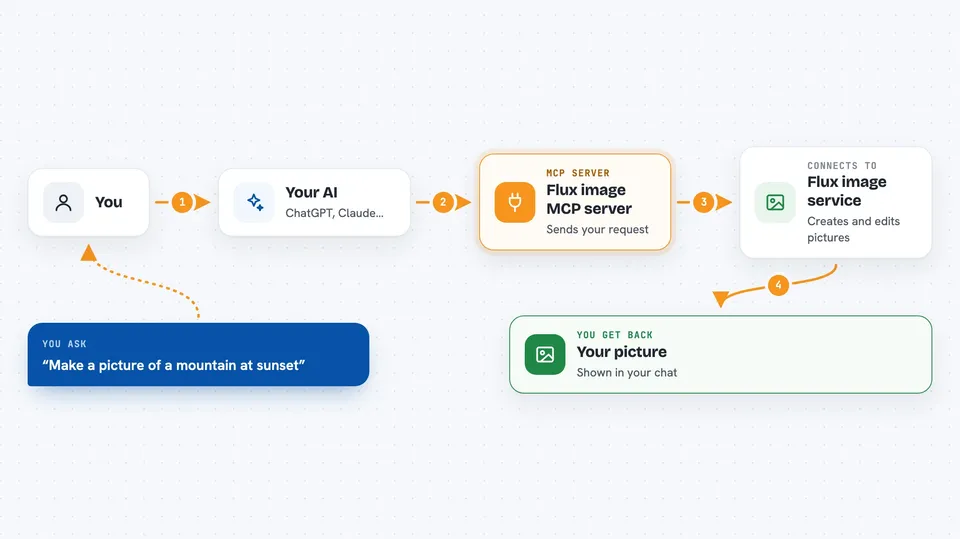
On its own, your AI can only chat. An MCP server is a small helper program that gives your AI a new skill or a connection to another service. This one connects your AI to Flux, an image making service, so your AI can send your request there and bring the picture back to you. You do not need to understand how it works, you just ask in plain words.
What this MCP server does
You ask your AI for a picture, like a mountain at sunset. Your AI passes that request to this helper. The helper sends it to the Flux service, which creates the image. When it is done, the helper brings the result back, and your AI shows it to you in the chat. You can also ask it to change a picture you already have, or check on a picture that is still being made.
 Click to zoom
What you can do with it
- Create a new image from a written description
- Edit an existing image, like adding sunglasses to a person
- Pick between different Flux models for speed or quality
- Check the status of an image that is still being made
- Look up several image tasks at once
- See which models are available and what they are good for
- Get tips on how to write a better image prompt
Try asking your AI
- “Generate a photorealistic mountain landscape at golden hour”
- “Add sunglasses to the person in this photo”
- “What is the status of my image generation?”
- “Which Flux model should I use for a high quality picture?”
What it gives back to you
You get the finished image shown in your chat, or a link to it. If the image is still being made, you get a status update. You can also get lists, like all the available models and what each one is best at. For edits, you get the changed picture back.
Before you start
What you need
- An Ace Data Cloud account and an API token (a kind of password for apps; the site gives you one)
- For Claude.ai, just an account there, since it connects with a login and no token is needed
- For other apps, the app itself, like Claude Desktop, Cursor, or VS Code
Good to know
Making images usually costs money on your Ace Data Cloud account, so keep an eye on your usage.
Install it with your AI
Add Flux image MCP server to your AI, no technical skills needed
You don't install anything by hand. You copy one prompt, paste it into an AI that can work on your computer, and it checks, installs and connects the server for you, asking you when it needs something.
Sign in to get the install prompt
Members get a ready-made prompt that lets the Claude desktop app check Flux image MCP server, install it and connect it for them, step by step. You don't need any technical skills: you copy, paste and answer a few questions. Your connected AI can also find and install any of the 4,361 MCP servers here for you.
Who it's for
Anyone who needs images for work or ideas, like marketers, designers, teachers, and people making slides or social posts.