
MCP server · Notes
AIStorageDepot MCP server
Let your AI search your shared team library of prompts, rules, skills and docs, and use them as slash commands.
This is a small helper that connects your AI assistant to your AIStorageDepot library. That is the place where you and your team keep prompts, rules, skills and documents in one shared, versioned spot. If you already store things there and want your AI to actually use them while you work, this is for you.
What is an MCP server? The 30-second version
On its own, your AI can only chat with you. An MCP server is a small helper program that gives your AI a new skill or a connection to an app or service. This one connects your AI to AIStorageDepot, so it can look things up in your library and pull them into the conversation when you ask. You add it once to your AI app, and from then on your stored content is within reach.
What this MCP server does
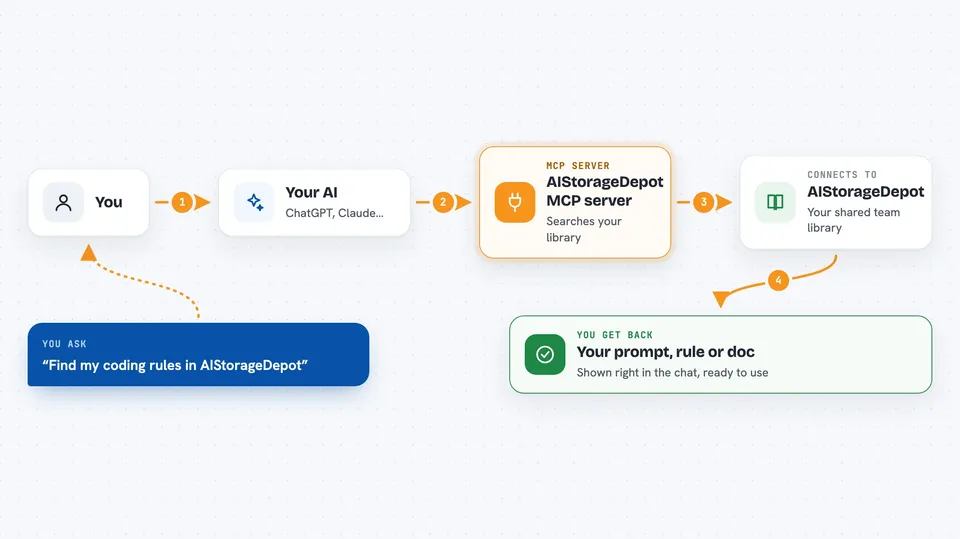
You ask your AI something, like to find your coding rules or a prompt you saved earlier. The AI uses this helper, which talks to AIStorageDepot over the internet. The helper searches your library and fetches the item you need. The content comes back into your chat, ready to use. Items you marked with a slash in the app also show up as slash commands you can type directly.
 Click to zoom
What you can do with it
- Search your whole library by keyword
- Fetch any item by its id
- Pull your saved prompts into the chat as slash commands
- Read your rules, docs and skills on demand
- Fill in prompt fields right after the command
- Sync your library to command files for Claude, Cursor, VS Code, Windsurf and Codex
- Try it with no account using the free public sample library
Try asking your AI
- “Find my coding rules in AIStorageDepot”
- “Pull up my project guidelines”
- “Search my library for anything about cold outreach”
- “Get the item called onboarding checklist”
What it gives back to you
You get back the actual content from your library: prompts, rules, docs or skills, shown right in the chat. Search gives you a list of matching items with their names and ids. Fetching an item gives you its full text. Slash commands drop the prompt into your message with any fields ready to fill in.
Before you start
What you need
- An AIStorageDepot account (free for individuals)
- An API token from Settings then API tokens (a kind of password for apps; the site gives you one)
- Node.js installed on your computer so the npx command can run
- An MCP-aware AI app like Claude Desktop, Cursor, Cline or Windsurf
Good to know
Your API token has full access to your account, so keep it secret and revoke it in Settings if you ever share it by mistake.
Install it with your AI
Add AIStorageDepot MCP server to your AI, no technical skills needed
You don't install anything by hand. You copy one prompt, paste it into an AI that can work on your computer, and it checks, installs and connects the server for you, asking you when it needs something.
Sign in to get the install prompt
Members get a ready-made prompt that lets the Claude desktop app check AIStorageDepot MCP server, install it and connect it for them, step by step. You don't need any technical skills: you copy, paste and answer a few questions. Your connected AI can also find and install any of the 4,361 MCP servers here for you.
Who it's for
Teams and individuals who keep their prompts, rules and docs in AIStorageDepot and want their AI assistant to use them while they work.





