
MCP server · Email
MCP Emails server
by Albretsen
Let your AI read, search, send and organize email in your own mailbox.
MCP Emails is a hosted helper that connects your email account to an AI assistant like Claude or ChatGPT. Once it is connected, you can ask your assistant to find messages, write replies, tidy folders or schedule a send, and it works directly on your real inbox. It is handy for anyone who spends a big part of the day in email.
What is an MCP server? The 30-second version
On its own, your AI can only chat with you. An MCP server is a small helper program that gives your AI a new skill or a connection to another service. This one connects your AI to your email mailbox, so it can look things up and do things there when you ask. You connect your mailbox once, paste one web address into your AI app, and the assistant can then work your inbox for you.
What this MCP server does
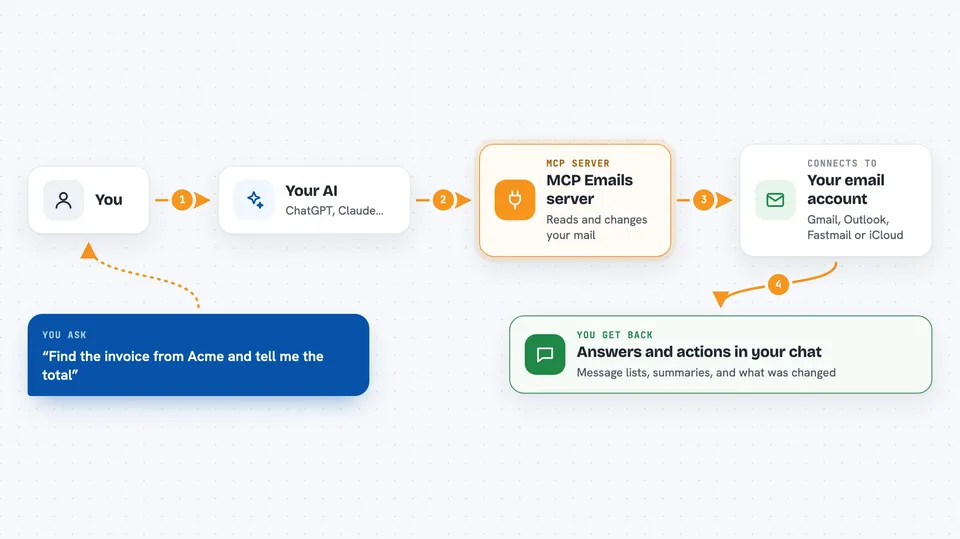
You ask your AI something about your email, like finding an invoice or writing a reply. The AI sends that request to this helper, which talks to your mail provider, such as Gmail, Outlook, Fastmail or iCloud. The provider sends back the live messages, and the helper passes the result to your AI. Your AI then shows you the answer or makes the change you asked for, like moving a message or sending a reply. Nothing is stored on the helper's side; mail is fetched fresh each time.
 Click to zoom
What you can do with it
- List and read the messages in your inbox
- Search your mail with normal words or filters
- Send, reply to and forward email from your real address
- Move, copy, flag and archive messages
- Create, rename and delete folders or labels
- Save drafts and schedule messages to send later
- Set up simple rules that tidy mail automatically
Try asking your AI
- “Show me the unread emails from this week and summarize them”
- “Find the invoice from Acme and tell me the total”
- “Reply to Sarah saying I will send the report tomorrow”
- “Move all newsletters from last month into the Reading folder”
What it gives back to you
You get answers in plain chat: lists of messages, short summaries, sender names, dates and subjects. When it sends or changes something, it tells you what it did, like which message was moved or which reply went out. You can also ask for an attachment or the original email file, and it will hand it to you. Everything appears right in the conversation with your AI.
Before you start
What you need
- An account at mcpemails.com (the free plan connects one mailbox)
- Your email login details or an app password for your mail provider
- An AI app that supports MCP servers, like Claude Desktop or Cursor
Good to know
It can send, move and delete real email in your mailbox, so give it only the permissions you are comfortable with and check before letting it delete or send in bulk.
Install it with your AI
Add MCP Emails server to your AI, no technical skills needed
You don't install anything by hand. You copy one prompt, paste it into an AI that can work on your computer, and it checks, installs and connects the server for you, asking you when it needs something.
Sign in to get the install prompt
Members get a ready-made prompt that lets the Claude desktop app check MCP Emails server, install it and connect it for them, step by step. You don't need any technical skills: you copy, paste and answer a few questions. Your connected AI can also find and install any of the 4,361 MCP servers here for you.
Who it's for
Anyone who lives in their inbox all day, like assistants, managers, support staff and small business owners.





