
MCP server · Notes
RecallNest MCP server
by AliceLJY
Give your AI a shared memory that survives across chat windows, so it remembers what you did before.
RecallNest is a memory helper that lives on your own computer. It lets your AI remember things from earlier sessions, even in a different window or a different app. It is handy if you use coding assistants or chat apps and are tired of repeating yourself every time.
What is an MCP server? The 30-second version
On its own, your AI can only chat. It forgets everything the moment you close the window. An MCP server is a small helper program that gives your AI a new skill or a connection to something. RecallNest is that helper here: it gives your AI a memory store on your machine, so it can look things up and save things for later when you ask.
What this MCP server does
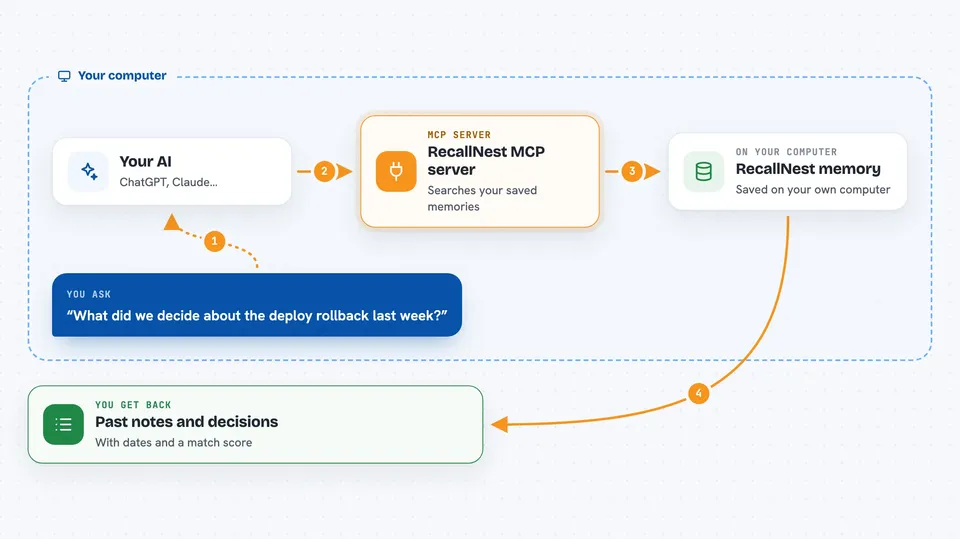
You ask your AI something, like how you fixed a problem last week. The AI passes your question to RecallNest. RecallNest searches its local memory store using a mix of keyword and meaning-based search, plus a map of connected topics. It hands back the most relevant pieces it found, and your AI uses them to answer you. When you finish a session, it can save a checkpoint so the next session picks up where you left off.
 Click to zoom
What you can do with it
- Recall past decisions and fixes from earlier sessions
- Save new facts, preferences, and notes to memory
- Checkpoint a session and resume it later
- Import conversations from Claude Code, ChatGPT, Slack, or plain text
- Search memory by topic or category
- See stats and health of your memory store
- Export a visual map of connected memories
Try asking your AI
- “What did we decide about the deploy rollback last week?”
- “Remember that I prefer dark mode and short answers.”
- “Checkpoint this session so I can pick it up tomorrow.”
- “Search my memory for anything about the login bug.”
What it gives back to you
You get back a ranked list of matching memories, each with a short snippet, a date, and a score. Sometimes you also get a summary or a checkpoint you can resume from. In the chat, your AI simply reads those results and answers you in normal words. It can also show you stats or a health report when you ask.
Before you start
What you need
- A computer where you can run commands (Mac, Linux, or Windows)
- Bun or Node.js 22 or newer installed
- A Jina API key (a kind of password for the search service; the Jina site gives you one for free)
Good to know
It saves your conversations and notes to a database on your computer, so keep private or sensitive content in mind before storing it.
Install it with your AI
Add RecallNest MCP server to your AI, no technical skills needed
You don't install anything by hand. You copy one prompt, paste it into an AI that can work on your computer, and it checks, installs and connects the server for you, asking you when it needs something.
Sign in to get the install prompt
Members get a ready-made prompt that lets the Claude desktop app check RecallNest MCP server, install it and connect it for them, step by step. You don't need any technical skills: you copy, paste and answer a few questions. Your connected AI can also find and install any of the 4,609 MCP servers here for you.
Who it's for
People who use coding assistants or chat apps daily and want their AI to remember context between sessions without repeating themselves.





