MCP server · Developer tools
Reuse Before Generate MCP server
by aradar46
Lets your AI check if your project idea already exists on GitHub, npm, PyPI and more before it starts writing code.
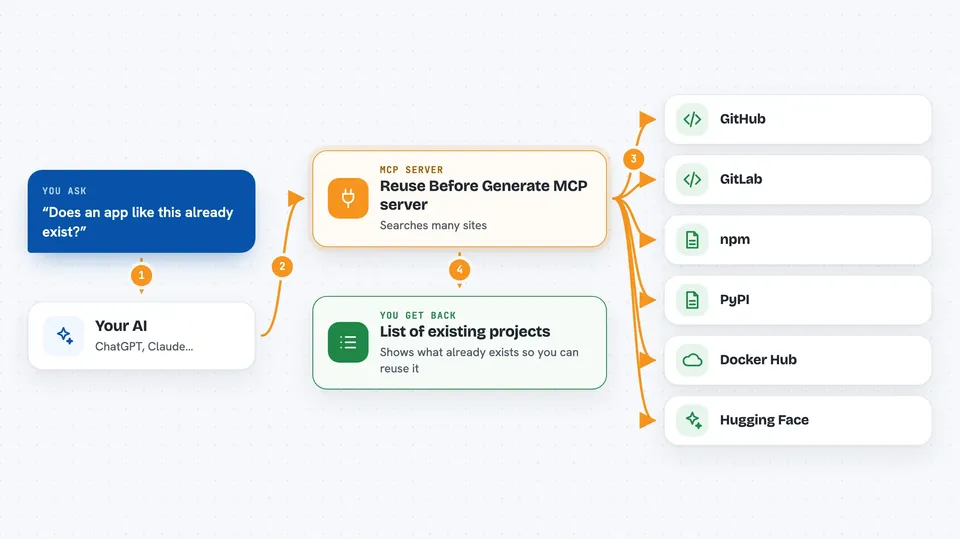
This is a small helper that stops your AI from building something that already exists. Before it writes a pile of new code, it can look across many public code and package sites to see if there is already a project you could use or extend. It is handy for anyone who asks an AI to build an app, a tool, or a module and would rather not reinvent the wheel.
What is an MCP server? The 30-second version
On its own, your AI can only chat with you using what it already knows. An MCP server is a small helper program that gives your AI a new skill or a connection to other places. This one connects your AI to public code and package indexes like GitHub, npm, PyPI and many others. When you ask it to, your AI can use this helper to look things up there and bring the answers back into your chat.
What this MCP server does
You describe the thing you want to build, in plain words. Your AI passes that description to this helper. The helper searches many public code and package sites at the same time, like GitHub, GitLab, npm, PyPI, Docker Hub and more. It then hands the results back to your AI as a tidy Markdown list. Your AI shows you what already exists and suggests maintained projects you could reuse or extend instead of starting from scratch.
 Click to zoom
What you can do with it
- Check if an app or module idea already exists before you build it
- Search many package indexes at once, like npm, PyPI, crates.io and NuGet
- Find open-source desktop, mobile and Linux tools that match your idea
- Discover AI models and pipelines on Hugging Face that fit your project
- Spot existing Docker images you could build on
- Get a short list of maintained alternatives to extend
- Run the same search from your terminal without an AI client
What it gives back to you
You get back a short, readable list of matching projects and packages, grouped by where they were found. Each entry usually shows the name, a short description, and a link so you can look closer. Your AI can then summarise the options and ask whether you want to reuse or extend one of them. Nothing is installed or changed on your computer; it is just a search.
Before you start
What you need
- Node.js installed on your computer (so the npx command can run)
- An AI coding assistant that supports MCP, like Claude Code, Cursor, Claude Desktop, Windsurf or VS Code
- Optional: a GitHub token if you want higher GitHub search limits (you can skip this to start)
Good to know
It only searches public sites, so private or internal projects will not show up, and results can be incomplete if a site is busy or rate-limited.
Install it with your AI
Add Reuse Before Generate MCP server to your AI, no technical skills needed
You don't install anything by hand. You copy one prompt, paste it into an AI that can work on your computer, and it checks, installs and connects the server for you, asking you when it needs something.
Sign in to get the install prompt
Members get a ready-made prompt that lets the Claude desktop app check Reuse Before Generate MCP server, install it and connect it for them, step by step. You don't need any technical skills: you copy, paste and answer a few questions. Your connected AI can also find and install any of the 4,609 MCP servers here for you.
Who it's for
Developers, makers and anyone who asks an AI to build software and wants to avoid duplicating work that already exists.