
MCP server · Analytics
Baserow MCP server
by bram2w
Let your AI search your Baserow tables and add, change, or remove rows for you.
This is a helper that connects your AI assistant to Baserow, a tool for building online databases that looks a lot like a spreadsheet. Once it is connected, you can ask your AI in plain words to look things up or update your data, instead of clicking around yourself. It is handy if you keep lists, contacts, projects, or inventory in Baserow and want to work with them faster.
What is an MCP server? The 30-second version
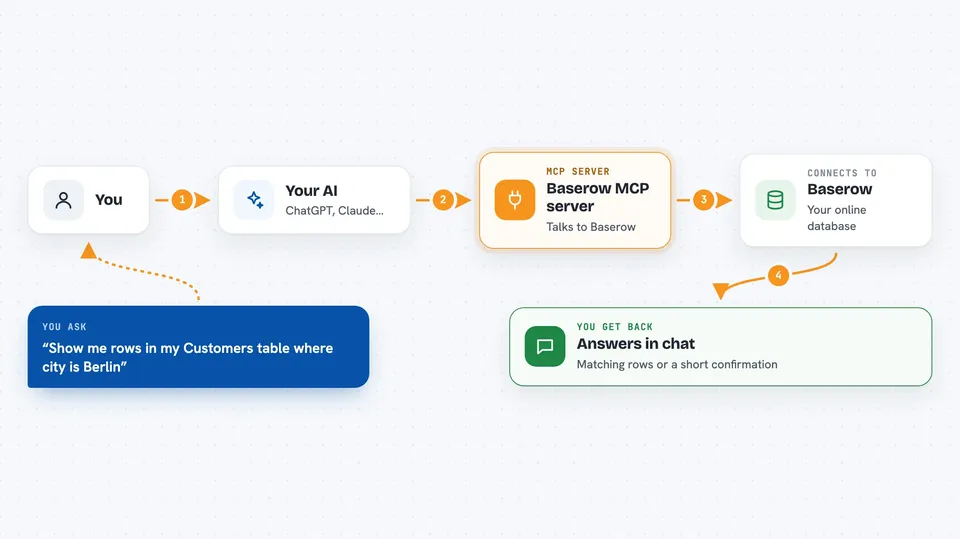
On its own, your AI can only chat. It cannot see your Baserow data or change anything there. An MCP server is a small helper program that gives your AI a new skill, in this case the skill to talk to Baserow. When you ask a question, the AI passes it to this helper, the helper reaches your Baserow account, and the answer comes back to you in the chat.
What this MCP server does
You ask your AI something about your Baserow data, like which tables you have or what is inside one of them. The AI sends that request to this helper. The helper talks to Baserow for you and brings back the result. If you ask it to add, change, or delete a row, it does that too and tells you what it did. You never have to open Baserow yourself unless you want to.
 Click to zoom
What you can do with it
- List all the tables in your Baserow workspace
- Search inside a table for rows that match what you describe
- Read the contents of a specific row
- Add a new row with the values you give it
- Update an existing row, like fixing a phone number or a status
- Delete a row you no longer need
- Look up a table's fields so you know what columns exist
Try asking your AI
- “List all the tables in my Baserow workspace”
- “Show me the rows in my Customers table where the city is Berlin”
- “Add a new row to my Tasks table with the title Send invoice and status Open”
- “Update row 42 in my Contacts table and change the email to anna@example.com”
What it gives back to you
You get answers in plain text in the chat. For a search, you see a list of matching rows with their values. For a change, you see a short confirmation of what was added, updated, or deleted. If something goes wrong, like a wrong table name, the AI tells you so you can try again.
Before you start
What you need
- A Baserow account (you can sign up for free at baserow.io, or use your own self-hosted copy)
- A Baserow API token, which is a kind of password the app gives you so other tools can reach your data
- The address of your Baserow instance if you are not using the standard baserow.io one
Good to know
This helper can change and delete rows in your Baserow tables, so double-check before you say yes to a delete or a big update.
Install it with your AI
Add Baserow MCP server to your AI, no technical skills needed
You don't install anything by hand. You copy one prompt, paste it into an AI that can work on your computer, and it checks, installs and connects the server for you, asking you when it needs something.
Sign in to get the install prompt
Members get a ready-made prompt that lets the Claude desktop app check Baserow MCP server, install it and connect it for them, step by step. You don't need any technical skills: you copy, paste and answer a few questions. Your connected AI can also find and install any of the 4,361 MCP servers here for you.
Who it's for
Anyone who keeps lists or records in Baserow and wants to look things up or update them by just asking their AI, without opening the app.


