MCP server · Research
Google Maps MCP server
by cablate
Lets your AI look up places, routes, travel times, weather and local rankings using Google Maps.
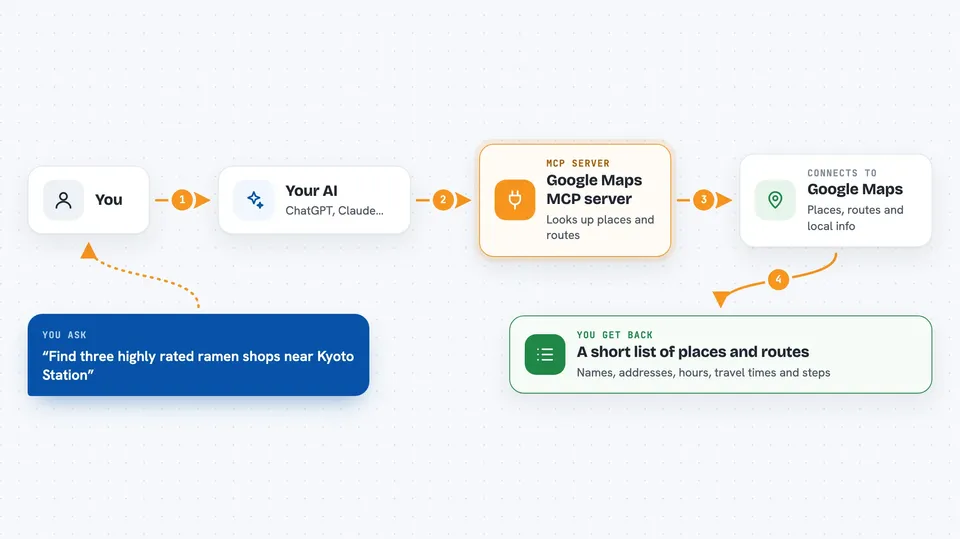
This is a small helper that connects your AI assistant to Google Maps. Once it is set up, you can ask your AI about places, addresses, directions and travel times in normal words, and it will look them up for you. It is handy if you plan trips, check addresses, compare restaurants or research a neighborhood.
What is an MCP server? The 30-second version
On its own, your AI can only chat with you using what it already knows. An MCP server is a small helper program that gives your AI a new skill, in this case a connection to Google Maps. When you ask a question about a place or a route, your AI passes the request to this helper, the helper asks Google Maps, and the answer comes back into your chat. You do not need to understand how it works inside, you just need to connect it once.
What this MCP server does
You type a question in plain words, like asking for cafes near a station or the travel time between two addresses. Your AI sends that request to this helper program. The helper talks to Google Maps and gets the facts back, such as names, addresses, ratings, opening hours, distances or routes. Then your AI turns those facts into a normal answer in your chat, often as a short list or a step by step plan. Everything it does is read only, so it looks things up but does not change or book anything.
 Click to zoom
What you can do with it
- Find places by name or by what you are looking for, like quiet cafes in a city
- Turn an address into map coordinates and turn coordinates back into an address
- Get directions between two points by car, walking, cycling or public transport
- Compare travel times and distances between several places at once
- Plan a route with multiple stops in a sensible order
- Check the weather, air quality, elevation and timezone for a location
- See how a business ranks in local search results across an area
Try asking your AI
- “Find three highly rated ramen shops near Kyoto Station and show their opening hours”
- “How long does it take to get from Tokyo Station to Tokyo Skytree by train”
- “Plan a two day Kyoto itinerary that groups nearby places together and checks travel times”
- “What is the weather and air quality in Osaka tomorrow”
What it gives back to you
You get answers written in normal language, often as a short list of places with names, addresses, ratings and hours. For routes you get travel time, distance and step by step directions. For planning questions you get a suggested order of stops with notes on how long each leg takes. The AI may also show a simple map image when you ask for one.
Before you start
What you need
- Node.js 18 or newer installed on your computer
- A Google Maps Platform API key (a kind of password for apps; you get it from Google Cloud, and it usually needs billing turned on)
- The APIs you plan to use enabled in your Google Cloud project, such as Places API (New), Routes API and Geocoding API
Good to know
It can only read data, but live calls to Google Maps may cost money on your Google Cloud account, and the facts it returns do not guarantee that a place is open, safe or accessible.
Install it with your AI
Add Google Maps MCP server to your AI, no technical skills needed
You don't install anything by hand. You copy one prompt, paste it into an AI that can work on your computer, and it checks, installs and connects the server for you, asking you when it needs something.
Sign in to get the install prompt
Members get a ready-made prompt that lets the Claude desktop app check Google Maps MCP server, install it and connect it for them, step by step. You don't need any technical skills: you copy, paste and answer a few questions. Your connected AI can also find and install any of the 4,361 MCP servers here for you.
Who it's for
Anyone who plans trips, checks addresses, compares local places or researches a neighborhood, especially assistants, travel planners, sales and delivery teams and small business owners.