
MCP server · Research
Unsplash MCP server
by cevatkerim
Let your AI find Unsplash photos and give you the credit text to go with them.
This is a small helper that connects your AI to Unsplash, the site full of free photos. You ask for pictures, and your AI brings back photo links plus the credit line you are supposed to show. It is handy if you write blog posts, newsletters, or web pages and need images you are allowed to use.
What is an MCP server? The 30-second version
On its own, your AI can only chat with you. An MCP server is a small helper program that gives your AI one new skill, in this case a connection to Unsplash. Once it is set up, your AI can search Unsplash and pull photo details for you when you ask. You do not need to understand how it works inside. You just talk to your AI like normal.
What this MCP server does
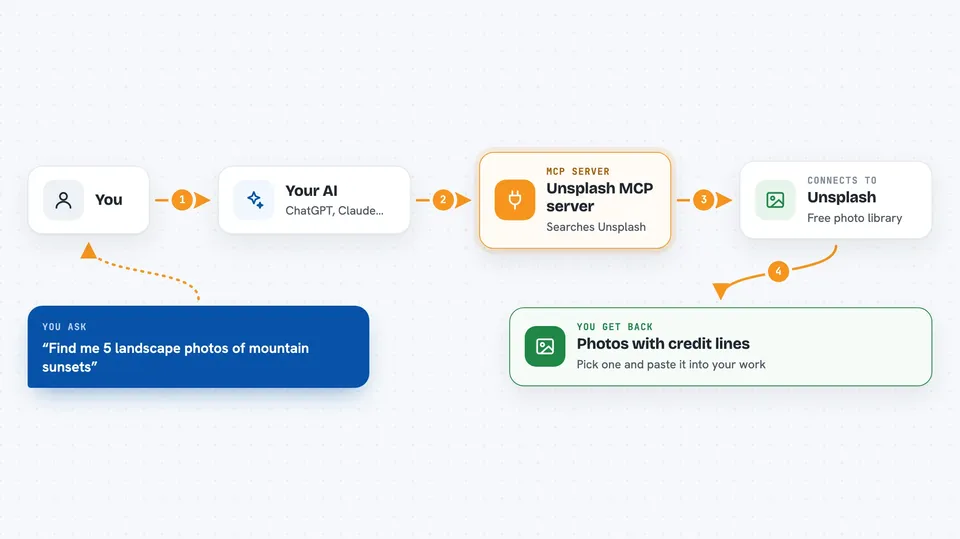
You ask your AI for a photo, for example a mountain at sunset. Your AI passes that request to this helper, and the helper asks Unsplash for matching photos. Unsplash sends back the photo links, the photographer's name, and the ready-made credit line. Your AI then shows you the results in the chat, so you can pick one and paste it into your work.
 Click to zoom
What you can do with it
- Search Unsplash photos by keyword
- Filter results by color or by landscape, portrait, or square shape
- Get a random photo when you just want something fresh
- Sort results by most relevant or by newest
- Get a ready-made credit line and HTML credit for each photo
- Track a download so you stay within Unsplash's rules
Try asking your AI
- “Find me 5 landscape photos of mountain sunsets on Unsplash”
- “Give me a random nature photo in portrait orientation”
- “Search Unsplash for blue coffee shop interiors and show the credit lines”
- “Get 3 latest photos of city streets at night”
What it gives back to you
You get a list of photos with their links, sizes, and a short description of each. Every photo also comes with a plain credit line like Photo by John Doe on Unsplash, plus an HTML version you can paste into a web page. If you ask to download one, you get the download link. Everything shows up as text in your chat, so you can copy what you need.
Before you start
What you need
- Python 3.11 or newer on your computer
- An Unsplash API access key (a kind of password for apps; Unsplash gives you one for free when you sign up as a developer)
- The Claude desktop app or another AI app that supports MCP servers
Good to know
Unsplash asks you to always show the credit line and to track downloads, so keep the attribution text with any photo you use.
Install it with your AI
Add Unsplash MCP server to your AI, no technical skills needed
You don't install anything by hand. You copy one prompt, paste it into an AI that can work on your computer, and it checks, installs and connects the server for you, asking you when it needs something.
Sign in to get the install prompt
Members get a ready-made prompt that lets the Claude desktop app check Unsplash MCP server, install it and connect it for them, step by step. You don't need any technical skills: you copy, paste and answer a few questions. Your connected AI can also find and install any of the 4,609 MCP servers here for you.
Who it's for
Writers, bloggers, marketers, and anyone who builds web pages and needs properly credited photos without hunting for them by hand.


