
MCP server · Video editing
Loudcheck MCP server
by chaoz23
Ask your AI whether an audio or video file meets broadcast loudness rules, and get a clear pass or fail.
Loudcheck is a small helper that checks how loud a media file is and tells you whether it passes an official loudness standard. It is handy if you work with audio or video files that have to meet a delivery rule, like a TV show or a radio spot. Instead of reading raw numbers from a meter, you get a plain pass or fail answer.
What is an MCP server? The 30-second version
On its own, your AI can only chat with you. An MCP server is a small helper program that gives your AI a new skill or a connection to another tool. This one connects your AI to loudcheck, which measures media files and checks them against loudness standards. So when you ask your AI about a file, it can run the check for you and explain the result.
What this MCP server does
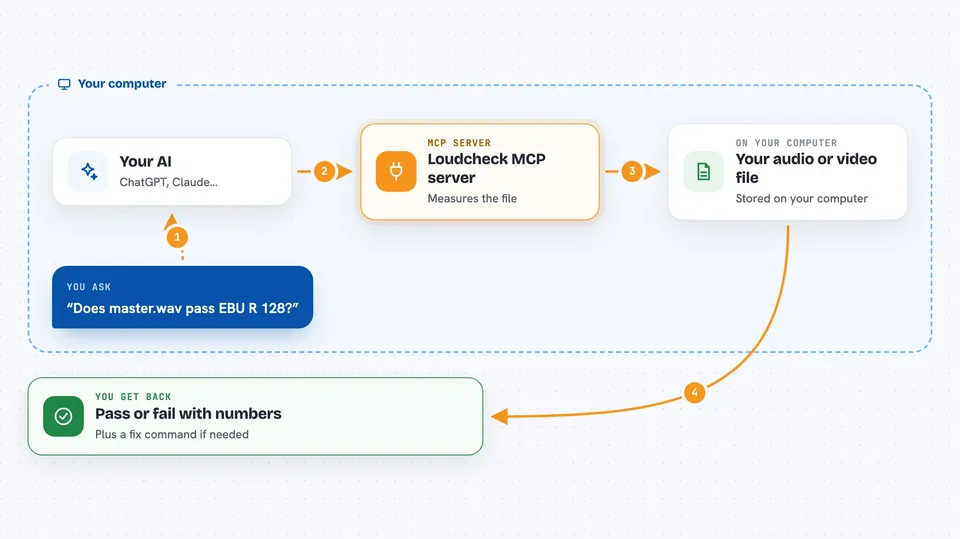
You ask your AI to check a media file. The AI passes that request to the loudcheck helper. The helper runs a measurement on the file using ffmpeg, compares the numbers to the standard you chose, and decides if it passes or fails. Then it sends the verdict back to your AI, which shows it to you in the chat, with the numbers and a suggested fix if needed.
 Click to zoom
What you can do with it
- Check a WAV, MP4, or MOV file against EBU R 128 or ATSC A/85
- Get a pass or fail verdict with the exact numbers and how far off they are
- See which specific measurement failed and by how much
- Get a ready-to-use ffmpeg command to fix a file that is too loud or too quiet
- Check every audio track in a video file at once
- Run a batch check on a whole folder of files
- Ask which loudness standards are available and what they require
Try asking your AI
- “Check if master.wav passes EBU R 128”
- “Is my interview.mp4 compliant with ATSC A/85?”
- “Run a loudness check on all the files in my masters folder”
- “What does the BS.1770 standard measure?”
What it gives back to you
You get a clear verdict: PASS or FAIL, or MEASURED if you chose a standard that only measures. For each measurement you see the number, the target, the allowed range, and how far off you are. If it fails, you also get a plain-English explanation and an ffmpeg command you can run to fix it.
Before you start
What you need
- Python 3.10 or newer
- ffmpeg version 5.0 or newer installed on your computer
- A media file to check
Good to know
This tool only measures and gives advice; it never changes your files, so you have to apply any fix yourself.
Install it with your AI
Add Loudcheck MCP server to your AI, no technical skills needed
You don't install anything by hand. You copy one prompt, paste it into an AI that can work on your computer, and it checks, installs and connects the server for you, asking you when it needs something.
Sign in to get the install prompt
Members get a ready-made prompt that lets the Claude desktop app check Loudcheck MCP server, install it and connect it for them, step by step. You don't need any technical skills: you copy, paste and answer a few questions. Your connected AI can also find and install any of the 4,361 MCP servers here for you.
Who it's for
Audio engineers, video editors, podcasters, and anyone who has to deliver media files that meet a loudness standard.





