MCP server · Developer tools
Terrarium MCP server
by chryaner
Your AI can spin up real throwaway Windows or Linux computers, use them, then reset them to clean.
Terrarium gives your AI its own real computers to work with. It makes fresh Windows or Linux machines in seconds, lets your AI use them, and wipes them back to clean just as fast. It is handy if you want your AI to test an install, try something risky, or work on a machine that is not yours.
What is an MCP server? The 30-second version
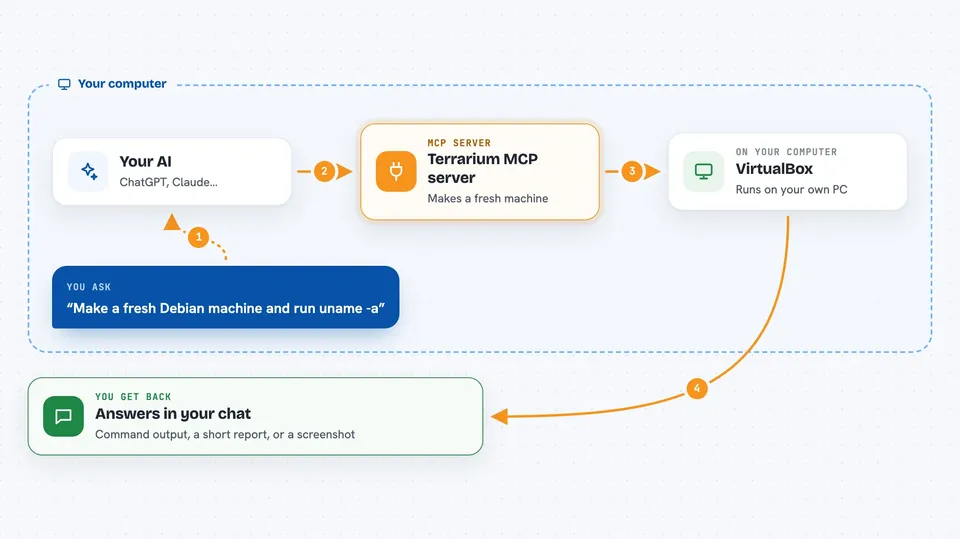
On its own, your AI can only chat with you. An MCP server is a small helper program that gives your AI a new skill or a connection to something outside the chat. This one connects your AI to VirtualBox, the free tool that runs virtual computers on your PC. So when you ask for a machine, your AI can actually create one, run things in it, and clean it up.
What this MCP server does
You ask your AI for a machine, for example a fresh Debian or Windows computer. Your AI passes that request to this helper, which talks to VirtualBox on your PC. VirtualBox makes a copy of a ready-made machine in a second or two. Your AI can then run commands in it, take screenshots, click and type, and when you are done it can reset the machine to clean or delete it. You get the results back in your chat, like command output or screenshots.
 Click to zoom
What you can do with it
- Create a fresh Windows or Linux machine in seconds
- Run commands inside that machine and read the output
- Take screenshots of the machine's screen
- Click, scroll, type and press keys on a machine that has no SSH
- Reset a machine back to its clean state in seconds
- Delete a machine when you are done with it
- Copy files into or out of the machine
Try asking your AI
- “Fork a fresh debian-12 machine, run uname -a in it, then delete it.”
- “Install our app on the Windows env and screenshot each step.”
- “Fork a clean env, build the project in it, tell me what the README missed.”
- “Make a throwaway machine, reproduce this bug, and give me a screenshot trail.”
What it gives back to you
You get answers in your chat, like the output of a command, a short report of what happened, or a screenshot of the machine's screen. When your AI makes or changes a machine, it tells you the name and what it did. You can also ask for a step-by-step screenshot trail. Nothing shows up on your own desktop; it all happens inside the virtual machine.
Before you start
What you need
- A Windows PC (this only runs on Windows)
- VirtualBox 7.x installed (free; winget install Oracle.VirtualBox)
- Node.js if you use the npx command, or Scoop/Go for other install paths
- A Windows installation ISO saved on your PC if you want a Windows machine (Linux images download themselves)
Good to know
It can create, change and delete virtual machines on your PC, so check which machine your AI is working on before letting it delete or reset anything.
Install it with your AI
Add Terrarium MCP server to your AI, no technical skills needed
You don't install anything by hand. You copy one prompt, paste it into an AI that can work on your computer, and it checks, installs and connects the server for you, asking you when it needs something.
Sign in to get the install prompt
Members get a ready-made prompt that lets the Claude desktop app check Terrarium MCP server, install it and connect it for them, step by step. You don't need any technical skills: you copy, paste and answer a few questions. Your connected AI can also find and install any of the 4,361 MCP servers here for you.
Who it's for
People who want their AI to test installs, reproduce bugs, or do risky work on a real throwaway computer, like developers, testers, and support engineers.