
MCP server · Browser automation
Browser Use MCP server
by co-browser
Let your AI open websites, click around and read pages for you.
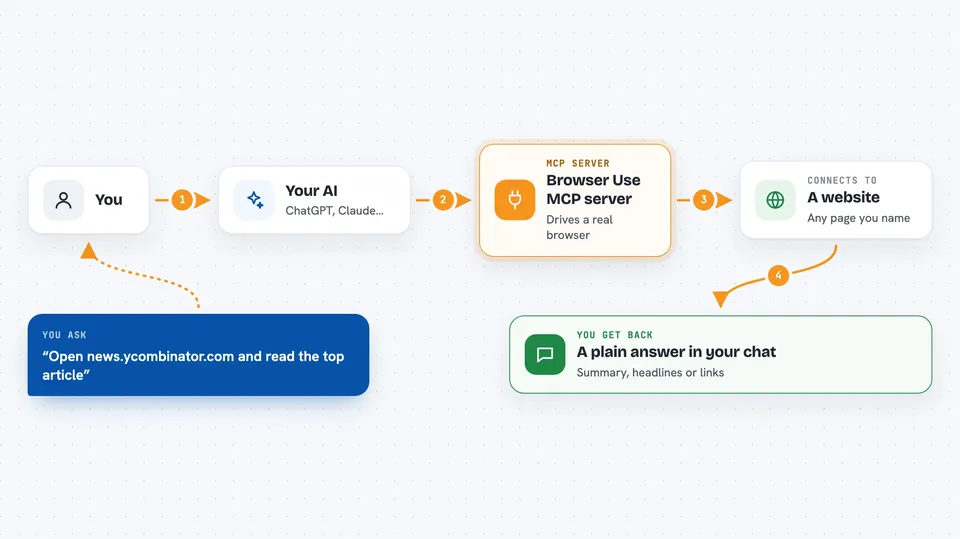
This is a helper that lets your AI actually use a web browser: open pages, click links, fill in boxes and read what is on the screen. It is handy if you often ask your AI about something on a website and then have to copy and paste the page yourself. Instead, the AI goes and looks for you.
What is an MCP server? The 30-second version
On its own, your AI can only chat with you. An MCP server is a small helper program that gives your AI one new skill or one new connection. This helper connects your AI to a real web browser, so the AI can visit pages and do things there when you ask. You stay in the chat; the helper does the clicking in the background.
What this MCP server does
You ask your AI something that needs a website, like reading a page or finding a link. The AI passes that job to this helper. The helper drives a real browser, opens the page, clicks and scrolls, and reads what is there. Then it sends the result back, and your AI tells you the answer in plain words. If you use the Docker setup, you can even watch the browser working live through a VNC viewer.
 Click to zoom
What you can do with it
- Open a web page and tell you what it says
- Find and click links or buttons on a page
- Fill in a search box or a simple form
- Collect a few facts from a site and summarise them
- Follow a page step by step and report back
- Watch the browser work live through a VNC viewer
Try asking your AI
- “Open https://news.ycombinator.com and return the top ranked article”
- “Go to the BBC news homepage and list the main headlines right now”
- “Search Google for the weather in Paris tomorrow and tell me the result”
- “Open this page and click the first link, then tell me where it goes”
What it gives back to you
You get answers in the chat: a summary of the page, a list of headlines or links, or the result of an action it took. It can also tell you what it clicked and what happened next. If something went wrong, it usually says so instead of guessing.
Before you start
What you need
- An OpenAI API key (a kind of password for AI services; you get one from your OpenAI account)
- The uv tool and Playwright installed (the README shows the exact commands)
- The mcp-proxy tool if you want to use stdio mode
- Optional: Docker if you prefer to run it in a box with a VNC viewer
Good to know
It really clicks and types on websites for you, so avoid pointing it at accounts or pages where a wrong click could change or delete something important.
Install it with your AI
Add Browser Use MCP server to your AI, no technical skills needed
You don't install anything by hand. You copy one prompt, paste it into an AI that can work on your computer, and it checks, installs and connects the server for you, asking you when it needs something.
Sign in to get the install prompt
Members get a ready-made prompt that lets the Claude desktop app check Browser Use MCP server, install it and connect it for them, step by step. You don't need any technical skills: you copy, paste and answer a few questions. Your connected AI can also find and install any of the 4,361 MCP servers here for you.
Who it's for
People who often need information from websites and would rather have their AI fetch it than copy and paste by hand.


