
MCP server · Video editing
Final Cut Pro MCP server
by DareDev256
Let your AI read, check and edit your Final Cut Pro timelines from a simple XML export.
This is a helper that connects your AI assistant to Final Cut Pro timelines. You export your timeline as an XML file from Final Cut, then ask your AI to check it, fix small problems, or build new cuts from it. It is handy for editors who do a lot of repetitive timeline work and would rather describe it than click through it.
What is an MCP server? The 30-second version
On its own, your AI can only chat. An MCP server is a small helper program that gives your AI a new skill or a connection to an app. This one connects your AI to Final Cut Pro timeline files, so it can read your edit, spot problems, and write a new version for you. You stay in charge: you export the file, you ask, and you import the result back.
What this MCP server does
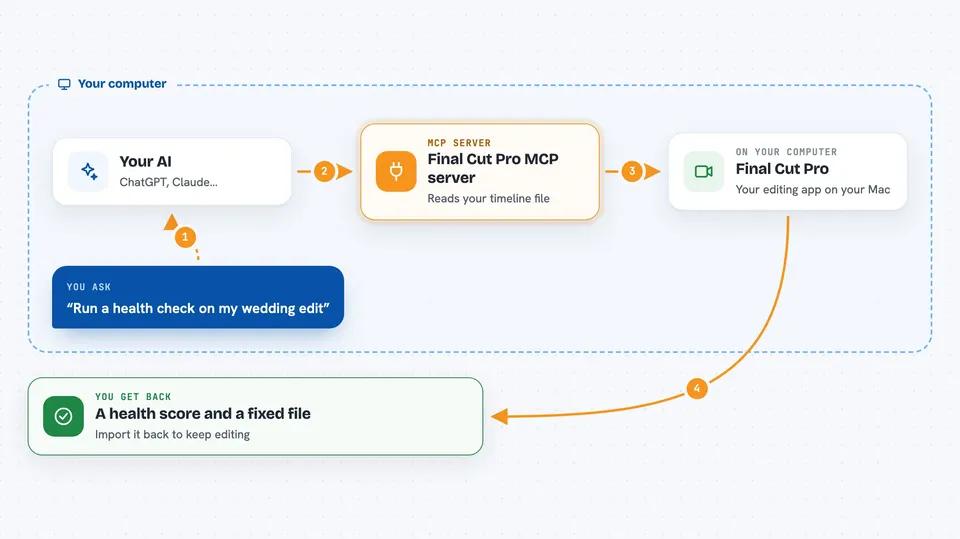
You export your timeline from Final Cut Pro as an XML file. You tell your AI what you want, like a health check or chapter markers. The AI uses this helper to read the file and understand every clip, marker and gap. The helper makes the changes you asked for and saves a new XML file. You import that file back into Final Cut Pro and keep editing.
 Click to zoom
What you can do with it
- Run a health check on a timeline and get a score
- Find flash frames, gaps and duplicate clips
- Add chapter markers from a transcript or subtitle file
- Build a rough cut or montage from tagged clips
- Export an EDL or CSV list of clips with timecodes
- Reformat a timeline for a different screen shape
- Push a finished XML straight into an open Final Cut Pro
Try asking your AI
- “Run a health check on my wedding edit and fix anything under 2 frames”
- “Add chapter markers from this transcript: [paste transcript]”
- “Build a 60 second rough cut from clips tagged Interview with medium pacing”
- “Export an EDL and CSV of all clips with timecodes”
What it gives back to you
You get back plain answers in the chat, like a list of problem clips, a health score, or a summary of what changed. It can also save a new XML file you can import into Final Cut Pro. When it pushes to a running Final Cut, it tells you which library and event it landed in. Every change is non-destructive, so your original file is never touched.
Before you start
What you need
- A Mac with Final Cut Pro installed (for Live mode)
- Python 3.10 or newer
- The uv tool, which runs the server with uvx
- Your Final Cut Pro projects folder path, set as FCP_PROJECTS_DIR
Good to know
It can change your timeline files and push new versions into Final Cut Pro, so keep a copy of your original export and check the result before you rely on it.
Install it with your AI
Add Final Cut Pro MCP server to your AI, no technical skills needed
You don't install anything by hand. You copy one prompt, paste it into an AI that can work on your computer, and it checks, installs and connects the server for you, asking you when it needs something.
Sign in to get the install prompt
Members get a ready-made prompt that lets the Claude desktop app check Final Cut Pro MCP server, install it and connect it for them, step by step. You don't need any technical skills: you copy, paste and answer a few questions. Your connected AI can also find and install any of the 4,361 MCP servers here for you.
Who it's for
Video editors and post-production people who work in Final Cut Pro and want help with repetitive timeline tasks like markers, checks and rough cuts.





