MCP server · Research · official
Discourse MCP server
by discourse · official
Lets your AI search and read Discourse forums, and with permission post and manage topics for you.

This is a small helper made by Discourse itself. It connects your AI assistant to a Discourse forum so the AI can search topics, read posts, and, if you allow it, write replies and manage things. It is handy if you spend time in a Discourse community and want your AI to do the digging for you.
What is an MCP server? The 30-second version
On its own, your AI can only chat with you using what it already knows. An MCP server is a small helper program that gives your AI a new skill or a connection to an app or service. This one connects your AI to a Discourse forum, so when you ask a question the AI can go look things up or make changes there for you. You stay in charge: you choose the site, and writing is off until you turn it on.
What this MCP server does
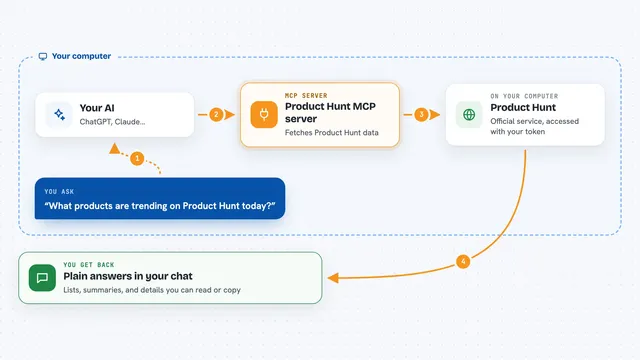
You ask your AI something about a forum, like find recent posts about a topic. The AI passes your request to this helper. The helper talks to the Discourse site over the web using the site's own tools. Then it hands the results back to your AI, which shows them to you in the chat. If you have switched on writing, the helper can also post, reply, or change things, one action at a time.
 Click to zoom
What you can do with it
- Search a forum for topics and posts that match keywords
- Read a full topic and its replies
- List and look up users and their activity
- Browse categories, tags, and groups
- Read your private messages (only with a logged-in key)
- Post a reply, start a topic, or save a draft (writes must be turned on)
- Run saved Data Explorer queries on sites where you are an admin
Try asking your AI
- “Search the forum for recent topics about pricing”
- “Summarize the last 20 replies in the topic about the new release”
- “Who has posted the most in the support category this month”
- “Draft a friendly reply to that question and show it to me before posting”
What it gives back to you
You get back plain answers in the chat: lists of topics with titles and links, the text of posts, user names, and counts. Search results come as a ranked list you can skim. If you asked it to write something, it tells you what it posted or changed, and where. Long posts may be shortened to keep the chat readable.
Before you start
What you need
- Node.js version 24 or newer on your computer
- The web address of the Discourse forum you want to use
- For private messages or writing: an API key from that forum (a kind of password for apps, which the forum gives you)
Good to know
Writing is off by default, and when you turn it on the helper can post, reply, or change things on the forum under your account, so only enable it on sites where you are comfortable with that.
Install it with your AI
Add Discourse MCP server to your AI, no technical skills needed
You don't install anything by hand. You copy one prompt, paste it into an AI that can work on your computer, and it checks, installs and connects the server for you, asking you when it needs something.
Sign in to get the install prompt
Members get a ready-made prompt that lets the Claude desktop app check Discourse MCP server, install it and connect it for them, step by step. You don't need any technical skills: you copy, paste and answer a few questions. Your connected AI can also find and install any of the 4,361 MCP servers here for you.
Who it's for
Community managers, moderators, support staff, and anyone who spends a lot of time reading or answering questions on a Discourse forum.