MCP server · Research · official
Sendchamp Docs MCP server
by sendchamp · official
Lets your AI look up Sendchamp's SMS, OTP and WhatsApp documentation and answer your questions about it.

This is a small helper from Sendchamp, the company behind an African messaging service for SMS, OTP codes, WhatsApp, voice and email. It lets your AI assistant search and read Sendchamp's own documentation for you, instead of you digging through pages yourself. It is handy if you are setting up texts or one-time codes for customers in Nigeria, Kenya, Ghana or other African markets.
What is an MCP server? The 30-second version
On its own, your AI can only chat with you using what it already learned. An MCP server is a small helper program that gives your AI one extra skill or connection. This one connects your AI to Sendchamp's documentation, so it can look things up there when you ask. You stay in your normal chat window; the helper does the fetching behind the scenes.
What this MCP server does
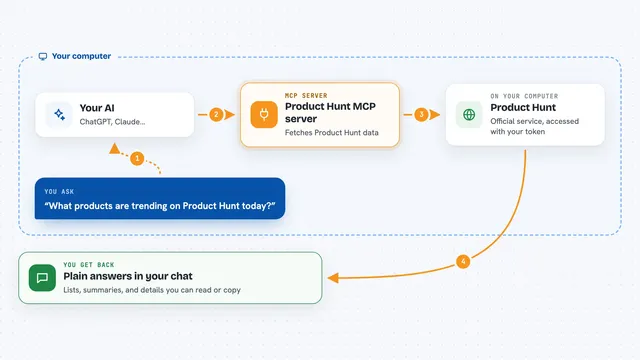
You ask your AI a question about Sendchamp, like how to send an SMS or set up an OTP code. The AI passes your question to this helper. The helper searches Sendchamp's documentation and pulls back the matching pages. The AI then reads those pages and writes you a plain answer in the chat. It only reads; it does not send messages or change anything in your account.
 Click to zoom
What you can do with it
- Search Sendchamp's documentation for a topic you name
- Read a specific Sendchamp guide or page in full
- Find out how to send an SMS in a particular African country
- Look up how OTP verification works across SMS, email, WhatsApp or voice
- Check the right wording for a Sendchamp setting or field
- Get the steps for connecting Sendchamp to your app
Try asking your AI
- “How do I send an SMS to customers in Nigeria with Sendchamp?”
- “Show me how Sendchamp OTP verification works and what channels it supports.”
- “What is the base URL and how do I authenticate Sendchamp API calls?”
- “Find the Sendchamp guide for sending WhatsApp messages.”
What it gives back to you
You get answers written in the chat, based on Sendchamp's own documentation. The AI can quote the relevant steps, list the channels or settings you need, and point you to the right guide. It can also show the page text it found so you can read the original. Nothing is sent or changed in your Sendchamp account.
Before you start
What you need
- An AI assistant that supports MCP servers, such as Cursor or Claude Code
- The Sendchamp docs MCP server added (the README shows a one-line setup for Cursor)
Good to know
This server only reads Sendchamp's documentation, so it cannot send messages or change your account, but the answers it gives are only as good as the docs and you should still check anything important before relying on it.
Install it with your AI
Add Sendchamp Docs MCP server to your AI, no technical skills needed
You don't install anything by hand. You copy one prompt, paste it into an AI that can work on your computer, and it checks, installs and connects the server for you, asking you when it needs something.
Sign in to get the install prompt
Members get a ready-made prompt that lets the Claude desktop app check Sendchamp Docs MCP server, install it and connect it for them, step by step. You don't need any technical skills: you copy, paste and answer a few questions. Your connected AI can also find and install any of the 4,361 MCP servers here for you.
Who it's for
Developers and technical teams building SMS, OTP or WhatsApp features for African markets, and anyone who needs quick answers from Sendchamp's documentation.