
MCP server · Notes
MCP Context Provider
by doobidoo
Give your AI a memory of your rules and lessons, so it stops forgetting them between chats.
This is a small helper program that keeps a set of rules and lessons for your AI, and hands them back at the start of each new chat. It is handy if you keep telling Claude the same things over and over, like how you want your files named or which mistakes to avoid. Instead of repeating yourself, you write the rules down once and they come back automatically.
What is an MCP server? The 30-second version
On its own, your AI can only chat with you. It forgets everything the moment you close the window. An MCP server is a small helper program that gives your AI a new skill or a connection to something outside the chat. This one is a helper that stores your rules and lessons in files on your own computer, and feeds them back to the AI whenever a new session starts.
What this MCP server does
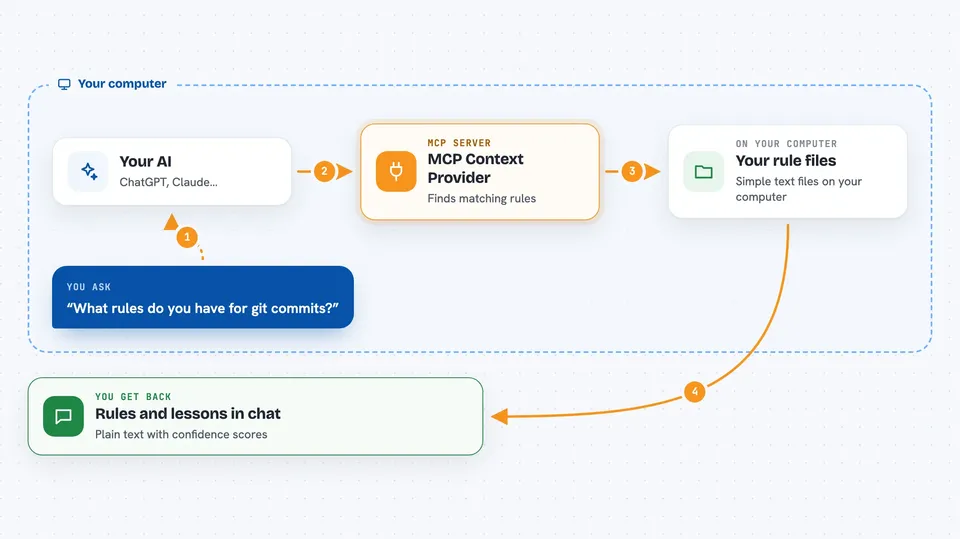
You write down your rules once, in simple files on your computer. When you start a chat, the AI asks this helper for the rules that fit what you are doing. The helper looks through your rule files, picks the ones that match, and sends them back. The AI then follows those rules as if you had just typed them. Over time you can also save short lessons learned from past sessions, and the helper keeps track of how reliable each lesson seems.
 Click to zoom
What you can do with it
- Keep a permanent set of rules for a tool, like git or a coding style
- Get the right rules back automatically when you start a new chat
- Save short lessons learned from past sessions and reuse them later
- Approve, reject, or adjust how much you trust each saved lesson
- Fix common typos or mistakes in text using your own correction patterns
- See a list of all your rules and lessons with their confidence scores
- Import a set of lessons from another computer without overwriting what you have
Try asking your AI
- “What rules do you have for git commits?”
- “Show me all my saved instincts and how confident you are in each one”
- “Apply my auto corrections to this paragraph”
- “Build the full context and instincts payload for a git workflow”
What it gives back to you
You get back plain text in the chat. Sometimes it is a list of rules or lessons with short descriptions and confidence scores. Sometimes it is the corrected version of a piece of text you gave it. Sometimes it is just a short answer telling you which rules apply right now. Nothing is changed on your computer unless you run a command yourself.
Before you start
What you need
- Node.js 18 or newer installed on your computer
- The Claude desktop app or Claude Code
- A folder on your computer where you keep your rule files
Good to know
Your saved lessons can contain private details like internal names or procedures, so keep them out of shared code folders and check them before sharing.
Install it with your AI
Add MCP Context Provider to your AI, no technical skills needed
You don't install anything by hand. You copy one prompt, paste it into an AI that can work on your computer, and it checks, installs and connects the server for you, asking you when it needs something.
Sign in to get the install prompt
Members get a ready-made prompt that lets the Claude desktop app check MCP Context Provider, install it and connect it for them, step by step. You don't need any technical skills: you copy, paste and answer a few questions. Your connected AI can also find and install any of the 4,609 MCP servers here for you.
Who it's for
People who use Claude often for the same kind of work and are tired of repeating the same instructions every time.





