MCP server · Design tools
Editmamei MCP server
by editmamei
Ask your AI to edit photos in Photoshop with plain words, and Photoshop does the actual edits.
Editmamei is a helper that lets your AI assistant drive Adobe Photoshop on your own computer. You describe the edit in everyday words, and the AI plans the steps while Photoshop carries them out with its normal tools like adjustment layers, masks, and filters. It is handy for photographers, retouchers, and anyone who edits photos and would rather talk than click.
What is an MCP server? The 30-second version
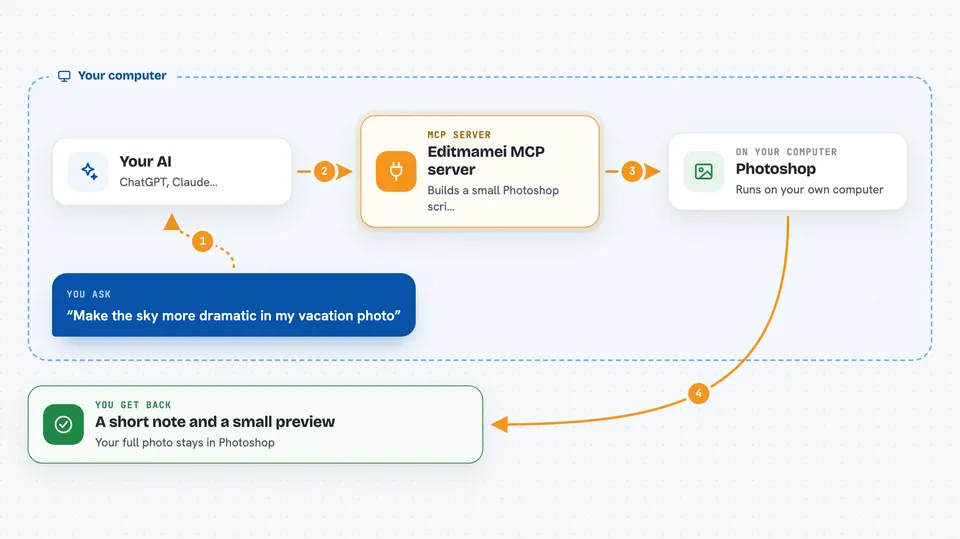
On its own, your AI can only chat. An MCP server is a small helper program that gives your AI a new skill or a connection to an app, and here it connects your AI to Adobe Photoshop on your machine. Once it is set up, you ask for an edit in plain words, the AI turns that into steps, and Editmamei passes those steps to Photoshop so the edit actually happens. Your photos stay on your computer; the AI directs, Photoshop edits.
What this MCP server does
You tell your AI what you want, like making the sky more dramatic or sharpening the eyes. The AI looks at what Editmamei can do, plans a few steps, and asks Editmamei to carry them out. Editmamei builds a small Photoshop script and runs it in your local Photoshop through the system's own automation channel. Photoshop does the pixel work with its normal tools, and Editmamei sends a small preview and measurements back to your AI so it can check the result and try again if needed.
 Click to zoom
What you can do with it
- Open a photo and make adjustments like brightness, contrast, or color
- Select the subject or the sky automatically and work on just that part
- Add adjustment layers and masks so edits stay reversible
- Retouch skin, sharpen eyes, or soften areas you point out
- Export a smaller web-ready JPEG at a size you choose
- Check the result with a preview and simple measurements
- Undo or redo the last step if you change your mind
Try asking your AI
- “Open my vacation photo and make the sky more dramatic but keep the foreground natural”
- “Sharpen the eyes, soften the skin, and leave everything else alone”
- “Isolate the subject onto its own layer with a clean mask”
- “Export a 2048 pixel web JPEG”
What it gives back to you
You get answers in the chat, like a short note that the edit was done, a small preview image, and simple measurements such as a histogram or a before-and-after comparison. If something changed, it also tells you which document and layer are now active. You do not get your full-size edited file in the chat; the edit happens in Photoshop on your computer.
Before you start
What you need
- Adobe Photoshop 2026 (version 27.x) installed on your computer
- Windows 10 or 11, or macOS 13 or newer
- Node.js 22 or newer if you install with npm
- An AI client that supports MCP, like Claude Desktop, Cursor, or Claude Code
Good to know
It can change your open Photoshop document and save or export files, so keep a backup of important photos and check the preview before you accept big edits.
Install it with your AI
Add Editmamei MCP server to your AI, no technical skills needed
You don't install anything by hand. You copy one prompt, paste it into an AI that can work on your computer, and it checks, installs and connects the server for you, asking you when it needs something.
Sign in to get the install prompt
Members get a ready-made prompt that lets the Claude desktop app check Editmamei MCP server, install it and connect it for them, step by step. You don't need any technical skills: you copy, paste and answer a few questions. Your connected AI can also find and install any of the 4,361 MCP servers here for you.
Who it's for
Photographers, retouchers, and photo editors who want to edit by conversation, plus developers who want to connect Photoshop to an AI workflow.