
MCP server · Analytics
PostgreSQL MCP server (hardened)
by Eszetael
Let your AI ask read-only questions of a PostgreSQL database, safely and with limits.
This is a helper that lets your AI assistant look inside a PostgreSQL database and answer questions about the data, without being able to change anything. It is made for people who want the AI to read and report, not to write. If you have ever wanted to ask "how many orders came in last month?" without opening a database tool, this is for you.
What is an MCP server? The 30-second version
On its own, your AI can only chat with you. An MCP server is a small helper program that gives your AI a new skill or a connection to an app or service. This one connects your AI to a PostgreSQL database, so it can look things up there when you ask. The AI sends the question through this helper, and the helper only allows reading, never writing.
What this MCP server does
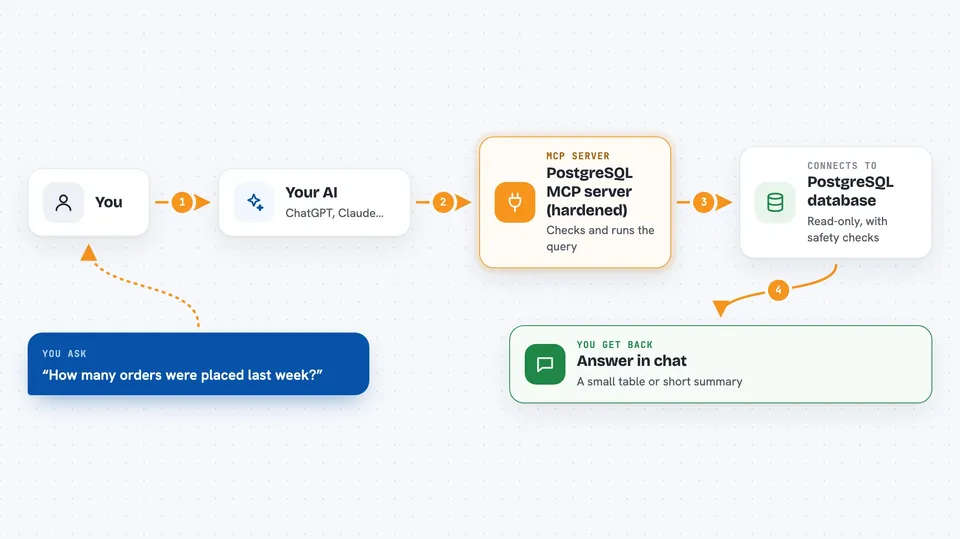
You ask your AI a question about your data, like how many customers signed up last week. The AI turns that into a database query and sends it to this helper. The helper checks the query first to make sure it only reads, then runs it against your PostgreSQL database inside a read-only transaction with a time limit. If the query looks too expensive, it is refused before it runs. You get the answer back in the chat, as a table or a short summary.
 Click to zoom
What you can do with it
- Ask questions about your data in plain English and get answers
- Look at table structures, columns, and relationships
- Run read-only queries with automatic timeouts and cost limits
- Hide sensitive columns from the AI so it never sees them
- Get an audit log of every query that was run
- Check that a query is safe before it ever reaches the database
Try asking your AI
- “How many orders were placed in the last 30 days?”
- “Show me the top 10 customers by total spend this year”
- “What columns does the employees table have?”
- “Which products have not been ordered at all?”
What it gives back to you
You get answers in the chat, usually as a small table or a short written summary. The server also returns schema information when you ask about table structures. Every query is logged, so you can see what was asked and when. If a query is refused, you get a clear reason instead of a database error.
Before you start
What you need
- A PostgreSQL database you can connect to
- A connection string (a line of text with the address, username, and password)
- A read-only database user, which the server strongly recommends
- An MCP client like Claude Desktop or another app that supports MCP servers
Good to know
Even though it is read-only, it can still see sensitive data in your database, so use a limited database user and hide private columns where you can.
Install it with your AI
Add PostgreSQL MCP server (hardened) to your AI, no technical skills needed
You don't install anything by hand. You copy one prompt, paste it into an AI that can work on your computer, and it checks, installs and connects the server for you, asking you when it needs something.
Sign in to get the install prompt
Members get a ready-made prompt that lets the Claude desktop app check PostgreSQL MCP server (hardened), install it and connect it for them, step by step. You don't need any technical skills: you copy, paste and answer a few questions. Your connected AI can also find and install any of the 4,609 MCP servers here for you.
Who it's for
Anyone who works with a PostgreSQL database and wants to ask questions about the data without writing SQL or risking changes, especially analysts, support teams, and operations staff.


