MCP server · Productivity
Miro MCP server
by evalstate
Let your AI read your Miro boards and add stickies or shapes for you.
This is a small helper that connects your AI assistant to Miro, the online whiteboard app. Once it is set up, you can ask your AI to look at a board or add notes to it, and it does the clicking for you. It is handy if you plan workshops, run brainstorming sessions, or keep project boards in Miro and want less manual dragging.
What is an MCP server? The 30-second version
On its own, your AI can only chat with you. An MCP server is a small helper program that gives your AI one new skill, in this case a connection to Miro. You install it once, give it your Miro access key, and from then on your AI can look things up on your boards or add items when you ask. Think of it as giving your assistant a key to your whiteboard room.
What this MCP server does
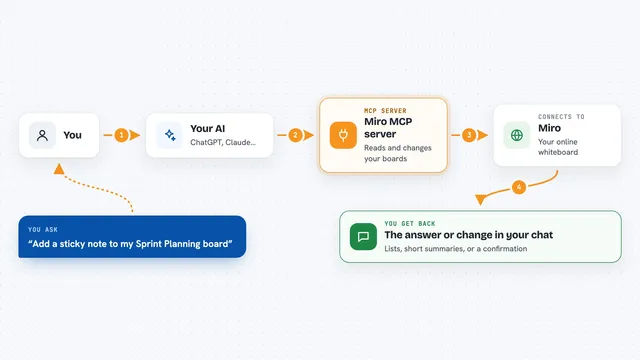
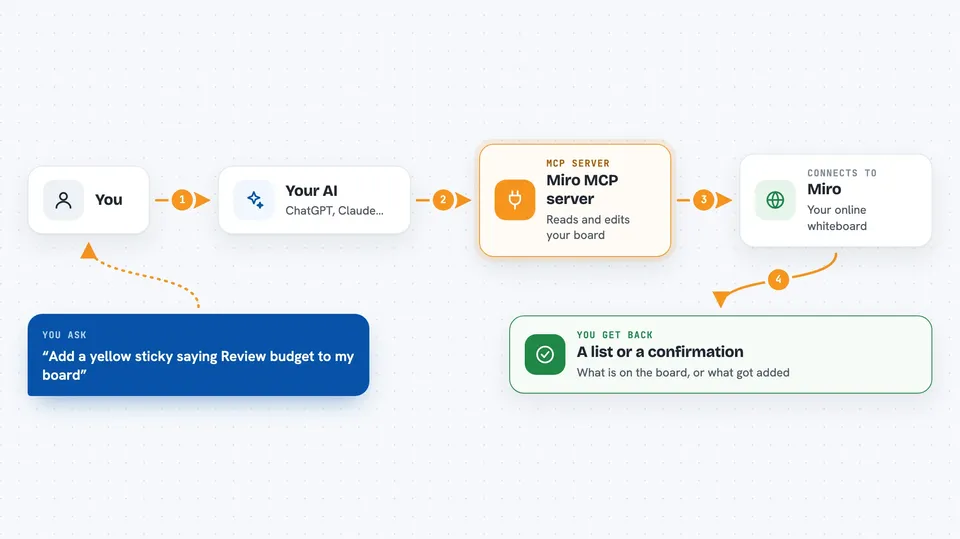
You ask your AI something about a Miro board, like reading what is on it or adding notes. The AI passes your request to this helper program. The helper talks to Miro using your access key, then brings the answer or the change back. You see the result in the chat, for example a list of what is on the board or a note that a new sticky was created. It can work with single items or many at once.
 Click to zoom
What you can do with it
- Read the contents of a Miro board
- Read a specific frame or area on a board
- Create a sticky note on a board
- Create a shape on a board
- Bulk create many items at once
- Turn a photo of sticky notes into Miro items
Try asking your AI
- “Read my Miro board called Sprint Planning and list everything on it”
- “Add a yellow sticky note saying Review budget to the top left of my board”
- “Create ten stickies from this list of ideas on my workshop board”
- “Look at this photo of our sticky notes and recreate them on my Miro board”
What it gives back to you
You get answers in the chat, like a list of what is on a board or a frame. When you ask it to add things, it tells you what it created and where. If something fails, it usually says why, for example a wrong board name or a missing key. You do not get files, just text and confirmations.
Before you start
What you need
- A Miro account with at least one board
- A Miro OAuth access key (a kind of password that lets apps act on your behalf; you create it in your Miro account settings)
- The Claude desktop app or another AI app that supports MCP servers
- Node.js installed on your computer if you run it locally
Good to know
This helper can add items to your Miro boards, so check what your AI is about to create before you say yes, and keep your Miro access key private.
Install it with your AI
Add Miro MCP server to your AI, no technical skills needed
You don't install anything by hand. You copy one prompt, paste it into an AI that can work on your computer, and it checks, installs and connects the server for you, asking you when it needs something.
Sign in to get the install prompt
Members get a ready-made prompt that lets the Claude desktop app check Miro MCP server, install it and connect it for them, step by step. You don't need any technical skills: you copy, paste and answer a few questions. Your connected AI can also find and install any of the 4,361 MCP servers here for you.
Who it's for
People who plan workshops, run brainstorming sessions, or manage project boards in Miro and want their AI to help read and fill those boards.