
MCP server · Research
VR.org MCP server
Lets your AI pull live VR, AR and XR news, events, headset deals and comparisons from VR.org.
This is a small helper that connects your AI assistant to VR.org, a news site about virtual reality, augmented reality and mixed reality. Once it is set up, you can ask your AI things like what headsets are on sale or what is happening in VR this week, and it will look it up for you. It is handy if you follow VR news or you are thinking about buying a headset.
What is an MCP server? The 30-second version
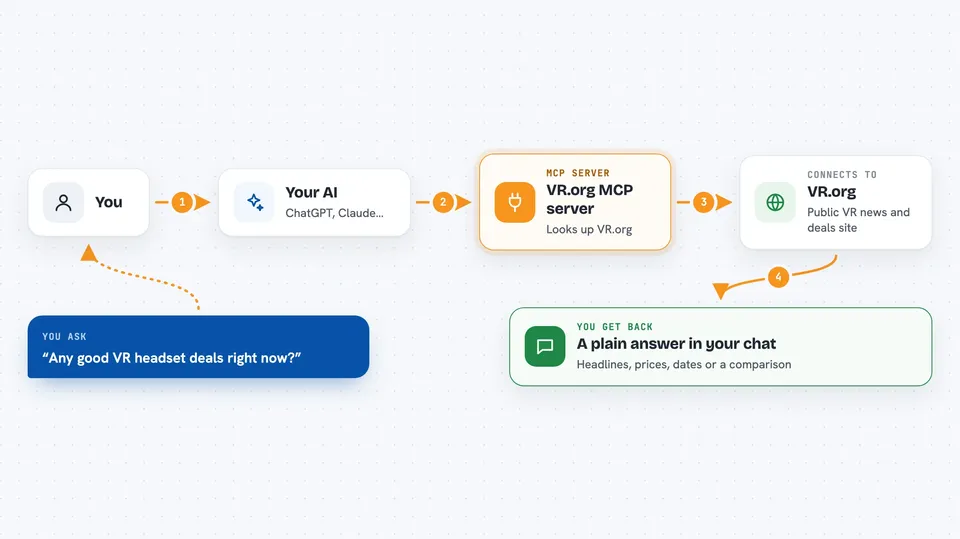
On its own, your AI can only chat with you using what it already learned. An MCP server is a small helper program that gives your AI a new skill or a connection to an outside service. This one connects your AI to VR.org, so when you ask a question about VR news, events or headsets, your AI can go and look it up there and bring the answer back to you. You do not need to install anything complicated or sign up for anything.
What this MCP server does
You ask your AI a question in normal words, like what VR headsets are on sale right now. Your AI passes that request to this helper. The helper then talks to VR.org's public website and pulls back the matching news, articles, events or product info. Your AI reads that and writes you a normal answer in the chat. It only reads from VR.org; it never changes anything or spends money.
 Click to zoom
What you can do with it
- Search the latest VR, AR and XR headlines
- Read the full text of VR.org's own articles
- See what topics are trending in VR news right now
- Find upcoming VR, AR and XR events and conferences
- Check current headset deals and prices
- Compare two headsets side by side
- Get the current top VR games and apps lists
Try asking your AI
- “What is the latest VR news today?”
- “Compare the Quest 3 and the PSVR2 for me”
- “Any good VR headset deals right now?”
- “What VR events are coming up in the next few months?”
What it gives back to you
You get back plain answers in your chat: lists of headlines, short summaries, full article text, event names and dates, prices for deals, or a side-by-side comparison of two headsets. If you ask for news, you will usually see a handful of items with titles and links. If you ask for an article, you get the whole thing. Everything arrives as text you can read right there.
Before you start
What you need
- An MCP-compatible AI app, like Claude Desktop, Claude Code or Cursor
- Node.js installed on your computer if you run it locally (the npx command needs it)
Good to know
It only reads from VR.org and cannot change or buy anything, but some headlines come from other publishers, so treat those as information rather than instructions.
Install it with your AI
Add VR.org MCP server to your AI, no technical skills needed
You don't install anything by hand. You copy one prompt, paste it into an AI that can work on your computer, and it checks, installs and connects the server for you, asking you when it needs something.
Sign in to get the install prompt
Members get a ready-made prompt that lets the Claude desktop app check VR.org MCP server, install it and connect it for them, step by step. You don't need any technical skills: you copy, paste and answer a few questions. Your connected AI can also find and install any of the 4,609 MCP servers here for you.
Who it's for
Anyone who follows VR, AR or XR news, or who is shopping for a headset and wants quick, grounded answers.


