
MCP server · Developer tools
Coolify MCP server
by frndchagas
Lets your AI manage your self-hosted Coolify apps: deploy, check status, and fix problems.
This is a helper that connects your AI assistant to Coolify, the tool many people use to run their own apps on their own server. Once it is set up, you can ask your AI in plain words to deploy an app, check what is running, or figure out why something broke. It is handy for anyone who runs a Coolify server and would rather ask questions than click around a dashboard.
What is an MCP server? The 30-second version
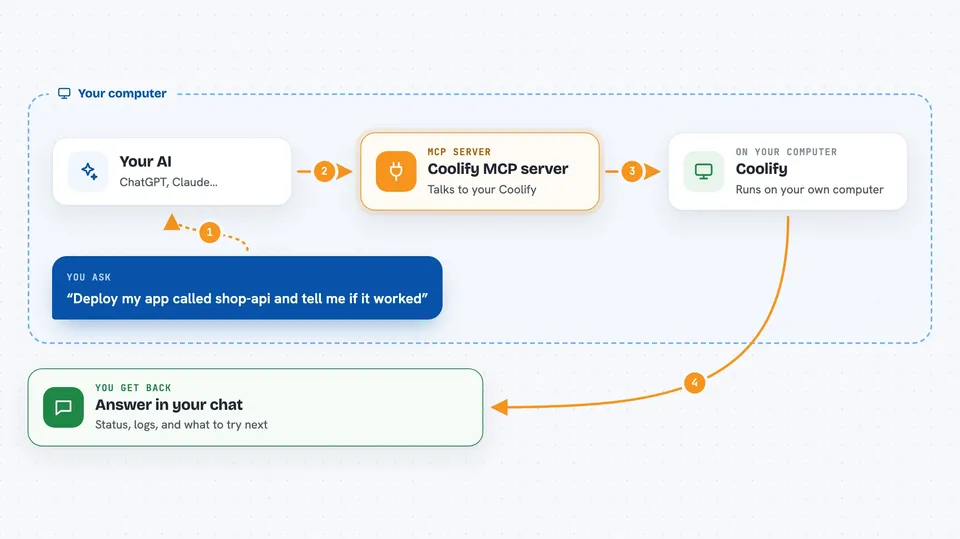
On its own, your AI can only chat. It cannot see your Coolify server or do anything there. An MCP server is a small helper program that gives your AI a new skill, and in this case the skill is talking to Coolify for you. You ask your AI something, your AI passes the request to this helper, and the helper talks to your Coolify setup and brings the answer back.
What this MCP server does
You ask your AI a question or give it a task, like deploy my app or why did the last deploy fail. Your AI sends that to this helper, which talks to your Coolify server using the Coolify API. The helper looks up the right app, project, or database and either fetches information or makes the change. Then it hands the result back to your AI, which explains it to you in the chat. For bigger actions like deploying, it can wait until the deploy finishes and show you the last lines of the log if something went wrong.
 Click to zoom
What you can do with it
- Deploy an application and wait until it finishes
- Check why an app is down or a deploy failed
- List your projects, servers, apps, and databases
- Create a new project, environment, or application from scratch
- Start, stop, or restart an app, database, or service
- Manage environment variables, with secrets hidden by default
- Set up database backups and scheduled tasks
- Search the official Coolify documentation offline
Try asking your AI
- “Deploy my app called shop-api and tell me if it worked”
- “Why is my blog app down right now?”
- “Show me all running deployments on my server”
- “Create a new Postgres database for the staging project”
What it gives back to you
You get answers in the chat: lists of apps, servers, or databases, status summaries, and short explanations. When you deploy or restart something, it tells you the result and can show the last lines of the log if it failed. For diagnostics, it pulls together the app status, recent deploys, and log snippets into one short summary with hints on what to try next. Secrets like passwords and tokens are hidden by default.
Before you start
What you need
- A Coolify server (version 4.3.10 is what this targets)
- A Coolify API token from Settings > API in your Coolify dashboard
- Node.js 18 or newer if you install it yourself
- The Claude desktop app if you want the one-click install
Good to know
It can create, change, and delete real things on your server, including databases and their backups, so keep write protection on if you only want to look around.
Install it with your AI
Add Coolify MCP server to your AI, no technical skills needed
You don't install anything by hand. You copy one prompt, paste it into an AI that can work on your computer, and it checks, installs and connects the server for you, asking you when it needs something.
Sign in to get the install prompt
Members get a ready-made prompt that lets the Claude desktop app check Coolify MCP server, install it and connect it for them, step by step. You don't need any technical skills: you copy, paste and answer a few questions. Your connected AI can also find and install any of the 4,609 MCP servers here for you.
Who it's for
People who run their own Coolify server and want to ask their AI to deploy, check, or fix things instead of clicking through the dashboard.



