
MCP server · Coding
Commands MCP server
by g0t4
Lets your AI run commands and scripts on your own computer and read the output back to you.
This is a small helper that lets your AI actually run commands on your computer, instead of just talking about them. You ask for something like listing files or checking your hostname, and the AI runs it for you. It is handy if you are comfortable with a terminal and want your AI to do the typing.
What is an MCP server? The 30-second version
On its own, your AI can only chat. It cannot touch your computer. An MCP server is a small helper program that gives your AI one new skill. This helper gives your AI the ability to run commands on your machine, so when you ask it to check something or run a script, it can actually do it.
What this MCP server does
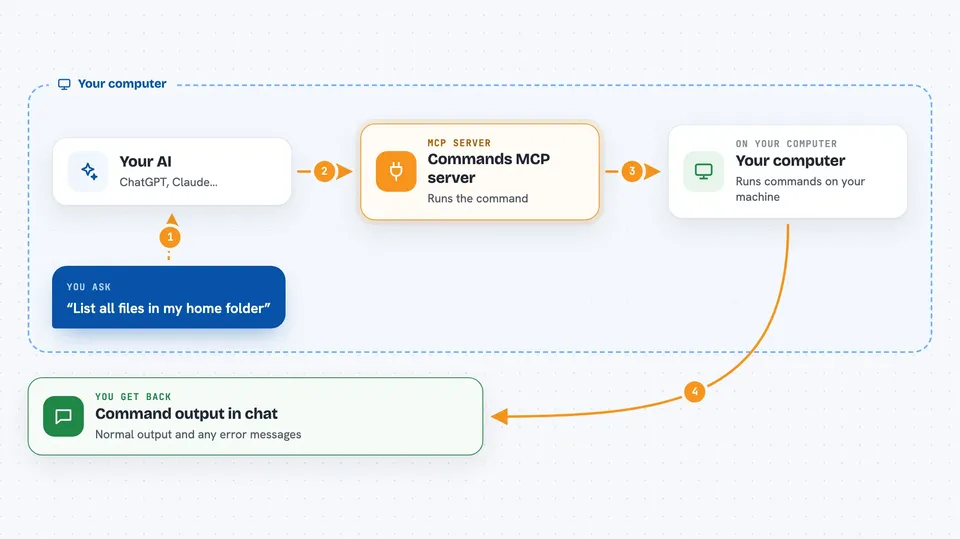
You ask your AI to run a command, like listing files in a folder. The AI sends that command to this helper. The helper runs it on your computer, the same way you would type it into a terminal. It then hands the text output back to the AI. The AI shows you the result right in the chat.
 Click to zoom
What you can do with it
- Run a single command and see its output
- List files in a folder
- Check simple system details like your hostname
- Run a short script by sending it in
- Create a file by writing text into it
- Run commands that use pipes and redirects, just like in a terminal
Try asking your AI
- “Run hostname for me”
- “List all files in my home folder with details”
- “Run this Python snippet and show me the output”
- “Create a file called notes.txt with the text hello world”
What it gives back to you
You get back the text the command printed, both the normal output and any error messages. It shows up as plain text in the chat, so you can read it or ask the AI to explain it. If the command created or changed a file, the AI will tell you that too. There is no separate file to download; it is all in the conversation.
Before you start
What you need
- The Claude desktop app or another app that supports MCP servers
- Node.js installed on your computer (the free program that runs this helper)
Good to know
This helper can run anything on your computer with your own permissions, so always review each command before you approve it and never run it with sudo.
Install it with your AI
Add Commands MCP server to your AI, no technical skills needed
You don't install anything by hand. You copy one prompt, paste it into an AI that can work on your computer, and it checks, installs and connects the server for you, asking you when it needs something.
Sign in to get the install prompt
Members get a ready-made prompt that lets the Claude desktop app check Commands MCP server, install it and connect it for them, step by step. You don't need any technical skills: you copy, paste and answer a few questions. Your connected AI can also find and install any of the 4,609 MCP servers here for you.
Who it's for
People who already use a terminal and want their AI to run commands and scripts for them without switching windows.



