
MCP server · Developer tools
Ratatosk MCP server
by garlicKim21
Your AI can check CNCF release notes for security fixes, breaking changes, and deprecations that affect the versions you run.
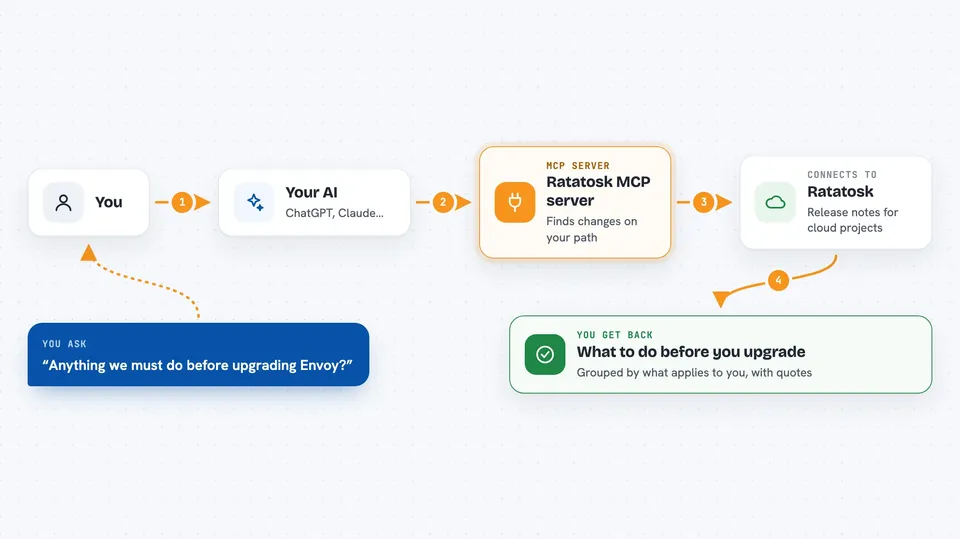
Ratatosk is a helper that reads release notes from 76 CNCF projects, like Envoy and Istio, and turns them into short, clear notes about what changed. It is handy if you run cloud software and want to know what you need to do before upgrading. You ask your AI a question in plain words, and it answers using these notes.
What is an MCP server? The 30-second version
On its own, your AI can only chat with you. An MCP server is a small helper program that gives your AI a new skill or a connection to a service. This one connects your AI to Ratatosk, a service that watches CNCF release notes and sorts out the important changes. Once it is connected, your AI can look up those changes for you when you ask.
What this MCP server does
You ask your AI something like whether your setup needs anything before an upgrade. Your AI sends that question to this helper, which talks to the Ratatosk service. Ratatosk returns the security fixes, breaking changes, and deprecations on your upgrade path, each with a quote from the original release note as proof. Your AI then explains the answer in the chat, split into what applies to everyone and what only applies if your setup matches.
 Click to zoom
What you can do with it
- Check what you must do before upgrading a component you run
- Look up every change tied to one exact identifier, like a CVE or a flag
- See the newest releases of a project as short one-line summaries
- Follow one issue across all the releases where it appeared
- List the projects Ratatosk tracks and their short names
- Keep a local copy of the change feed in sync
Try asking your AI
- “We run envoy v1.36.8 and istio 1.30.1. Anything we must do before upgrading?”
- “What changed in Kubernetes lately?”
- “Show me every change touching CVE-2026-31837.”
- “Which releases of Istio fixed the JWKS resolver issue?”
What it gives back to you
You get back a clear answer in the chat, not a wall of raw data. It lists the changes on your upgrade path, grouped into what applies to everyone and what only applies if your configuration matches. Each change comes with a quote from the original release note, so you can check it yourself. Some tools return lists, like the newest releases of a project or every release where one issue appeared.
Before you start
What you need
- An MCP-capable client, like Claude Code or Claude Desktop
- For the hosted option: nothing else, no account and no API key
- For the self-hosted option: Docker installed, or a source build
Good to know
The analyses are AI-generated reference information with no warranty, so check the original release notes before acting, especially if your AI is doing something on your behalf.
Install it with your AI
Add Ratatosk MCP server to your AI, no technical skills needed
You don't install anything by hand. You copy one prompt, paste it into an AI that can work on your computer, and it checks, installs and connects the server for you, asking you when it needs something.
Sign in to get the install prompt
Members get a ready-made prompt that lets the Claude desktop app check Ratatosk MCP server, install it and connect it for them, step by step. You don't need any technical skills: you copy, paste and answer a few questions. Your connected AI can also find and install any of the 4,361 MCP servers here for you.
Who it's for
People who run or upgrade cloud software and want a quick, plain answer about what changed and what they must do.




