
MCP server · Email
PostStack MCP server
by getpoststack
Let your AI send emails, manage contacts, and check deliverability through your PostStack account.
This is a helper that connects your AI assistant to PostStack, an email service hosted in the EU. Once it is set up, you can ask your AI to send emails, look up contacts, and check things like spam scores, all in plain conversation. It is handy if you run email campaigns or send transactional emails and want less clicking around.
What is an MCP server? The 30-second version
On its own, your AI can only chat with you. An MCP server is a small helper program that gives your AI a new skill or a connection to another service. This one connects your AI to PostStack, your email platform. So when you ask your AI to send a welcome email or check who opened your last newsletter, it can actually do that for you through PostStack.
What this MCP server does
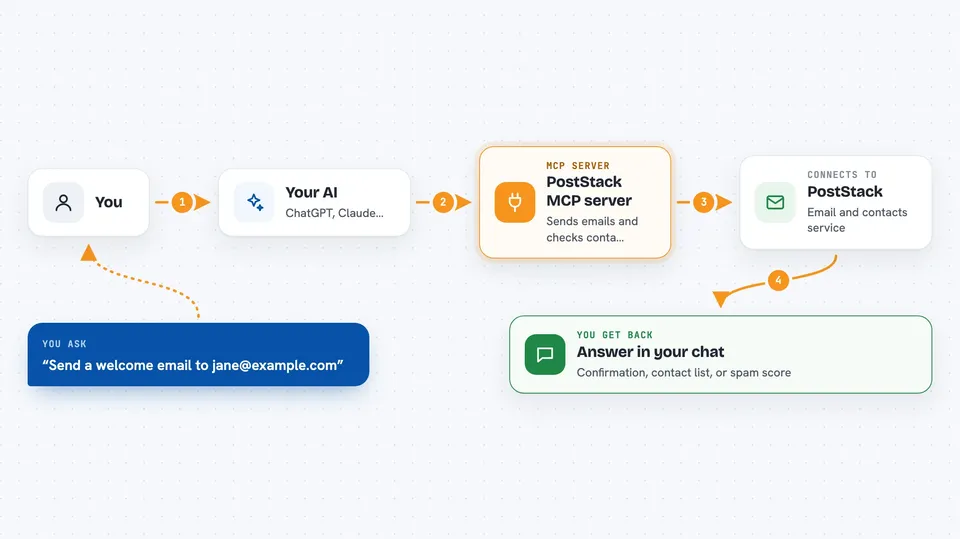
You ask your AI something in plain words, like send a welcome email to a new contact. Your AI uses this helper to talk to PostStack behind the scenes. PostStack then does the work, whether that is sending an email, looking up a contact, or checking a draft for spam issues. The helper brings the result back to your AI, and your AI tells you what happened in the chat. You never have to open the PostStack dashboard yourself unless you want to.
 Click to zoom
What you can do with it
- Send a single email or schedule one for later
- Look up a contact and see their recent activity
- Check a draft email for spam issues before sending
- Create and manage segments of contacts
- See how a broadcast performed and who did not click
- Draft a reply to an inbound email
- Validate an email address before adding it as a contact
Try asking your AI
- “Send a welcome email to jane@example.com using our welcome template”
- “Who opened last week's newsletter and who did not click anything?”
- “Check this draft for spam problems before I send it”
- “Add this new contact to the Product Updates segment”
What it gives back to you
You get answers in the chat, like a list of contacts, a summary of how a broadcast did, or a spam score with warnings. If your AI sends an email, it tells you it went out and gives you the details. For drafts, it can show you the rendered email and any issues it found. Everything comes back as text you can read and act on.
Before you start
What you need
- A PostStack account
- A PostStack API key (a kind of password for apps; you get one from your PostStack settings)
- Node.js 18 or newer if you install it on your computer
- The Claude desktop app or another MCP-compatible tool
Good to know
Some actions cannot be undone, like deleting a contact, a template, or a domain, so double-check before you ask your AI to do them.
Install it with your AI
Add PostStack MCP server to your AI, no technical skills needed
You don't install anything by hand. You copy one prompt, paste it into an AI that can work on your computer, and it checks, installs and connects the server for you, asking you when it needs something.
Sign in to get the install prompt
Members get a ready-made prompt that lets the Claude desktop app check PostStack MCP server, install it and connect it for them, step by step. You don't need any technical skills: you copy, paste and answer a few questions. Your connected AI can also find and install any of the 4,361 MCP servers here for you.
Who it's for
People who run email marketing or send transactional emails and want to manage it by chatting with their AI instead of clicking through a dashboard.





