MCP server · Developer tools
Sentry MCP server
by getsentry
Lets your AI look up Sentry errors, issues and performance data and help you debug them.
This is a helper that connects your AI assistant to Sentry, the tool many teams use to catch and track errors in their apps. Once it is connected, you can ask your AI about crashes, error reports and slow spots in plain English instead of clicking around the Sentry website. It is handy for developers, support people and anyone who gets bug reports and wants quick answers.
What is an MCP server? The 30-second version
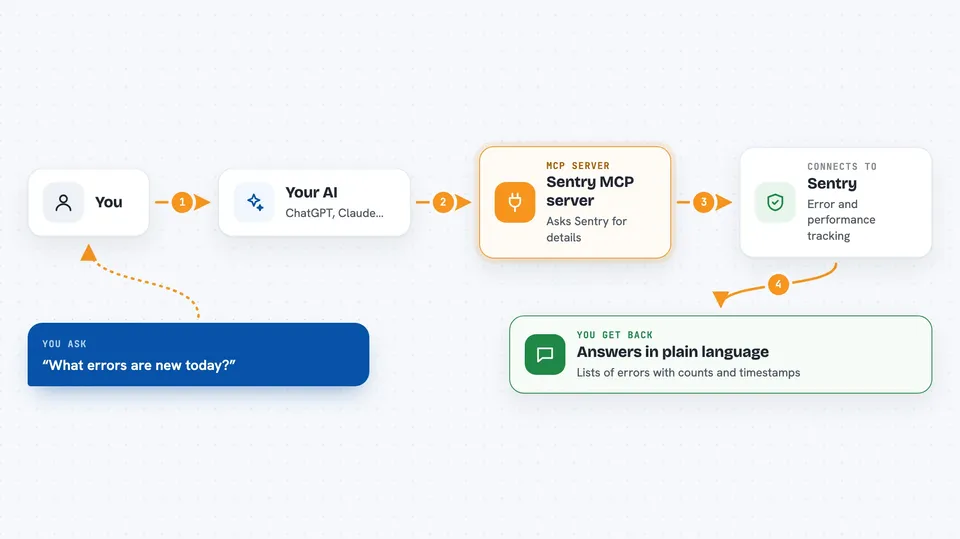
On its own, your AI can only chat with you using what it already knows. An MCP server is a small helper program that gives your AI a new skill or a connection to an app, and here that app is Sentry. When you ask a question, your AI passes it to this helper, the helper talks to Sentry on your behalf, and the answer comes back into your chat. You do not need to understand how it works under the hood, you just need to connect it once.
What this MCP server does
You ask your AI something like which errors are new today. The AI sends that request to this Sentry helper. The helper asks Sentry for the matching issues, events or performance data. Sentry sends the details back, and the helper hands them to your AI. Your AI then writes you a short answer, a list or a summary right in the chat.
 Click to zoom
What you can do with it
- Look up recent errors and issues in your Sentry projects
- Summarise what an error is and how often it happens
- Check performance data such as slow requests or traces
- Search issues and events using plain-language questions
- See which project or team an issue belongs to
- Help you triage and organise issues while you debug
Try asking your AI
- “What are the newest unresolved errors in my main project?”
- “Summarise this issue and tell me how often it happens.”
- “Which requests have been slowest in the last 24 hours?”
- “Search for issues related to checkout failures this week.”
What it gives back to you
You get answers written in normal language, plus lists of issues, events or traces with their key details like counts, timestamps and project names. It can also give short summaries of a single issue or a group of them. Everything shows up in your chat, so you can keep asking follow-up questions. If you ask it to change something in Sentry, it will report back what it did.
Before you start
What you need
- A Sentry account with access to at least one project
- A Sentry user auth token (a kind of password for apps, created in your Sentry settings)
- An AI assistant that supports MCP servers, such as Claude Code or Cursor
Good to know
It can read your Sentry data and, with the right permissions, change issues and projects, so connect it only to accounts and tokens you are comfortable giving your AI access to.
Install it with your AI
Add Sentry MCP server to your AI, no technical skills needed
You don't install anything by hand. You copy one prompt, paste it into an AI that can work on your computer, and it checks, installs and connects the server for you, asking you when it needs something.
Sign in to get the install prompt
Members get a ready-made prompt that lets the Claude desktop app check Sentry MCP server, install it and connect it for them, step by step. You don't need any technical skills: you copy, paste and answer a few questions. Your connected AI can also find and install any of the 4,361 MCP servers here for you.
Who it's for
Developers, support engineers and anyone who deals with app errors and wants to ask questions about Sentry without leaving their editor or chat.