
MCP server · Analytics
SQL to CSV/Parquet MCP server
by gigamori
Ask your AI to run a SQL query and save the results as a CSV or Parquet file on your computer.
This is a small helper that lets your AI run SQL queries against a database and save the answer as a file, either a CSV (the kind you open in Excel) or a Parquet file (a compact format used for data work). It is handy if you often need to pull data out of a database but do not want to write the code yourself. You just tell your AI what you want, and it does the running and saving for you.
What is an MCP server? The 30-second version
On its own, your AI can only chat. An MCP server is a small helper program that gives your AI a new skill or a connection to another app. This one connects your AI to a database, so it can run SQL queries and save the results to files for you. You ask in plain words, and the helper does the technical work behind the scenes.
What this MCP server does
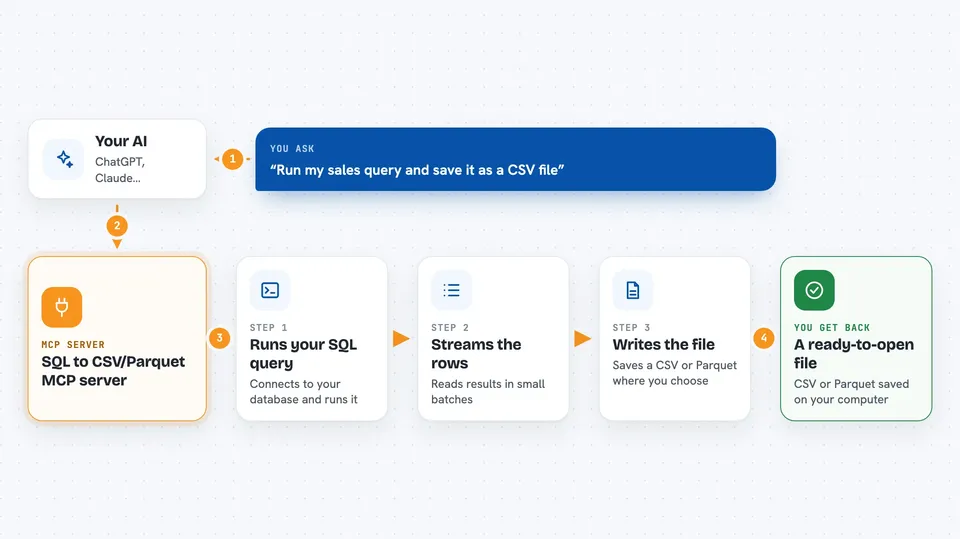
You ask your AI something like run this query and save the result as a CSV. The AI uses this helper to connect to your database and run the SQL. The helper streams the rows back in chunks and writes them into a CSV or Parquet file at the path you choose. When it is done, it tells you OK, or it tells you what went wrong and cleans up the half-written file. You end up with a file you can open or share.
 Click to zoom
What you can do with it
- Run a SQL query stored in a file and save the result as a CSV
- Export a large query result to a Parquet file for data tools
- Choose the batch size so big results are handled in chunks
- Count tokens in a CSV output if you want a rough size warning
- Work across many databases like PostgreSQL, MySQL, SQLite, SQL Server, Redshift and BigQuery
- Get a clear error message and no leftover half-written file if something fails
Try asking your AI
- “Run the query in sql/queries/sales.sql and save the result to output/sales.csv as CSV”
- “Export last month's orders to output/orders.parquet using a batch size of 200000”
- “Run the SQL in reports/top_customers.sql and write it to output/top_customers.csv”
- “Run this query and tell me if the CSV ends up with too many tokens”
What it gives back to you
You get a short text message back in the chat. On success it usually just says OK. If you turned on token counting for CSV, it also tells you how many tokens the file has. On failure it says Error followed by the reason, and any partial file is deleted.
Before you start
What you need
- A database you can connect to, with its connection details ready
- The connection token (a short string that tells the helper how to reach your database)
- A computer or environment where you can run the helper (the README uses uvx)
- An MCP-aware app like Cursor or Claude Desktop to add the helper to
Good to know
It runs whatever SQL is in the file you point it at, so be careful with queries that change or delete data, and check the output path before you run it.
Install it with your AI
Add SQL to CSV/Parquet MCP server to your AI, no technical skills needed
You don't install anything by hand. You copy one prompt, paste it into an AI that can work on your computer, and it checks, installs and connects the server for you, asking you when it needs something.
Sign in to get the install prompt
Members get a ready-made prompt that lets the Claude desktop app check SQL to CSV/Parquet MCP server, install it and connect it for them, step by step. You don't need any technical skills: you copy, paste and answer a few questions. Your connected AI can also find and install any of the 4,609 MCP servers here for you.
Who it's for
People who work with databases and want to pull query results into files without writing code, like analysts, ops folks, and anyone doing quick data exports.


