
MCP server · Notes
AgentRecall MCP server
by Goldentrii
Lets your AI remember past sessions and your corrections, so it stops repeating the same mistakes.
AgentRecall is a memory helper for your AI assistant. It saves what happened in each session and every time you correct the AI, then brings the useful bits back the next time you work together. It is handy if you use an AI coding assistant often and are tired of explaining the same things again.
What is an MCP server? The 30-second version
On its own, your AI can only chat with you in the moment. An MCP server is a small helper program that gives your AI a new skill or a connection to something outside the chat. This one connects your AI to AgentRecall, a memory store that lives on your computer. Once connected, your AI can look up what you decided before, or write down a correction you just made, without you copying anything by hand.
What this MCP server does
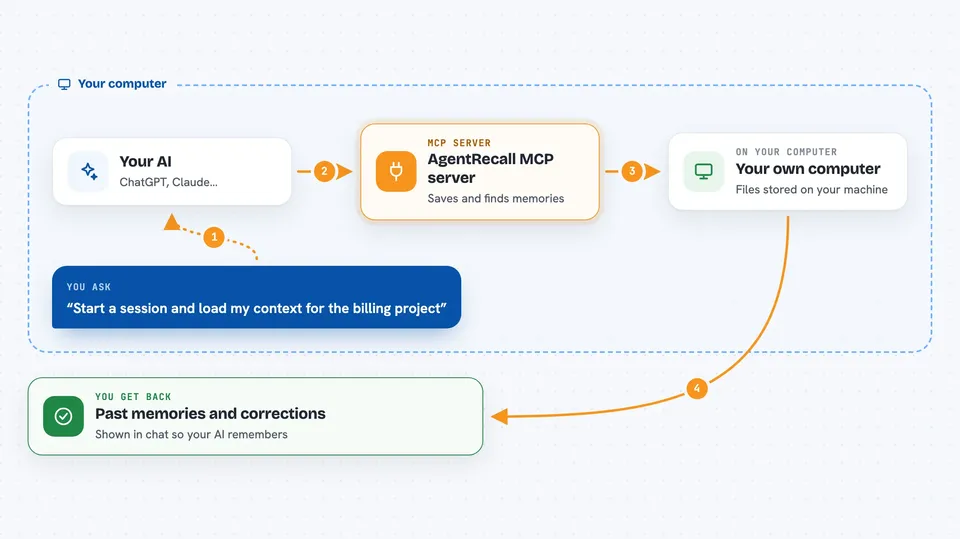
You start a session and your AI calls AgentRecall to load context from past work. As you work, when you correct the AI, it saves that correction as a record with a note about how serious it was. When you ask about something you discussed before, the AI searches your saved memories and brings back the relevant ones. At the end of the session, the AI saves a summary so the next session starts smarter. Everything is stored in files on your machine, grouped into layers like sessions, facts, how-tos, and corrections.
 Click to zoom
What you can do with it
- Load your past project context at the start of a session
- Save a correction you made so the AI follows it later
- Search your saved memories for a past decision or fix
- Write a session journal so nothing gets lost
- Consolidate repeated corrections into general rules
- Run an optional overnight job that tidies and merges memories
- Turn on local semantic search so differently worded questions still find the right memory
Try asking your AI
- “Start a session and load my context for the billing project”
- “Remember this correction: always ask me before changing the database schema”
- “Search my memories for how we handled rate limiting last time”
- “Save this session and compound what we learned”
What it gives back to you
You get back short lists of past memories, decisions, and corrections that match what you are working on. The AI shows them in the chat as context it will use, often with the project name and when it was saved. When it saves something, you get a short confirmation that the memory was written. There is also a status board that lists pending work and blockers across all your projects.
Before you start
What you need
- Node.js installed on your computer (the free program that runs npx commands)
- An AI client that supports MCP, such as Claude Code, Cursor, VS Code, Windsurf, or Codex
- For the optional overnight job: a live Claude Code login
Good to know
It writes files to your computer to store memories, and the optional overnight job needs a live Claude Code login, so keep an eye on what it saves if your work is sensitive.
Install it with your AI
Add AgentRecall MCP server to your AI, no technical skills needed
You don't install anything by hand. You copy one prompt, paste it into an AI that can work on your computer, and it checks, installs and connects the server for you, asking you when it needs something.
Sign in to get the install prompt
Members get a ready-made prompt that lets the Claude desktop app check AgentRecall MCP server, install it and connect it for them, step by step. You don't need any technical skills: you copy, paste and answer a few questions. Your connected AI can also find and install any of the 4,361 MCP servers here for you.
Who it's for
People who use an AI coding assistant every day on real projects and want it to remember their decisions and corrections between sessions.





