MCP server · Analytics
WaveGuard anomaly detector
by gpartin
Ask your AI to spot unusual numbers or text in your data, using a physics-based detector.
WaveGuard is an online service that looks at your data and tells you which entries look odd compared to what is normal. You give it a few examples of normal data, then the new data you want checked, and it flags anything that stands out. It is handy for anyone who has to watch numbers, logs, or transactions and wants a second pair of eyes.
What is an MCP server? The 30-second version
On its own, your AI can only chat with you and work with what you paste in. An MCP server is a small helper program that gives your AI a new skill or a connection to another service. This one connects your AI to WaveGuard, an anomaly detection service that runs in the cloud. Once it is set up, you can ask your AI in plain words to check your data, and it will pass the data to WaveGuard and tell you what came back.
What this MCP server does
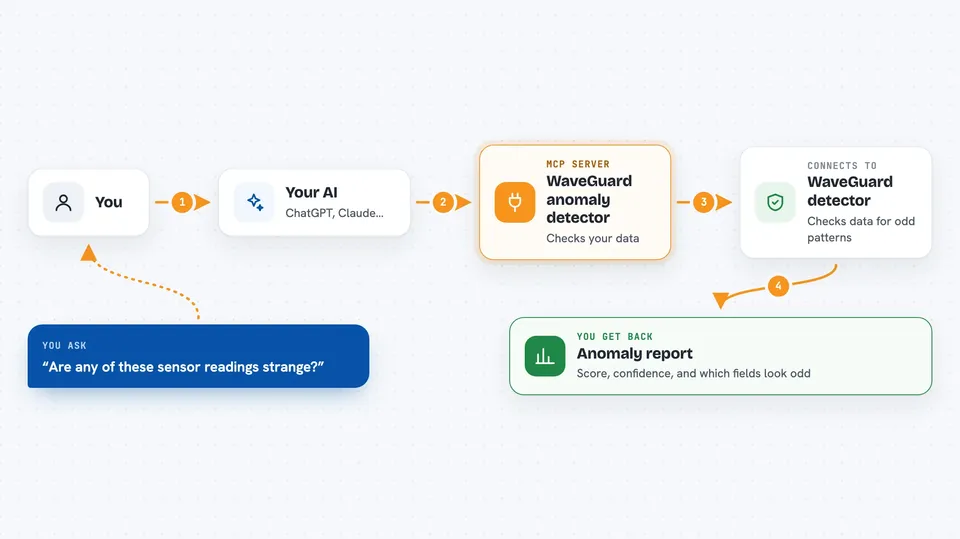
You ask your AI something like whether any of your sensor readings look strange. Your AI sends your normal examples and your new data to WaveGuard through this helper. WaveGuard runs its physics-based check on its own computers and compares the new data to the normal pattern. It sends back a score, a confidence level, and which fields triggered the alert. Your AI then explains the result to you in the chat.
 Click to zoom
What you can do with it
- Check a list of numbers or records for unusual entries
- Compare new data against a few examples of normal data
- Flag odd lines in a batch of log text
- Scan a time series and point out the strange segments
- See which specific fields caused an alert
- Check whether the WaveGuard service is up and running
Try asking your AI
- “Here are three normal server readings and two new ones. Are any of the new ones anomalous?”
- “Check these log lines against the normal ones and tell me if anything looks suspicious.”
- “Scan this list of transactions and flag the ones that look like fraud.”
- “Is the WaveGuard service available right now?”
What it gives back to you
You get back a short answer in the chat, plus the details behind it. For each item you checked, WaveGuard gives a score, a confidence percentage, and a yes or no on whether it is an anomaly. It also tells you which fields or features made it suspicious. Your AI turns that into a plain sentence or a small list you can read.
Before you start
What you need
- A WaveGuard API key from RapidAPI (a kind of password for apps; the site gives you one for free)
- The Claude desktop app or another AI tool that supports MCP servers
- uvx installed on your computer (a small tool that runs Python programs)
Good to know
Your data is sent to an outside service for checking, so do not use it with private or regulated information unless you are allowed to share it.
Install it with your AI
Add WaveGuard anomaly detector to your AI, no technical skills needed
You don't install anything by hand. You copy one prompt, paste it into an AI that can work on your computer, and it checks, installs and connects the server for you, asking you when it needs something.
Sign in to get the install prompt
Members get a ready-made prompt that lets the Claude desktop app check WaveGuard anomaly detector, install it and connect it for them, step by step. You don't need any technical skills: you copy, paste and answer a few questions. Your connected AI can also find and install any of the 4,066 MCP servers here for you.
Who it's for
People who watch data for a living, like IT operations staff, security analysts, fraud reviewers, and anyone who gets a pile of numbers or logs and wants help spotting the odd ones.