
MCP server · Notes
Memxus MCP server
by gpitrella
Your AI can save decisions and project notes once, then recall them in any other AI tool you use.
Memxus is a shared memory for your AI tools. You save a decision, a preference or a project note once, and every AI you connect can find it again later. It is handy if you keep re-explaining the same things to ChatGPT, Claude or Cursor.
What is an MCP server? The 30-second version
On its own, your AI can only chat with you in that one window. An MCP server is a small helper program that gives your AI a new skill or a connection to another service. This one connects your AI to Memxus, a place where your notes and decisions are stored. So when you ask your AI something, it can look things up in Memxus and use what it finds.
What this MCP server does
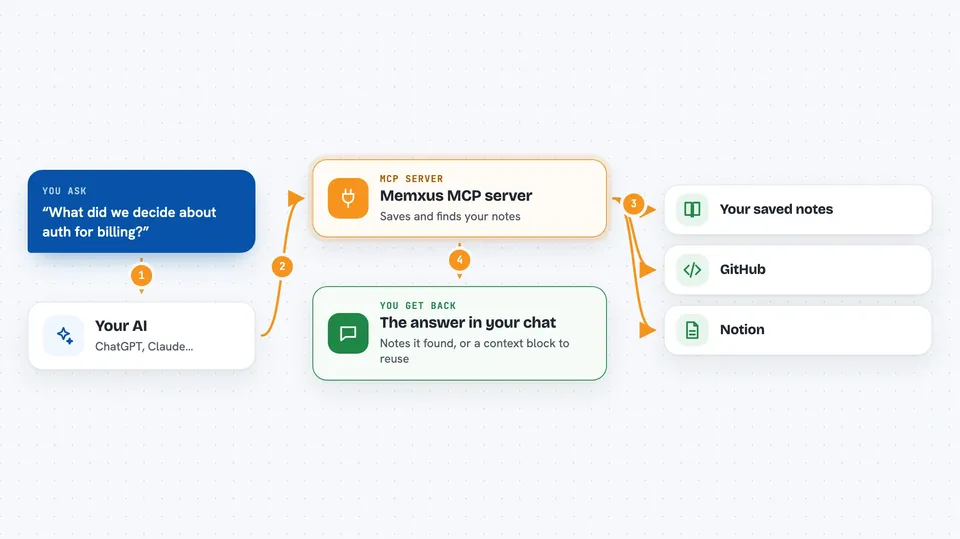
You tell your AI to remember something, like a technical choice or a preference. The AI passes that to Memxus through this helper, and Memxus saves it. Later, in any connected AI, you ask about that topic and the AI searches Memxus for you. Memxus can also pull in content from GitHub and Notion if you connect them, so your real project work becomes searchable too. You get the answer back in the chat, without repeating yourself.
 Click to zoom
What you can do with it
- Save a decision or preference so every AI can reuse it
- Search your saved notes by meaning, not just exact words
- Get a ready-made context block to paste into an AI prompt
- Browse and list what you have saved, by project or tag
- Update or delete a saved memory when things change
- Connect GitHub so repos, commits and issues become searchable
- Connect Notion so selected pages join your project context
Try asking your AI
- “Remember this in Memxus: we use Postgres with pgvector for search.”
- “What did we decide about the authentication approach for the billing project?”
- “Give me a context block about our frontend stack for a new AI session.”
- “List everything saved under the project:checkout collection.”
What it gives back to you
You get answers in plain chat text: a summary of what was saved, a list of matching memories, or a formatted context block you can reuse. When you ask a question, the AI replies with the relevant notes it found, often with short labels like the collection or tags. If you change or delete something, it confirms what it did.
Before you start
What you need
- A Memxus account (you sign in with Google)
- An MCP-compatible AI app such as Claude Desktop, Cursor or VS Code
Good to know
It can delete memories permanently if you ask it to, and it can read the GitHub and Notion content you choose to connect, so check what you sync.
Install it with your AI
Add Memxus MCP server to your AI, no technical skills needed
You don't install anything by hand. You copy one prompt, paste it into an AI that can work on your computer, and it checks, installs and connects the server for you, asking you when it needs something.
Sign in to get the install prompt
Members get a ready-made prompt that lets the Claude desktop app check Memxus MCP server, install it and connect it for them, step by step. You don't need any technical skills: you copy, paste and answer a few questions. Your connected AI can also find and install any of the 4,609 MCP servers here for you.
Who it's for
Developers and small product teams who use several AI tools and are tired of repeating the same project context.





