MCP server · Developer tools
Server Ops MCP server
by GT-dinuo
Let your AI check server health, read logs, edit project files, and manage Nginx and certificates for you.
This is a helper that connects your AI assistant to a server, either the one you are working on or a remote one over SSH. You can then ask in plain words for things like CPU and disk checks, log searches, small code edits, or an Nginx reload. It is handy for developers and anyone who looks after a website or app and does not want to memorise commands.
What is an MCP server? The 30-second version
On its own, your AI can only chat with you. An MCP server is a small helper program that gives your AI a new skill or a connection to something outside the chat. This one connects your AI to a server, so it can look up how the machine is doing, read logs, and make small changes when you ask. You set it up once, and after that you just talk to your AI like you would to a colleague.
What this MCP server does
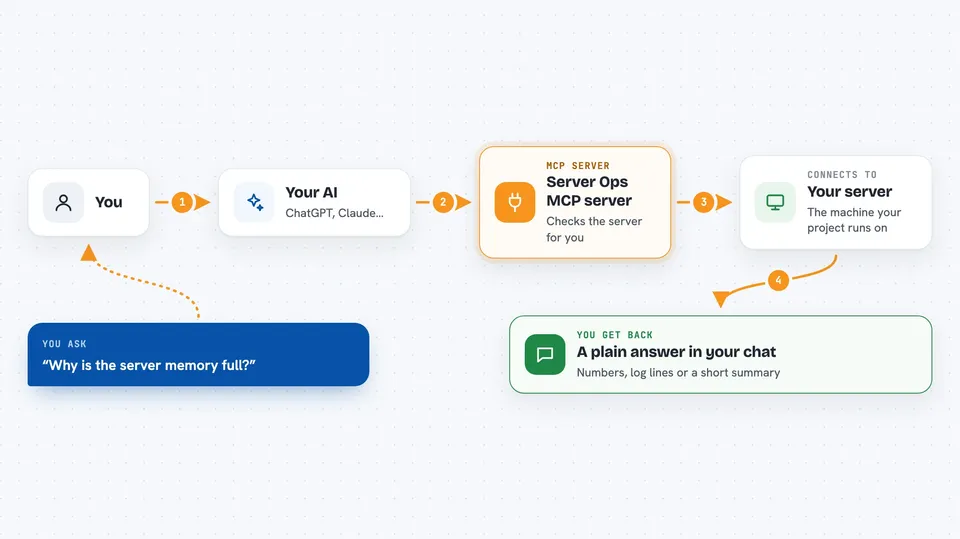
You ask your AI something like "why is the server memory full?" or "search the logs for errors from the last hour". The AI picks the right action from this helper and runs it on the server you pointed it at. The helper talks to the machine, gathers the answer, and hands it back to your AI. Your AI then explains the result to you in normal words. For anything that changes things, like writing a file or reloading Nginx, the helper asks you to confirm first.
 Click to zoom
What you can do with it
- Check CPU, memory, disk, load, and running processes on a server
- Search and read project logs or system logs for errors
- Read, write, patch, delete, and search files inside your project folder
- Test and read your Nginx configuration, and reload it safely
- Install or renew a website certificate
- Run a small set of approved commands on the server
- Audit your config files for leaked passwords or tokens
Try asking your AI
- “Check the server's CPU, memory, and disk usage”
- “Search for error-level logs from the last hour”
- “Read the Nginx config and tell me if anything looks wrong”
- “Find every place in the code that calls sendSms”
What it gives back to you
You get back plain answers in the chat: numbers for CPU, memory, and disk, lists of log files or matching log lines, the content of a file, or a short summary of what the AI found. For changes, it first shows you exactly what it plans to run and waits for your yes. Once you confirm, it tells you the result, for example that Nginx reloaded or the file was saved.
Before you start
What you need
- Node.js 18 or newer on the machine where your AI runs
- The path to your project folder (OPS_PROJECT_ROOT)
- For remote servers: the server address, a username, and either an SSH key file or a password
Good to know
This helper can change and delete files and reload services on your server, so read the confirmation message carefully before you say yes, and use a limited account for remote servers.
Install it with your AI
Add Server Ops MCP server to your AI, no technical skills needed
You don't install anything by hand. You copy one prompt, paste it into an AI that can work on your computer, and it checks, installs and connects the server for you, asking you when it needs something.
Sign in to get the install prompt
Members get a ready-made prompt that lets the Claude desktop app check Server Ops MCP server, install it and connect it for them, step by step. You don't need any technical skills: you copy, paste and answer a few questions. Your connected AI can also find and install any of the 4,609 MCP servers here for you.
Who it's for
Developers, small teams, and anyone who looks after a website or app and wants help with everyday server checks and small fixes.