
MCP server · Notes
RAG Documentation MCP server
Let your AI search your own documentation and answer with the right context.
This is a small helper that lets your AI look things up in documentation you have collected, instead of guessing. You add pages or docs to it once, and later your AI can search them and quote the parts that matter. It is handy if you often ask your AI about a product, a tool, or an internal guide.
What is an MCP server? The 30-second version
On its own, your AI can only chat with what it already knows. An MCP server is a small helper program that gives your AI a new skill or a connection to something outside the chat. This one connects your AI to a searchable library of documentation you have fed it. When you ask a question, the AI quietly asks this helper to look things up, then uses what it finds to answer you.
What this MCP server does
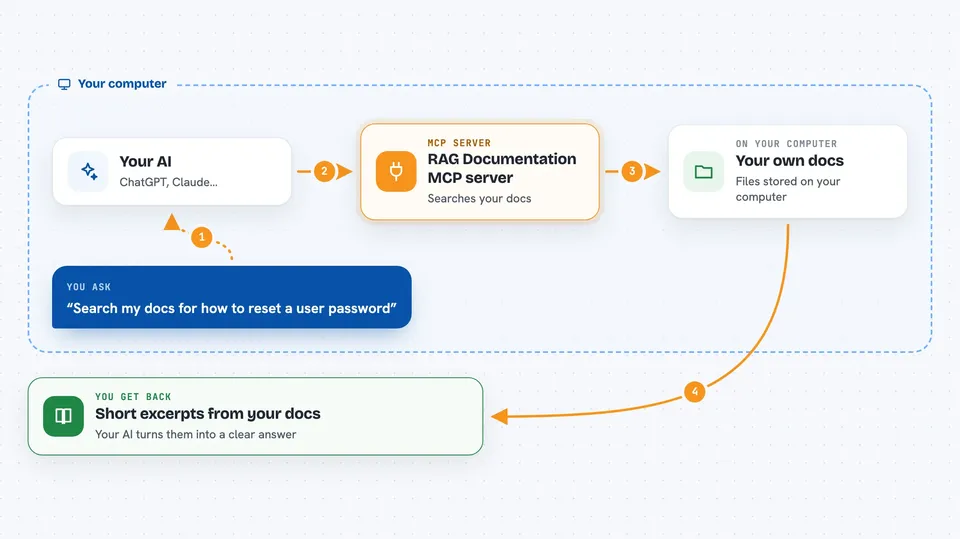
You ask your AI a question in normal words. The AI sends your question to this helper. The helper searches the documentation you have stored, using meaning rather than just exact words, and finds the closest matches. It sends those excerpts back to the AI, which then writes an answer using them. You can also use it to add new pages, check what is waiting to be processed, and remove sources you no longer want.
 Click to zoom
What you can do with it
- Search your stored documentation with a plain question
- See which documentation sources are already indexed
- Pull all the links off a web page and queue them for indexing
- Check which pages are still waiting to be processed
- Run the queue so waiting pages get indexed
- Clear the queue if you added the wrong things
- Remove documentation sources you no longer need
Try asking your AI
- “Search my docs for how to reset a user password”
- “What documentation sources do you have right now?”
- “Take this page and add its links to the queue: https://example.com/docs”
- “What is still waiting in the processing queue?”
What it gives back to you
You get back short excerpts from your documentation, ranked by how well they match your question, along with where they came from. For the listing and queue tools, you get simple lists, like source titles with their links and last update times, or the URLs still waiting to be processed. The AI then turns those into a normal answer in the chat. When you remove or clear something, it just tells you it is done.
Before you start
What you need
- An OpenAI API key (a kind of password for OpenAI's service, used here to turn text into searchable numbers)
- A Qdrant database (a place that stores and searches those numbers); you need its web address and an API key
- The Claude desktop app or another AI app that supports MCP servers
- Node.js installed on your computer so the npx command can run
Good to know
Removing documentation and clearing the queue are permanent, so double check before you ask the AI to do them.
Install it with your AI
Add RAG Documentation MCP server to your AI, no technical skills needed
You don't install anything by hand. You copy one prompt, paste it into an AI that can work on your computer, and it checks, installs and connects the server for you, asking you when it needs something.
Sign in to get the install prompt
Members get a ready-made prompt that lets the Claude desktop app check RAG Documentation MCP server, install it and connect it for them, step by step. You don't need any technical skills: you copy, paste and answer a few questions. Your connected AI can also find and install any of the 4,361 MCP servers here for you.
Who it's for
People who keep asking their AI about a specific product, tool, or guide and want answers grounded in real documentation.





