MCP server · Privacy
Terminal History MCP server
by HasanJahidul
Lets your AI search your own shell history so you can find past commands you forgot.
This is a small helper that lets your AI look through your own command line history. You know that long command you typed three weeks ago and can't remember? Now you can just ask. It is handy for anyone who spends time in a terminal and keeps forgetting what they ran.
What is an MCP server? The 30-second version
On its own, your AI can only chat with you. An MCP server is a small helper program that gives your AI a new skill or a connection to something. This one connects your AI to your shell history, the list of commands you have typed in zsh, bash or fish. Once it is running, your AI can search that list for you when you ask.
What this MCP server does
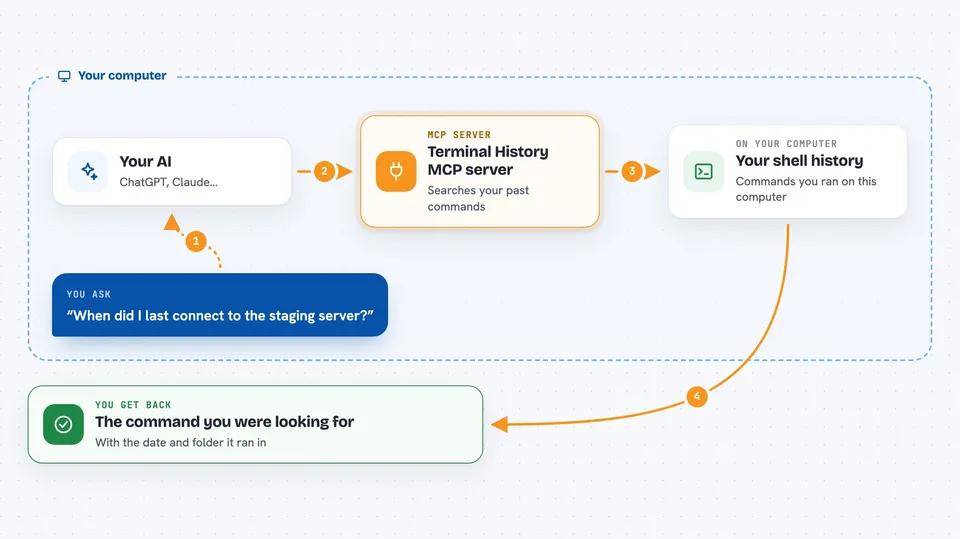
You ask your AI a question about your past commands, like when you last connected to a server. The AI passes your question to this helper. The helper looks through a local copy of your history and finds matching commands. Then it hands the results back to the AI, which explains them to you in the chat. Everything stays on your own computer.
 Click to zoom
What you can do with it
- Search your whole shell history by keyword
- Find the last commands you ran in a specific folder
- List recent commands that failed
- See what you ran around a certain command
- Rebuild the search index after you have run more commands
Try asking your AI
- “When did I last ssh into the staging server?”
- “Show me my recent failed commands.”
- “What did I run yesterday in /etc/nginx?”
- “What was that long docker compose flag I used a few weeks ago?”
What it gives back to you
You get back a short list of matching commands, usually with a timestamp and the folder they ran in. The AI turns that into a plain answer, like a date or a copy of the command you were looking for. Nothing is changed on your system, it only reads.
Before you start
What you need
- Node.js installed on your computer
- A terminal where you have used zsh, bash or fish
- An MCP client like Claude Code, Cline, Cursor or Zed
Good to know
It reads your shell history, which can contain private details, though common secrets like tokens and passwords are scrubbed before being stored.
Install it with your AI
Add Terminal History MCP server to your AI, no technical skills needed
You don't install anything by hand. You copy one prompt, paste it into an AI that can work on your computer, and it checks, installs and connects the server for you, asking you when it needs something.
Sign in to get the install prompt
Members get a ready-made prompt that lets the Claude desktop app check Terminal History MCP server, install it and connect it for them, step by step. You don't need any technical skills: you copy, paste and answer a few questions. Your connected AI can also find and install any of the 4,361 MCP servers here for you.
Who it's for
Developers, sysadmins and anyone who lives in a terminal and forgets their own commands.