
MCP server · Productivity
Harvest MCP server
by ianaleck
Ask your AI to log time, check projects and pull Harvest time reports.
This connects your AI assistant to Harvest, the time tracking app. Once set up, you can just talk to your AI instead of clicking around Harvest. It is handy if you track your hours in Harvest and want quick answers or updates without leaving your desk routine.
What is an MCP server? The 30-second version
On its own, your AI can only chat with you based on what it already knows. An MCP server is a small helper program that runs alongside your AI and gives it a new skill. Here, that helper is built for Harvest, so your AI gets a live line into your Harvest account. When you ask something about your timesheets or projects, the AI passes the request through this helper, and Harvest sends real data back.
What this MCP server does
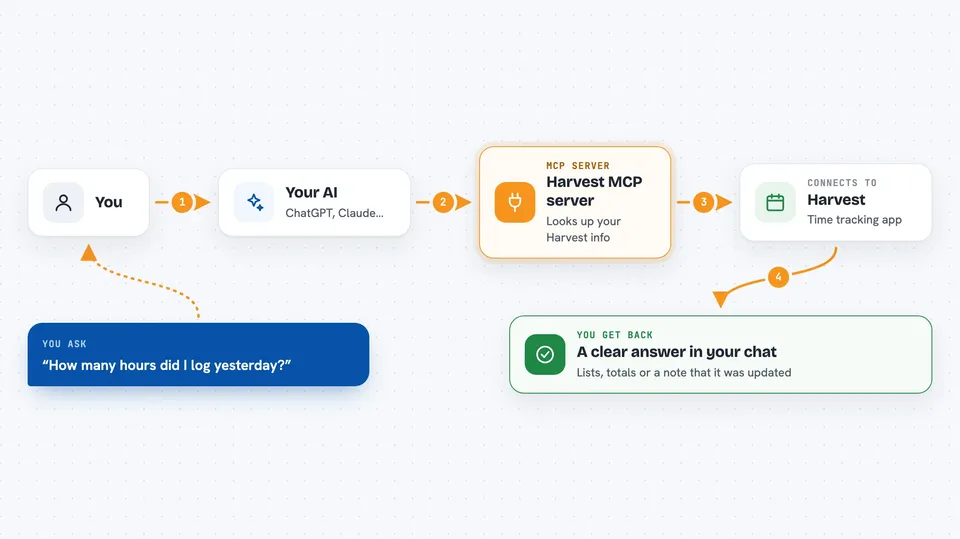
When you ask your AI a question about Harvest, the AI calls this little helper program. The helper then signs into Harvest using your personal access token and asks Harvest for whatever you needed. Harvest replies, and the helper hands those results straight back to the AI. Your AI turns that raw answer into normal wording right inside the chat window. If you asked it to create or update something, the same path goes the other way and makes the change in Harvest for you.
 Click to zoom
What you can do with it
- See your time entries for any day, week or date range
- Start and stop timers for a chosen task
- Look at active projects and how much has been billed against each
- Check clients and contacts stored in your Harvest account
- Pull time, expense and budget reports whenever you need figures
- Log a brand-new time entry or fix one that was wrong
- Find out who else is on your Harvest account and view their tracked hours
Try asking your AI
- “Show me everything I logged yesterday across all projects”
- “Start a timer for writing documentation on the Website Redesign project”
- “Which projects have gone past half of their planned budget?”
- “Give me a summary of unbilled time and costs for Client Northwind since January”
What it gives back to you
Most questions come back as tidy lists or tables written out in plain language, sometimes grouped by person or project. Report-style queries return totals such as hours worked, amounts owed or remaining budgets. For actions like creating a time entry or stopping a timer, the reply confirms what changed along with the relevant IDs. Everything shows up directly in your conversation thread, ready to skim or copy elsewhere.
Before you start
What you need
- A Harvest account where you can reach the developer settings area
- Your Harvest personal access token, generated yourself in Harvest settings
- Your Harvest numeric account identifier shown near the top of Harvest admin screens
- Somewhere to put two lines of configuration next to your AI application
Install it with your AI
Add Harvest MCP server to your AI, no technical skills needed
You don't install anything by hand. You copy one prompt, paste it into an AI that can work on your computer, and it checks, installs and connects the server for you, asking you when it needs something.
Sign in to get the install prompt
Members get a ready-made prompt that lets the Claude desktop app check Harvest MCP server, install it and connect it for them, step by step. You don't need any technical skills: you copy, paste and answer a few questions. Your connected AI can also find and install any of the 4,609 MCP servers here for you.
Who it's for
Freelancers, consultants, agency staff and anyone whose working life revolves around filling in weekly timesheets in Harvest.





